
Your Product Runs on Scattered Data. It Shouldn't.
A Product OS (Product Operating System) is a unified intelligence layer that connects data from project management, error tracking, analytics, code repositories, documentation, and communication tools into a single queryable system. Instead of context-switching between seven or more fragmented tools, engineering teams get a connected view of their product — linking bugs to code changes, customer impact to deployments, and incidents to root causes — all in one place.
At Salesken, our product context was scattered across seven tools. Jira for tickets, Sentry for errors, Mixpanel for analytics, Slack for discussions, GitHub for code, Confluence for docs, and Google Sheets for roadmap planning. When a customer reported a checkout bug, our PM had to check five of these tools before she could even write a spec. That fragmentation is why I started thinking about a unified product operating system.
Your product is broken. Not your code — your view of your product.
Right now, somewhere in your company, these things are happening in parallel:
Your PM is in Jira, triaging a support ticket. A customer reported a checkout error three hours ago. To understand what happened, they need to jump to Sentry to see if there's an error log. Then to PostHog to check if revenue was affected. Then to GitHub to see if a recent deployment caused it. Then to Slack to ask the on-call engineer what they think. Then back to Jira to update the ticket status. Five tabs. Multiple context switches. 20 minutes for what should be a 2-minute investigation.
Your CTO is in a monthly incident review. An outage knocked out the API for 45 minutes. The team has data scattered across five systems: Datadog for metrics, GitHub for the code change, PagerDuty for the timeline, Slack for what people said, and a shared doc someone took notes in. They're assembling the story manually, like detectives without a case file.
Your on-call engineer gets paged at 3 AM. Error rate is spiking. They grab logs from Sentry, correlate with recent deployments in GitHub, check if any new features rolled out, review the change logs in Linear, and finally understand the problem. But they spent 15 minutes investigating instead of 2 minutes fixing.
Your product manager wants to write a spec for the next feature. They need to understand the current codebase structure, what similar features already exist, what user feedback informed this decision, and what metrics would define success. They're reading code comments, Slack threads, and Notion docs. It takes a day to build context.
This is the Product OS problem: Your product has a unified existence — one codebase, one customer experience, one set of behaviors. But your tools don't reflect that unity. You have a data fragmentation crisis that feels normal because it's been normal since the beginning.
What if it didn't have to be?
What Is a Product OS?
A Product OS is an operating system for your product. Like a computer OS unifies hardware, drivers, and applications into one coherent system, a Product OS unifies all the data about your product — your codebase, error logs, analytics, tickets, documentation, and conversations — into a single, intelligent model that can act autonomously on your behalf.
More precisely, a Product OS has four layers:
-
Data Layer: A unified index of everything about your product — not data duplication, but a connected model where a code change, a Sentry error, a support ticket, a user behavior change, and a Slack message about the issue are all linked because they describe the same event.
-
Tools Layer: Native integrations with GitHub, Sentry, PostHog, Jira, Linear, Slack, PagerDuty, and other critical systems. These aren't webhooks that sync data — they're bidirectional connections that let your system reason about your product using real-time data.
-
Skills Layer: Chained workflows that combine multiple tools into automated actions. Want to automatically triage critical bugs? That's a skill. Want to write a spec based on user feedback and codebase analysis? That's a skill. Want to diagnose an incident without human involvement? That's a skill.
-
Agents Layer: Autonomous agents that make decisions and take actions without being explicitly asked. An overnight monitoring agent that investigates anomalies while your team sleeps. A code review agent that understands your architecture and gives contextual feedback. A spec-writing agent that researches and drafts before your PM asks. These aren't chatbots that answer questions — they're autonomous decision-makers.
The magic isn't any single component. The magic is the connected system. Without unified data, tools are isolated. Without tools, data is inert. Without skills, tools stay manual. Without agents, skills are just saved workflows. But when all four layers work together, your product becomes intelligent.
Why Engineering Teams Are Drowning Without One
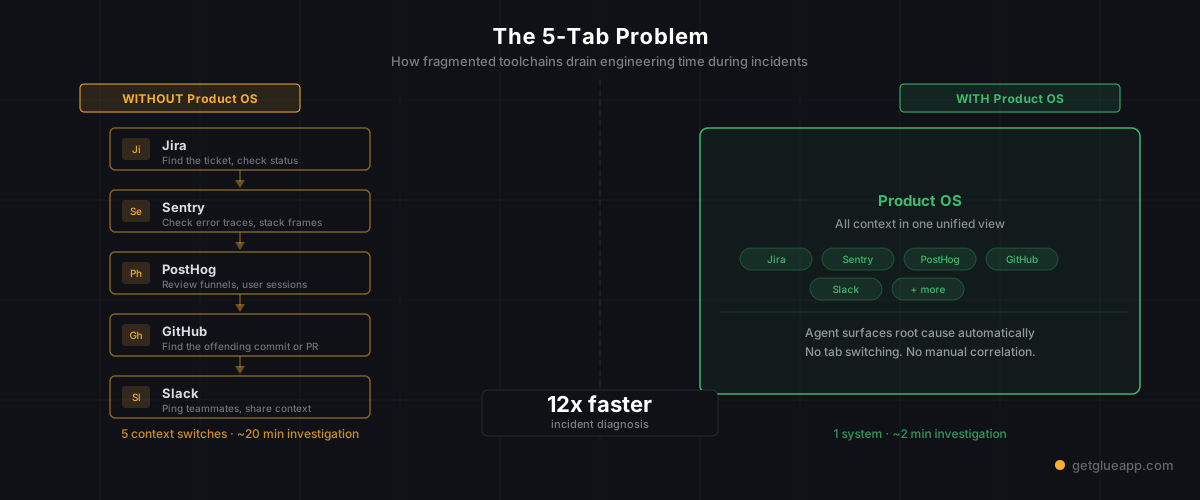
The core problem is context fragmentation.
Every tool solves one problem well. Jira is great for tracking work. Sentry is great for seeing errors. PostHog is great for understanding user behavior. GitHub is great for source control. Slack is great for real-time communication. But they're all siloed.
This creates the 5-Tab Problem: To answer a single question about your product, you need to be in five different systems simultaneously. And your brain can only hold so much context.
An engineer sees an error spike. It's not "Oh, I see the error in Sentry." It's:
- Check Sentry for the error signature
- Switch to GitHub to see if a recent commit matches the error timeline
- Switch to DataDog to see if metrics correlate
- Switch to Slack to ask if anyone knows what's happening
- Switch back to Sentry to confirm the correlation
Each tab switch is a context switch. Each context switch is cognitive friction. At scale — when you have 50 engineers, 100 services, 1,000 daily incidents — this friction becomes a force multiplier for bugs, slow incident response, and engineer burnout.
The second-order problem is decision latency. To make a decision about your product, you need what I've seen multiple places. To get what I've seen multiple places, you need to be in multiple tools. To do that safely and accurately, you often need someone senior (the PM, the tech lead, the CTO) to spend time context-switching instead of thinking strategically. This is what kills engineering velocity.
The third-order problem is no asynchronous intelligence. Your tools are synchronous — they respond to queries. But most problems aren't queries. They're anomalies. An error rate changed. A deploy broke revenue. A customer feedback pattern shifted. Your tools don't proactively tell you about these. You have to stumble into them, and by then, hours or days have passed.
The Four Layers of a Product OS
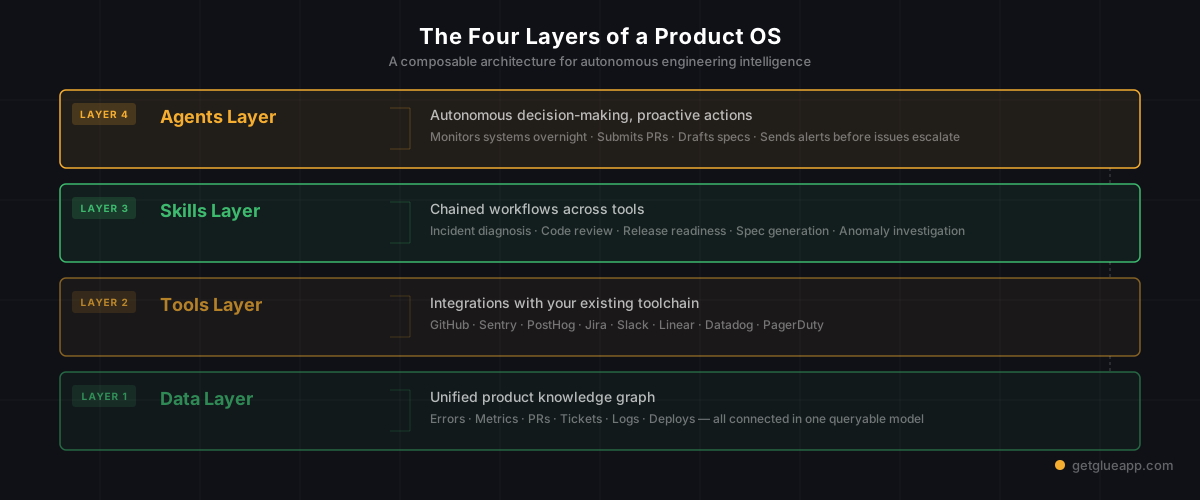
1. The Data Layer: A Unified Product Model
The data layer is the spine. It's not a database that copies your what I've seen Sentry, Jira, GitHub, and PostHog. That would make everything stale and create sync problems. Instead, it's a connected index — a knowledge graph where your product's entities (errors, code changes, tickets, user cohorts, deployments, features) are linked because they're causally or temporally related.
When you deploy code to production, the data layer connects:
- The commit hash and its code changes (from GitHub)
- The deployment event and timestamp (from your CI/CD)
- Any error changes in the error rate (from Sentry)
- Any metric changes (from PostHog or Datadog)
- Any user complaints (from Slack or support tickets)
These aren't linked manually. They're linked by the system because they happened in the same time window, to the same service, with overlapping users. Your product becomes a connected graph instead of a pile of separate logs.
2. The Tools Layer: Bidirectional Integrations
The tools layer is where the system touches your existing infrastructure. It's not another Zapier — those are unidirectional and dumb. Instead, a Product OS has intelligent, bidirectional connections to your critical systems.
This means:
- GitHub: The system understands your repo structure, can read code, understand dependencies, and comment intelligently on PRs.
- Sentry: The system sees errors in real-time, can understand error patterns, and can trace them back to specific commits.
- PostHog (or Amplitude): The system understands user funnels, cohort behavior, and can correlate user actions with product changes.
- Jira/Linear: The system sees tickets, understands priority and status, and can update tickets with findings.
- Slack: The system participates in channels, can surface relevant context without being asked, and can escalate issues proactively.
- PagerDuty: The system sees incidents, can auto-declare and auto-resolve, and can enrich the incident timeline with context.
With bidirectional integrations, the system isn't just reading your product data — it's acting on it. It doesn't just know there's an error; it can trace the error, find the recent change that caused it, tag the relevant engineer, and post a thread in Slack with the full diagnosis.
3. The Skills Layer: Automated Workflows
A skill is a multi-step workflow that coordinates across tools to accomplish a task. Skills are where latency disappears.
Example: Bug Triage Skill
- Input: A new error in Sentry hits a 5-minute threshold
- Action: System fetches the error, identifies the affected code in GitHub, checks when the code was deployed, finds the responsible engineer, checks if there's a correlated user complaint, writes a summary, creates or updates a Jira ticket, posts in the incident Slack channel with context
- Output: The ticket is ready for triage — no human had to jump between tabs
Example: Spec Writing Skill
- Input: "Write a spec for the new billing dashboard"
- Action: System searches for related user feedback in Slack, PostHog, and support tickets; analyzes the current billing code in GitHub to understand the architecture; searches for related work in Jira; identifies open questions and dependencies; writes a first draft spec with context, tradeoffs, and metrics
- Output: The PM has a drafted spec with research done — they edit for tone and priorities, not building context from scratch
Example: Incident Diagnosis Skill
- Input: PagerDuty fires an alert for API latency
- Action: System correlates the timing with recent deployments, code changes, and traffic patterns; checks error rates and database metrics; identifies the likely cause; checks the on-call engineer's status; prepares a summary with options
- Output: The on-call engineer gets a Slack message with "API latency spiked at 3:14 AM. Likely cause: [X] from commit [Y]. Rollback option: [Z]." They make a decision, not investigate.
Skills are where humans hand off research and decision-prep to the system.
4. The Agents Layer: Autonomous Decision-Making
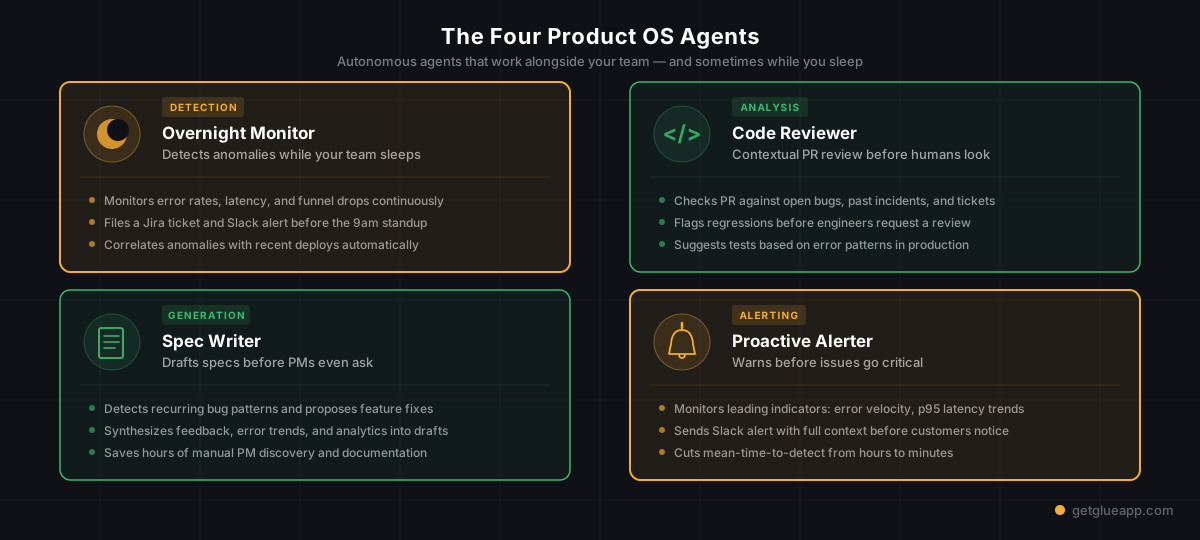
Agents are where the system stops responding to requests and starts acting proactively. An agent has a goal, access to skills, and the ability to make decisions without being asked.
The Overnight Monitoring Agent
- Goal: Detect and surface product anomalies while the team sleeps
- Decision-making: Is this error rate increase a real issue or noise? Should it wake someone? Is it related to a known deployment? Can it be auto-remediated?
- Actions: Posts findings in Slack, escalates to PagerDuty if critical, auto-rolls back if confidence is high
The Code Review Agent
- Goal: Provide contextual code review feedback before humans review
- Decision-making: Does this PR match the team's architecture patterns? Is it similar to an existing solution? Are there security or performance concerns? Should I flag this for human review or auto-approve?
- Actions: Comments on the PR with findings, tags relevant engineers, auto-approves if criteria are met
The Spec Writing Agent
- Goal: Have draft specs ready before PMs ask
- Decision-making: What features are being discussed in Slack? What user feedback themes are emerging? What's the codebase capability to support these? Should I draft a spec?
- Actions: Posts drafted specs in a Slack channel, tags PMs and tech leads, gets feedback and refines
The Proactive Alerting Agent
- Goal: Warn you about issues before they become critical
- Decision-making: Is this metric trending toward a problem? Is this error rate increasing gradually? Are users reporting issues in Slack that don't have tickets yet?
- Actions: Posts early warnings, suggests preventive actions, escalates appropriately
Agents aren't trying to replace humans — they're trying to remove busywork and decision-latency. They investigate while you sleep. They research while you're in meetings. They draft while you're thinking. By the time you need to make a decision, they've done the legwork.
Product OS vs. Existing Tools
This is where the Product OS category distinction matters. Here's why a Product OS is different from (and complementary to) the tools you already have:
Understanding what truly matters to customers and addressing the right feature question is essential for enterprise success. As detailed in The Feature Question That Kills Enterprise Deals, getting this clarity right can be the difference between winning and losing enterprise customers.
Product OS vs. Existing Tools
This is where the Product OS category distinction matters. Here's why a Product OS is different from (and complementary to) the tools you already have:
vs. Project Management Tools### vs. Project Management Tools (Jira, Linear, Asana)
- PM Tool: Tracks work status. Useful for "what are we building?"
- Product OS: Understands why work matters and what's actually happening in production. Connects tickets to errors, user behavior, and code. Useful for "why is this happening and what should we build next?"
vs. Observability Platforms (Datadog, New Relic, Splunk)
- Observability: Shows you what's happening in production with unprecedented depth
- Product OS: Shows you what's happening and connects it to code changes, user impact, and business context. When your error rate spikes, observability shows you the spike. A Product OS shows you the spike, finds the commit that caused it, identifies affected users, and suggests a fix.
vs. Search Engines (GitHub Copilot, Cody, etc.)
- Code Search: Helps you find code and get answers about code
- Product OS: Understands your entire product model, not just code. Can reason about how a code change affects user behavior and metrics. Can take actions, not just answer questions.
vs. Internal Developer Portals (Port, Backstage, etc.)
- IDP: Catalogs your services, standards, and infrastructure
- Product OS: Does what an IDP does, but adds an intelligence layer. Instead of just knowing "this service exists," it knows "this service has been error-prone lately, here are the patterns, here's what changed, here's what might fix it."
vs. Incident Management (PagerDuty, Opsgenie, etc.)
- Incident Tool: Coordinates response to known issues
- Product OS: Identifies issues before you know they're issues, diagnoses them automatically, and suggests fixes
The key difference: Existing tools are stores. A Product OS is intelligent.
Jira stores your tickets. A Product OS understands which tickets matter and which are symptoms of deeper issues.
Sentry stores your errors. A Product OS understands which errors are critical, what caused them, and how to fix them.
GitHub stores your code. A Product OS understands your architecture, can predict the impact of changes, and can quality-check PRs before humans review them.
You keep all your existing tools. A Product OS sits on top and adds a unified intelligence layer.
What a Product OS Makes Possible
Here are concrete scenarios that become normal instead of exceptional with a Product OS:
Scenario 1: You Wake Up to No Work to Do
You wake up and open Slack. An agent has already investigated the overnight monitoring data, found an anomaly in user signup flow, correlated it to a code change from yesterday, validated that it's safe to revert, and created a Jira ticket with the full diagnosis. You revert a single commit. The anomaly stops. You log off.
Without a Product OS: You'd get a Slack message "signups down 30%." You'd spend 45 minutes investigating before you even found the commit that caused it. Another 30 minutes deciding whether to revert or fix forward. By then, you've lost 4 hours of revenue.
Scenario 2: You Answer a Question in 10 Seconds
A PM asks: "What would it take to support 100x more concurrent users?" Instead of "let me look at the code and get back to you," you ask the Product OS. It analyzes your architecture, identifies the bottlenecks (database connections, cache layer, message queue), checks recent PRs for capacity work, finds related GitHub discussions, and gives you an answer with estimates and options in 30 seconds.
Without a Product OS: The PM waits for an engineer to context-switch, spend hours reviewing the codebase and infrastructure, and then give an educated guess that's probably wrong because they forgot some detail.
Scenario 3: Your Spec is Drafted Before You Ask for It
A customer cohort is churning. An agent notices the pattern in PostHog, correlates it with user Slack messages, finds related GitHub issues, and drafts a spec for "churn reduction dashboard" with user research, codebase implications, and success metrics. The PM gets a Slack message at 9 AM: "Found a potential churn issue. I drafted a spec. Thoughts?" They refine it in 15 minutes instead of writing it from scratch in 2 hours.
Without a Product OS: The PM has to manually aggregate user feedback, manually review code to understand what's possible, manually write the spec. Three days of work instead of one.
Scenario 4: Your Incident is Diagnosed While Paging Continues
An alert fires. Critical endpoint is erroring. In the next 10 seconds, before your on-call engineer even picks up the phone, the system has:
- Identified the exact error in Sentry
- Traced it to a code change in the last 10 minutes
- Checked if the change impacts the database layer
- Identified which recent PR introduced it
- Tagged the engineer who owns that code
- Posted in the incident Slack channel with the full diagnosis and rollback instructions
By the time the on-call engineer reads Slack, they know what to do. They don't spend 15 minutes investigating; they spend 2 minutes rolling back.
Without a Product OS: On-call engineer joins Slack, asks "what's failing?" Someone says "endpoint X." They check Sentry. They check GitHub. They ask in Slack "when did this deploy?" Someone finds the deploy time. They correlate with code changes. They make a hypothesis. They test a rollback. 20 minutes have passed.
Scenario 5: Code Review is Contextual, Not Repetitive
A new engineer submits their first PR to your codebase. Before a human reviews it, an agent has:
- Analyzed the code against your architecture patterns
- Found 3 similar solutions in the codebase and suggested the most relevant one
- Checked for security implications given your infrastructure
- Tested it against your performance benchmarks
- Run it through your linting and style standards
- Flagged one potential issue: "This creates a new database query in a hot path. Last quarter we had a similar issue in [other code]. Consider batching or caching."
When a human reviews, they're not starting from zero. They're reviewing well-researched code with context.
Without a Product OS: Human reviewer has to mentally run through "does this match our patterns?" (yes, familiar with codebase) or (no, new engineer doesn't know our patterns, sends back for revision).
FAQ
Q: Is a Product OS just another dashboard?
No. A dashboard shows you data. A Product OS understands your data, reasons about it, and acts on it without you asking. A dashboard is "here's what's happening." A Product OS is "here's what's happening, why it matters, and what you should do."
Q: Do I need to replace my existing tools?
No. A Product OS works with Jira, GitHub, Sentry, PostHog, and everything else. It's a layer on top that unifies them. You keep your existing tools; they just become more powerful when connected through a Product OS.
Q: Isn't this just AI doing my job?
No. Agents are good at repetition, research, and escalation. They're bad at judgment calls, context that requires domain knowledge outside your product, and decisions that need human values. A good Product OS removes busywork so humans can focus on the things that require human judgment.
Q: How do I start building a Product OS?
Start with your data layer. Get your critical systems (GitHub, Sentry, PostHog, Jira) talking to a unified model instead of living in silos. Then add a few key skills (triage, incident diagnosis, spec drafting). Then introduce agents for the parts of your workflow that are repetitive and high-latency. It's a progression, not a big bang.
Q: Can smaller teams benefit from a Product OS, or is this only for big companies?
If anything, smaller teams benefit more. When you're 5 engineers, one person lost to context-switching is 20% of your capacity. When you're 50 engineers, it's 2%. A Product OS returns that context-switching tax back to your team.
The Paradigm Shift
For 20 years, engineering tools have been specialized. One tool for project management. One tool for error tracking. One tool for analytics. One tool for code. The assumption was that specialization is better — let each tool do one thing well.
But this model doesn't scale with complexity. As your product gets more complex, more interdependent, and changes faster, the friction of jumping between tools becomes your bottleneck. Context fragmentation doesn't just slow you down; it changes how you work. You optimize for visibility over capability. You hire for generalists who can keep all systems in their head instead of specialists who go deep. You spend meetings synchronously aligning on what's happening instead of asynchronously acting on what's happening.
A Product OS is the answer to this. It's a unified operating system that treats your product as a connected whole, giving you the intelligence to act faster, investigate more deeply, and make better decisions without jumping between tabs.
The teams that build a Product OS first won't just be faster. They'll be in a different category entirely.
Next Steps
Ready to explore how a Product OS could work for your team?
- For Product Managers: How a Product OS Changes How You Work
- For Engineering Leaders: Building Product OS Infrastructure at Scale
- For CTOs: The Architecture of Agentic Product Intelligence
- Learn More: Agentic Engineering Intelligence Glossary
- See It In Action: Spec Writing Automation Use Case
Related Reading
- AI for Product Managers: How Agentic AI Is Transforming Product Management
- AI Product Discovery: Why What You Build Next Should Not Be a Guess
- Product Intelligence Platform: What It Is and Why You Need One
- AI Spec Writing: From Bug Report to PRD in 60 Seconds
- AI for Engineering Leaders: A Strategic Guide to Agentic AI Adoption
- Knowledge Management System Software for Engineering Teams
- Glue vs Backstage
- Glue vs Cortex
- Glue vs OpsLevel