
Building products across three companies — Shiksha Infotech, UshaOm, and Salesken — taught me that the hardest part of product development isn't building. It's knowing what to build and why.
By Priya Shankar
The 2026 reality: AI has moved beyond the hype cycle and into the productivity workflow. If you're a PM still figuring out how AI fits into your job, you're not behind - you're finally at the moment where it actually matters.
AI for Product Teams in 60 Seconds
AI works best for product teams in three distinct areas: synthesizing large volumes of qualitative data (customer feedback, user research), generating structured outputs from specifications (draft requirements, technical documentation), and querying codebases to answer questions that used to require context-hopping between engineers. The first two are nice-to-have efficiency gains. The third one changes what information is available to you.
Why AI for Product Teams Matters Now
For years, PMs have operated at an information disadvantage within their own organizations. You can see your roadmap. You know customer problems. But the actual codebase - the complexity, dependencies, bottlenecks, where the fragile parts live - that's lived entirely in engineering's head, or scattered across diagrams no one updates.
2026 is different. Codebase intelligence platforms have matured enough that a PM can now ask natural language questions about code architecture and get useful answers without a ten-minute Slack conversation with an overloaded architect. This isn't automation of existing work. This is access to information that was previously inaccessible.
At the same time, the broader AI ecosystem is still struggling with the core PM problem: understanding your specific context without drowning in setup time. A generic AI can draft a spec. A generic AI cannot know whether that spec makes sense given your technical constraints. You still need judgment. You still need relationship capital with your team. But you can now offload the data gathering, synthesis, and documentation work to AI - and that frees up your judgment for where it matters.
The Three AI Use Cases for PMs (And Which Actually Matter)
Research and Synthesis
AI is genuinely useful here. Dump customer feedback, support tickets, research transcripts into an LLM and ask it to identify themes. This works. It's faster than manual tagging, and it's better than trying to synthesize fifty hours of interviews in your head.
The catch: you still need to verify the themes against the raw data. AI can miss nuance. It can overweight vocal minorities. It can create clusters that make sense mathematically but not contextually. Your job is to sanity-check the synthesis, not to create it.
Use case that works: "I have six weeks of support tickets. Show me the top five customer pain points and give me three sample tickets for each." Takes an afternoon instead of two weeks.
Use case that doesn't work: "Generate insights from this user research." Too vague. Too dependent on the specific context of your product, your market, your strategy. You still need to think about what you're actually looking for.
Spec and Documentation Generation
This is where AI shines for output leverage. You have a clear idea of what you want to build. AI can take a rough brief and generate a comprehensive spec, acceptance criteria, edge cases, technical questions to surface to engineering.
The trap: over-indexing on this. Yes, it saves time. But a half-baked spec written by AI is worse than a half-baked spec written by you, because you know exactly where it's underspecified and where you need more thinking. AI specs read complete even when they're not. This creates false confidence.
The real value is not in AI writing your spec from scratch. The real value is in AI expanding a rough spec into a complete one - and you iterating on that. AI as a starting point, not the finish line.
Codebase Intelligence (The One That Changes Everything)
This is different from the other two categories. This is not automation of existing work. This is access to information that was previously locked behind context switching and engineer availability.
Example question a PM could ask Glue in 2025: "We're considering moving the payment processing to a different library. What parts of our codebase depend on the current payment library? How tightly coupled are they?" Three months ago, this required you to schedule an engineer, give them context on why you're asking, wait for them to come back with an answer - and hope they didn't miss anything. Now: two minutes.
Another: "Why is our login flow so slow?" A generic AI has no idea. Your codebase intelligence platform can show you the actual dependency chain, the modules involved, where complexity clusters are, where recent changes happened. This surfaces information that was inaccessible before.
The reason this has ROI that the other two don't: it's not replacing work you were already doing efficiently. It's replacing work you were doing inefficiently or not doing at all. It's surfacing information that was there but locked up. And that information directly impacts your product decisions.
The Workflow That Actually Works
Most PMs I've talked to try AI in isolation. They use it for one task, see if it saves time, move on. That's backward.
Instead, think of AI as part of a workflow with three phases: gathering, judgment, output.
Phase 1: Gathering (AI is very good at this)
You have a messy input: customer feedback, research data, codebase questions, product questions. AI can ingest that quickly, organize it, surface patterns, give you a synthesis to work from. This is your input layer. Let AI do the work.
Phase 2: Judgment (AI is bad at this, you are good at this)
You take the AI's synthesis and you make actual decisions. What matters most? What's the real constraint? What's the context the AI doesn't have? This is where your PM judgment lives. Do not outsource this to AI. It doesn't have your relationships with the team, your understanding of your market, your product taste.
Phase 3: Output (AI is very good at this)
You have a decision. You have direction. AI can now take that and generate the artifacts: the spec, the brief, the docs, the messaging. This is your output layer.
The trap people fall into: trying to skip Phase 2. Using AI to go directly from messy input to clean output. That works if you have very limited context requirements. It fails when your context is rich and specific, which is true for almost all PM work.
The workflow that works: AI handles the cognitively expensive data gathering (Phase 1) and the tedious output generation (Phase 3). You stay in the middle, making the judgment calls that require your context, relationships, and taste.
How to Actually Evaluate Whether an AI Tool Is Helping
This is the question most PMs avoid. You add ChatGPT to your workflow. You use it for a few things. It feels useful. So you keep using it. But is it actually saving you time, or is it just giving you the feeling of progress?
Real test: measure the time you spend on a task before and after adding the AI tool. Not perceived time. Actual time.
If you're using ChatGPT to synthesize customer feedback, time the manual process (reading the feedback, finding themes, writing them up). Then use AI and time that. If you're spending 60% of the time you used to spend, it's worth it. If you're spending 80% of the time (because you're fact-checking everything the AI does), it's not.
The hidden cost: switching cost. Every time you say "let me ask AI about this," you're context-switching. You're breaking your flow. If the task only saves 10 minutes of time, but it's embedded in a two-hour sprint planning session, it's not actually helping your velocity. It's just adding friction.
Real question to ask yourself: did this tool reduce the time I spend on low-value work? Not "does it work," but "does it free up time I can spend on judgment?"
For codebase questions, this is easier to measure. Before: "Let me Slack an engineer, wait 20 minutes for a response, get incomplete information." After: "Let me ask Glue, get comprehensive information in two minutes." Clear win. No ambiguity about whether your time improved.
For synthesis and spec generation, be more skeptical. You're probably underestimating the time you spend fact-checking and iterating on AI output.
Common Pitfalls
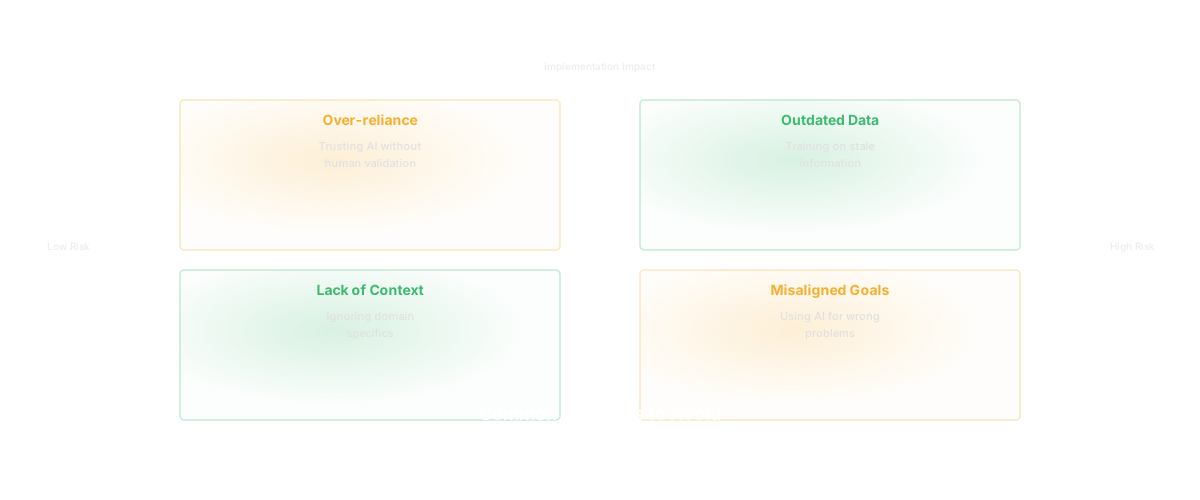
The biggest one: assuming AI can replace context. It can't. "Use ChatGPT to draft our sprint planning approach" doesn't work because ChatGPT doesn't know your team, your sprint rhythm, your technical constraints, your market. What it can do: "I've got a rough sprint planning approach for a mobile team working on retention features. Here's what we're thinking. Have ChatGPT generate potential risks we haven't thought through." Now ChatGPT has enough context to be useful.
Second: treating AI output as final. This is where people waste the most time. They use AI to generate something, and because it's clean and well-written, they assume it's correct. Then they discover edge cases, problems, ambiguity when they try to execute against it. The time they "saved" in generation they spend in iteration. AI is a starting point, not a finish line.
Third: using generic AI tools for context-specific work. ChatGPT for generic spec generation? Sure. ChatGPT for "understand the dependency implications of this technical decision in our codebase?" No. This is where specialized tools matter. A tool like Glue that's built for codebase questions will give you information a generic AI cannot, because it's actually reading your code, not guessing.
How Glue Helps
Glue is the exception to the "AI tools are mostly hype" rule because it solves a real information problem, not a hypothetical efficiency problem.
Before Glue, answering PM questions about codebase complexity required context-switching and engineer time. "What's coupled to this module?" "Where's the debt in this area?" "What changed in our auth system last quarter?" These are answerable questions, but they required you to interrupt someone who knew the code.
Glue answers these in the gathering phase of your workflow. You ask a natural language question about your codebase. You get back structured information about complexity, dependencies, ownership, change history, technical debt. You take that information into your judgment phase. You make decisions. You move to output.
The ROI of this is clearer than other AI tools because you can directly see the engineering time it saves. How many "quick question about the codebase" Slack messages do you not send? How many engineer interrupts do you avoid? That compounds.
More importantly, it surfaces information that was previously inaccessible at PM velocity. You can now answer some questions without waiting for engineering. That changes what questions you can explore during product planning. You can get more specific. You can do more scenarios.
This is the highest-ROI AI use case for product teams: access to information that was locked up, at a velocity that lets you iterate on product thinking.
Frequently Asked Questions
Q: Won't using AI tools make me a worse PM by outsourcing my thinking?
A: Not if you use them correctly. The risk is if you use them as a substitute for judgment (Phase 2). If you use them as a tool for gathering inputs (Phase 1) and writing outputs (Phase 3), you're freeing up mental energy for the judgment that matters. You're not thinking less. You're thinking about different things.
Q: How much time do I actually need to spend learning a tool like Glue?
A: For basic questions: five minutes. You learn how to ask a question in natural language and interpret the results. For advanced questions: a few hours over a week to understand what kinds of questions the tool can answer well and where it has limits. It's not like learning a complex SQL syntax. It's more like learning how to talk to a specialized expert on your team.
Q: What if my engineering team thinks I'm trying to go around them by using codebase intelligence tools?
A: This is a real concern. But frame it correctly: you're not trying to replace their expertise. You're trying to unblock yourself from interrupting them with basic questions so you can ask them the hard questions that actually need their judgment. Most engineers appreciate this. They'd rather you use a tool to answer "what changed in the payment system" so you can ask them "what are the implications for our roadmap?"
Q: What's the difference between Glue and just asking Claude or ChatGPT to analyze my codebase?
A: Generic AI tools don't have access to your actual codebase structure, dependencies, or change history. They can only work with what you feed them. Glue is built specifically to read codebases, understand their structure, and answer questions based on actual code architecture. It's like asking a generalist doctor versus asking a cardiologist about your heart. Both might have opinions, but one is built for this.
Q: How do I know if codebase intelligence is actually useful for my role?
A: Start with one specific question you've been meaning to ask engineering: "What parts of our system would break if we deprecated this library?" or "How many teams touch the payment system?" Ask Glue. If the answer was valuable and you got it in two minutes instead of two hours of engineering time, you've found the ROI. Then look for patterns: what types of questions do you ask frequently that require context switching? Those are your candidates for Glue.
Related Reading
- AI for Product Management: The Difference Between Typing Faster and Thinking Better
- The Product Manager's Guide to Understanding Your Codebase
- AI Product Discovery: Why What You Build Next Should Not Be a Guess
- Cursor for Product Managers: The Next AI Shift Nobody Is Talking About
- Product OS: Why Every Engineering Team Needs an Operating System
- Software Productivity: What It Really Means and How to Measure It