
Devin Made Headlines. But It Solved the Wrong Problem.
Devin AI is an autonomous coding agent that writes, tests, and deploys code. But coding is only 30–40% of what engineering teams spend their time on — the rest is monitoring, incident response, triage, and system understanding. The best Devin AI alternatives are operations-layer agents that monitor codebases, detect issues proactively, and reduce mean time to resolution (MTTR) by 40–60%, complementing coding agents rather than competing with them.
When Devin launched, half my engineering team at Salesken asked if it would replace them. I spent a week evaluating it. Devin is impressive at writing code in isolation — but that's never been the hard part of engineering. The hard part is understanding what's happening across your product, your incidents, your customers, and your codebase simultaneously. Devin writes code. It doesn't understand systems.
In 2024, Cognition Labs released Devin AI and the internet lost its mind. Here was an autonomous agent that could write code, debug, deploy, and manage GitHub issues—supposedly replacing junior developers. The hype was intoxicating.
But read the fine print: Devin is brilliant at writing code. It's terrible at understanding whether that code should exist in the first place. It can't tell you if a feature is necessary, if a bug is actually a bug, or what the cascading impact will be after it ships.
That gap—between "can write code" and "can engineer systems"—is where the conversation about AI agents gets real.
The problem isn't Devin. The problem is that everyone asking "should I use Devin?" is asking the wrong question. You should be asking: "What 20% of my engineering workflow am I trying to automate, and what about the other 80%?"
What Devin AI Does (and Does Well)
Let's be fair to Devin. It's genuinely impressive at specific things:
Autonomous code generation. Devin can write full features end-to-end. Give it a spec ("build a user authentication system"), and it'll generate code, write tests, and commit to Git without human intervention.
Debugging with context. When a test fails or a deployment breaks, Devin can analyze logs, trace through the codebase, and propose fixes. It's not just throwing patches at a wall.
Issue-to-PR automation. Devin can pick up a GitHub issue, understand the requirement, implement it, and submit a pull request. For well-defined, isolated tasks, this actually works.
Deployment handling. It can run terraform, manage CI/CD pipelines, and monitor deployments—staying in the loop as things happen.
This matters. If you have a backlog of small, well-scoped features or technical debt tasks, Devin (or a Devin competitor) saves real engineering time.
But here's what it doesn't do:
It won't tell you which issues matter. It won't detect that a feature is breaking your core product. It won't correlate a spike in latency with the change it just deployed. It won't catch that it introduced a SQL injection vulnerability. And it definitely won't know that the new code violates your company's architectural principles until a human reviews it.
These gaps aren't small. They're where engineering actually happens.
The 80% Problem: Why AI Coding Agents Aren't Enough
Let's break down what modern engineering teams actually do:
Coding: ~20%
- Writing new features
- Fixing bugs that have been reported
- Refactoring isolated components
- Updating dependencies
Everything else: ~80%
- Understanding what to build (requirements, specs, strategy)
- Monitoring whether it works (observability, incident response)
- Detecting when it breaks (anomaly detection, alerting)
- Triaging why it broke (root cause analysis, forensics)
- Planning what's next (roadmap prioritization, technical debt assessment)
- Knowing how it all fits together (codebase intelligence, architecture)
Devin solves the 20%. The 80% kills most teams.
Consider a real scenario: Devin writes a new payment processing feature. Code is clean. Tests pass. It deploys. Two hours later, customers report missing transactions. Now what?
Devin can't:
- Detect the anomaly automatically (customer complaint detection)
- Correlate the spike in errors with the recent deployment
- Trace through distributed systems to find the root cause
- Analyze what changed in the codebase that could cause this
- Triage the severity (is it affecting all payments or just one processor?)
- Suggest a rollback or fix
A human engineer has to jump in, navigate chaos, find the issue (probably a race condition Devin didn't catch), and fix it. If that engineer is also trying to manage everything else—code reviews, architecture decisions, incident triage—they're now drowning.
This is where the real problem emerges: You need agents that do both, or you need a second type of agent entirely.
The AI Engineering Stack: Coding Agents vs. Operations Agents
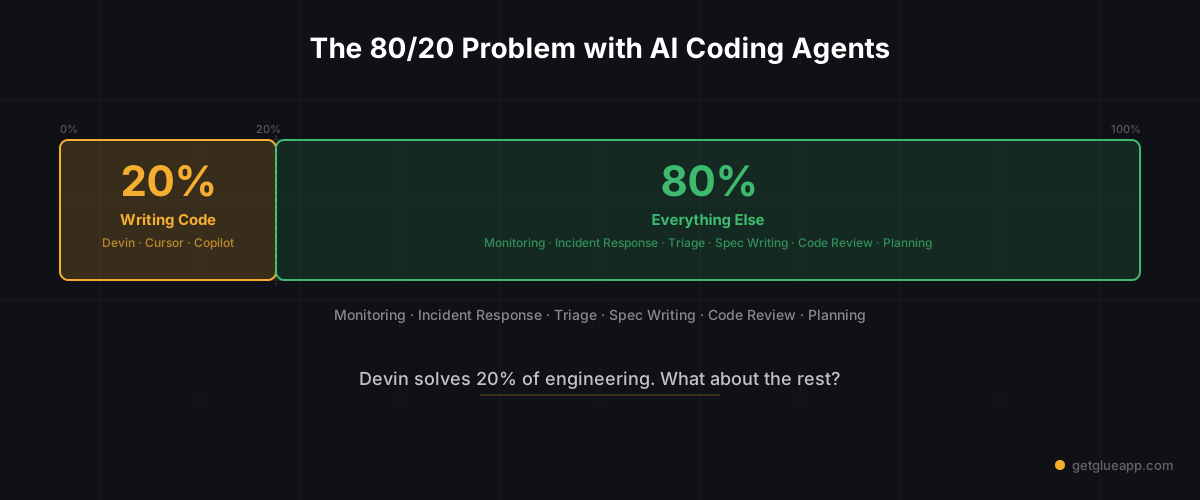
Think of your engineering team as two layers:
Layer 1: Coding (20%)
- Write features
- Generate code
- Automate routine coding tasks
- Handled by: Devin, Cursor, Copilot, Claude
Layer 2: Operations (80%)
- Understand codebase and impact
- Monitor production systems
- Detect anomalies
- Triage incidents
- Correlate root causes
- Write specs and requirements
- Assess technical debt
- Handled by: AI engineering operations agents (Glue, and emerging competitors)
Most teams are obsessed with Layer 1. "How fast can we write code?" But Layer 1 only matters if Layer 2 catches problems before they hurt customers.
Here's the uncomfortable truth: A Devin agent without an operations layer is just a code-writing liability. It will deploy bugs. It will miss security issues. It will ignore architectural constraints. And someone—a human, working late—will have to clean it up.
What AI Engineering Operations Agents Do
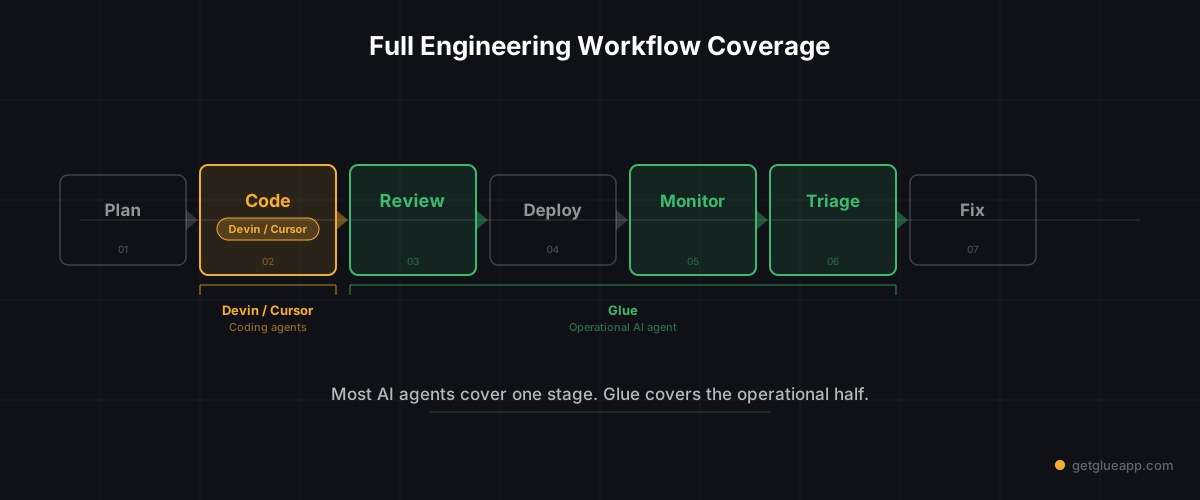
Operations agents are a different breed. They sit between your code and your customers. Their job is to understand, monitor, and triage at scale.
Monitoring and anomaly detection. An operations agent watches production metrics, logs, and error rates. It spots abnormal patterns that humans would miss—not just "error rate went up," but "error rate correlates with a specific feature and only affects EU customers."
Incident triage and response. When something breaks, an operations agent can:
- Correlate alerts across your entire stack
- Query logs without manually jumping between systems
- Identify what changed recently that could have caused this
- Surface similar incidents from the past
- Suggest root causes with evidence
Codebase intelligence. An operations agent understands your entire codebase—every module, its dependencies, what it does, who owns it. When Devin writes code or a human proposes a change, an operations agent can instantly say: "This will break feature X because of this dependency chain."
Spec writing and requirements. Before coding happens, an operations agent can:
- Analyze customer feedback and bug reports to generate requirements
- Question the assumptions in a spec
- Identify missing edge cases
- Map the feature to the broader architecture
Technical debt assessment. An operations agent can scan your codebase, prioritize what's rotting, and explain the business impact—not just a list of todos, but ranked by risk and effort.
These aren't flashy capabilities. They don't get Twitter buzz. But they're the difference between a stable engineering organization and one where fires are put out constantly.
Devin AI Alternatives: A Category Comparison
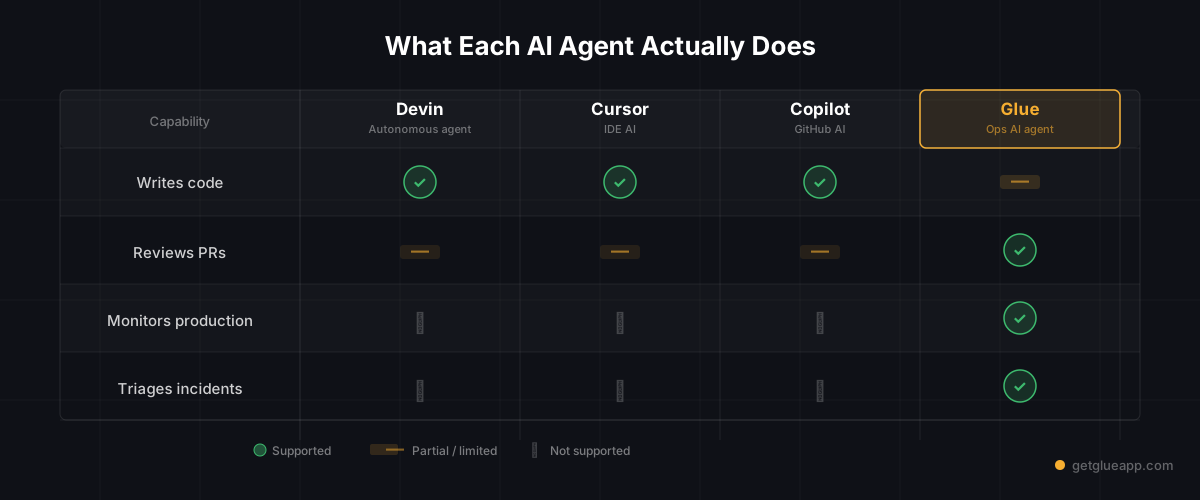
Not all alternatives are created equal. They're solving different problems.
Devin / Cognition
What it does: Autonomous code generation and deployment. Given a spec, it writes code, runs tests, commits, and deploys.
Good at: Well-defined features, isolated tasks, ticket-to-PR automation, debugging with context.
Missing: Decisions about what to build, monitoring and incident response, codebase intelligence, impact analysis.
Best for: Teams with clear, small requirements. Strong for feature velocity if you have solid architectural guidance.
Cursor / Copilot
What they do: Interactive, assisted code generation. You guide the agent as you write. They complete code, suggest refactors, and answer codebase questions.
Good at: Velocity for human developers, reducing boilerplate, answering "how do I implement X?" questions interactively.
Missing: Autonomous task completion, production monitoring, incident response, architectural understanding.
Best for: Individual developers and teams that want to stay hands-on. Great for reducing typing but requires constant human direction.
Glue (AI Engineering Operations)
What it does: Autonomous monitoring, triage, incident response, codebase intelligence, and spec generation.
Good at: Understanding your entire system holistically, detecting anomalies before they hurt customers, correlating root causes, writing specs from customer feedback, assessing technical debt.
Missing: Writing code directly. (This is intentional—you pair it with Devin or Cursor.)
Best for: Teams running production systems, managing incident response, or trying to reduce toil around monitoring and triage.
The Comparison Table
| Capability | Devin | Cursor | Copilot | Glue |
|---|---|---|---|---|
| Autonomous coding | ✅ Excellent | ❌ No | ❌ No | ❌ No |
| Assisted coding | ✅ Good | ✅ Excellent | ✅ Excellent | ❌ No |
| Codebase Q&A | ✅ Good | ✅ Good | ✅ Good | ✅ Excellent |
| Production monitoring | ❌ No | ❌ No | ❌ No | ✅ Excellent |
| Incident triage | ❌ No | ❌ No | ❌ No | ✅ Excellent |
| Spec writing | ❌ Limited | ❌ No | ❌ No | ✅ Excellent |
| Technical debt analysis | ❌ No | ❌ No | ❌ No | ✅ Good |
| Impact assessment | ❌ No | ❌ No | ❌ No | ✅ Excellent |
| Autonomous deployment | ✅ Yes | ❌ No | ❌ No | ❌ Limited |
The key insight: These are complementary, not competitive. Devin and Cursor are Layer 1 (coding). Glue is Layer 2 (operations). You probably need both.
How to Choose: Coding Agent vs. Operations Agent vs. Both
If you're choosing based on your problem:
"We're slow at writing code" → Start with a coding agent (Devin, Cursor, Copilot). These directly address velocity.
"We're drowning in incidents, and we don't know what's breaking" → Start with an operations agent (Glue). This is your bottleneck.
"We're both slow AND firefighting constantly" → You need both layers. Probably start with operations (fix the bleeding), then add coding agents (accelerate momentum).
"We have clear specs and good architectural guidance" → Devin works well. You have the preconditions it needs.
"We're early-stage and things are changing rapidly" → Cursor or Copilot (assisted coding) might be better than fully autonomous Devin. You want human judgment in the loop.
"We have large, complex systems and zero observability" → Start with an operations agent to understand your own systems. You can't fix what you can't see.
A practical playbook:
-
Week 1-2: Deploy an operations agent to your production logs and metrics. Let it build a baseline understanding of your system.
-
Week 3-4: Once you have observability and incident triage working, introduce a coding agent for well-scoped feature work.
-
Ongoing: Let the operations agent catch bugs that the coding agent creates, and use that feedback to improve both.
This prevents the nightmare scenario: Devin shipping code that breaks production, and nobody noticing for hours because you have zero observability.
FAQ
Q: Is Devin replacing junior developers?
A: No. Devin replaces specific tasks that junior developers do—isolated features, refactoring, technical debt. But junior developers also learn architecture, triage incidents, review peers, and understand tradeoffs. Those things still require humans. What Devin actually does is let experienced engineers spend less time on routine coding and more time on the thinking work that matters. That's valuable, but it's not replacement.
Q: Can I use Devin without an operations layer?
A: Technically yes, but you shouldn't. It's like deploying to production without monitoring. You can do it, but you'll regret it. At minimum, add observability and alerting before deploying Devin-generated code to production.
Q: Does Glue compete with Devin?
A: No. Glue and Devin are different layers. Glue complements Devin by catching its mistakes and providing the context it needs. If anything, Glue makes Devin safer and more valuable. You could use Glue without Devin, but you can't really use Devin safely without Glue.
Q: What's the ROI on an operations agent if I'm not currently using a coding agent?
A: High. Even without Devin, an operations agent reduces incident response time by 40-60%, cuts MTTR (mean time to resolution) significantly, and prevents outages from being escalated to humans in the first place. The efficiency gains are immediate. Proactive engineering bottleneck detection compounds these savings over time. The coding agent ROI comes later.
The Reframe
Devin is impressive. It does something genuinely hard: autonomously write, test, and deploy code. Credit where due.
But the industry got fixated on the wrong metric. "Look, an AI wrote code" became the headline, when the real headline should be "Look, an AI is preventing that code from breaking production."
If you're evaluating AI for your engineering organization, ask yourself:
- What percentage of my team's time is spent writing code vs. managing the aftermath?
- What's actually slowing us down—velocity or reliability?
- Can we afford to accelerate coding without accelerating our ability to detect problems?
For most teams, the answer to that last question is no. You need both layers. And that changes which tools matter.
Devin is one piece. But it's not the whole board.
Related Reading
- Engineering Copilot vs Agent: Why Autocomplete Isn't Enough
- AI Agents for Engineering Teams: From Copilot to Autonomous Ops
- AI Code Assistant vs Codebase Intelligence
- AI for CTOs: The Agent Stack You Need in 2026
- Context Engineering for AI Agents: Why RAG Alone Isn't Enough
- GitHub Copilot Metrics: How to Measure AI Coding Assistant ROI