Use Case
Write specs that don't require revision. Query your codebase before writing to surface constraints, dependencies, and existing infrastructure you can leverage.
At Salesken, I watched engineers rewrite specs that PMs had spent hours crafting — not because the PMs were bad writers, but because the specs were missing codebase context that only lived in engineers' heads.
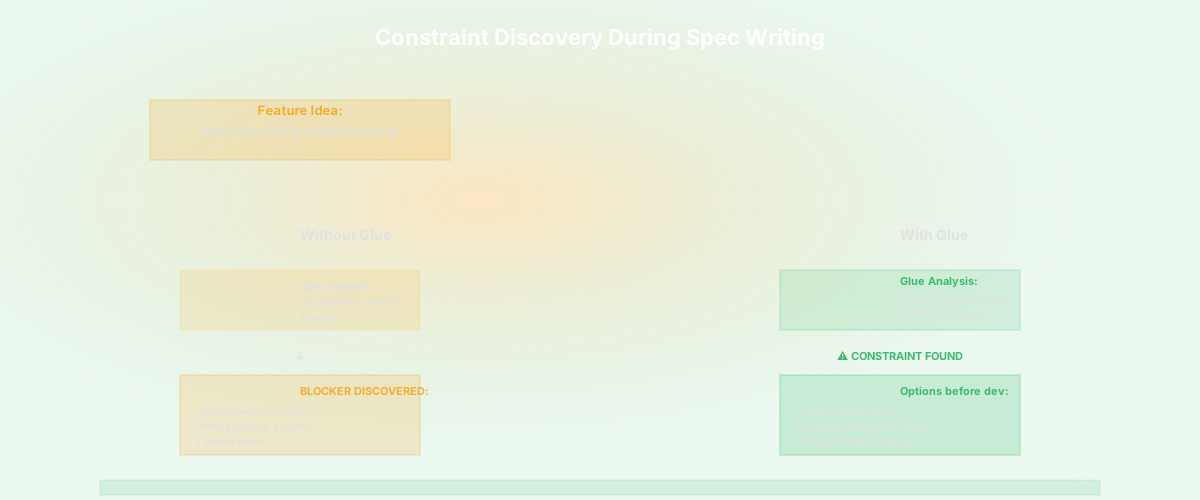
You've written a spec. It looks solid. You've talked to engineering, they signed off, and work starts. Three days in, an engineer discovers that the spec assumes the system has capabilities it doesn't have. Or it requires refactoring a component that was supposed to be stable. Or it conflicts with architectural constraints nobody mentioned in the spec review. The spec has to be rewritten. Work stops. Timelines slip.
This cycle - spec, discover technical constraint, revise - is the default in most product organizations. It's not because PMs are disconnected from engineering or because engineers didn't read the spec carefully. It's because technical reality is too complex for anyone to hold in their head completely. Engineers miss constraints. PMs miss dependencies. Architects miss what's already in the codebase. The spec looks viable until someone actually starts implementing it.
Product specs are written by product managers using information from customer feedback, competitive analysis, roadmap alignment, and conversations with engineering. The conversation with engineering is supposed to surface technical constraints - "we can't do that because of X, we could do this variation instead." But engineering conversations happen at a point in time, with limited information about the entire system.
An engineer might say "that's feasible" while mentally filtering for their area of the codebase. They don't know that another team is working on incompatible architecture in a different part of the system. Or they know the general architecture can support the feature, but they haven't traced through all the dependencies that would be affected. Or they've assumed something about the existing codebase that's actually not true.
The result is specs that have to be rewritten after engineering starts. This rework is expensive. The team has already pulled together an estimate, made a commitment, told customers about a delivery date. Then the spec changes. The estimate changes. Something else gets deprioritized. The org loses trust that estimates mean anything.
For teams with rapid shipping and iteration, constant spec revisions are death by a thousand cuts. For teams with longer planning cycles, a spec revision can blow up an entire quarter of planning. Either way, the cost is real.
The deeper issue: PMs feel like they can't write detailed specs because they don't understand the codebase well enough. So specs end up vague - "improve the checkout experience" instead of "reduce friction in the checkout experience by adding one-click payment for returning customers using stored payment methods." Vague specs lead to different understanding between PM and engineering, which leads to the shipped feature not being what was specified, which leads to rework. Technical vagueness creates product vagueness.
Some teams try to solve this by having longer, more detailed spec review meetings. An engineer or architect spends an hour carefully reading the spec and raising issues. This helps, but it's asynchronous communication compressed into a meeting - constrained by calendar availability and the engineer's ability to fully reason through the spec in real-time.
Other teams have architects review specs for technical feasibility. This also helps - more senior people catch things junior engineers miss. But architects are busy and not available for every spec. And reviewing a spec from outside the implementation context is hard - an architect might say "that's feasible" without knowing all the edge cases.
Some teams build a "spike" or "design" ticket before writing a spec. Engineering spends time investigating the technical approach. This is great if you have the bandwidth for spikes on every feature. Most teams don't.
Some teams accept spec revisions as inevitable and build them into their process. They estimate high ("it'll probably be 13 points, not 8, because something will come up"), scope it as "we'll build this and see what happens," or reserve time for midstream spec changes. This is honest about uncertainty, but it's inefficient. You're budgeting for discovery that should have happened before committing.
The root problem: specs are written in isolation from comprehensive technical information. They're written with whatever engineering context was available at the time, which is never complete. What's needed is a way to ground specs in actual codebase reality before engineering starts building.
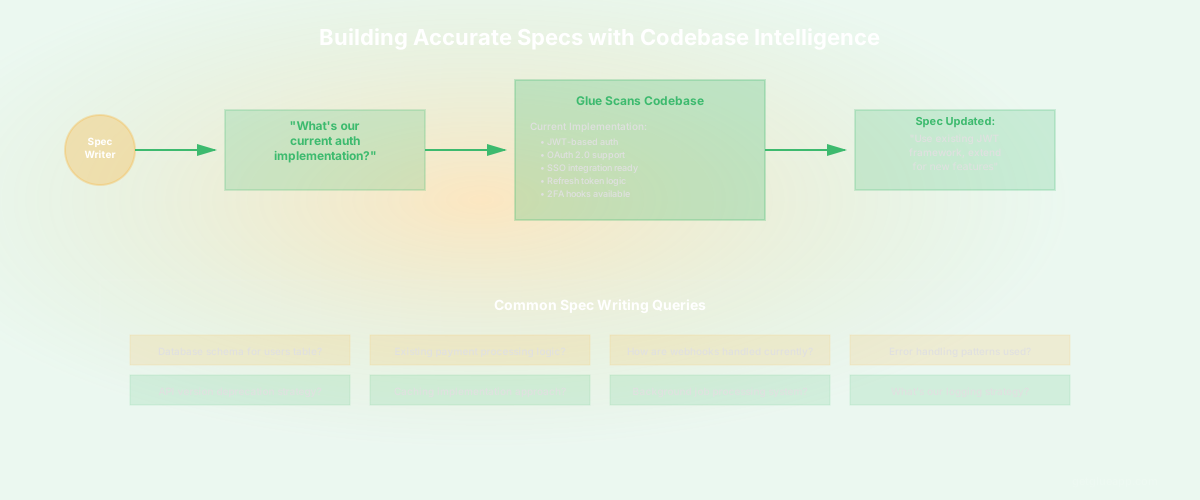
Glue lets PMs query the codebase BEFORE writing or finalizing specs. This grounds specs in technical reality. The workflow starts with a product idea. Before you write a spec, you ask Glue questions that surface constraints and dependencies.
A typical workflow: you're working on a feature idea for real-time notifications. Before writing a spec, you ask Glue: "Does our current architecture support WebSocket connections?" Glue might tell you: "Yes, you have a WebSocket server in your infrastructure, it's currently used for real-time collaboration features. Here's the codebase. It supports 10K concurrent connections with current hardware." Great - real-time is feasible within existing infrastructure.
Next question: "What would it take to send notifications for user activity?" You ask Glue: "What's our current event system look like?" Glue shows you have an event queue, it's used for analytics and email, and the schema is flexible. You ask: "What user activity do we currently track and emit events for?" Glue lists the events you're emitting. You ask: "What user activities would we need to track for notifications?" Glue helps you understand what's already there and what new events you'd need to add.
Now you ask: "If we added notification preferences and notification storage, where would they go in our data model?" Glue shows your user schema, where user settings are stored, and similar features in your codebase. You might discover that you don't have a way to store user preferences efficiently yet - that's a constraint you need to understand before writing the spec.
You ask: "What would be affected if we added a notifications service?" Glue maps which services would need to integrate with notifications (auth, user settings, billing), what interfaces you'd need to define, and whether any of those services have patterns you could reuse.
Specific questions shape the spec: "Does our API support server-initiated messaging or only client-initiated requests?" (Determines architecture options) "How do we handle long-lived connections in our infrastructure?" (Affects scalability) "What's our notification delivery guarantee - at least once or exactly once?" (Affects reliability). "Do we have webhooks or should we build notifications as a separate feature?" (Affects scope). "What notification channels do we currently support?" (Affects initial scope vs future work).
Each question surfaces either existing infrastructure you can leverage or constraints you need to design around. You write the spec with full knowledge of these constraints. You specify: "Use WebSocket for real-time delivery leveraging existing infrastructure. Emit events from user activity tracking. Store notification preferences in user schema. Integration with auth service for authenticated connections."
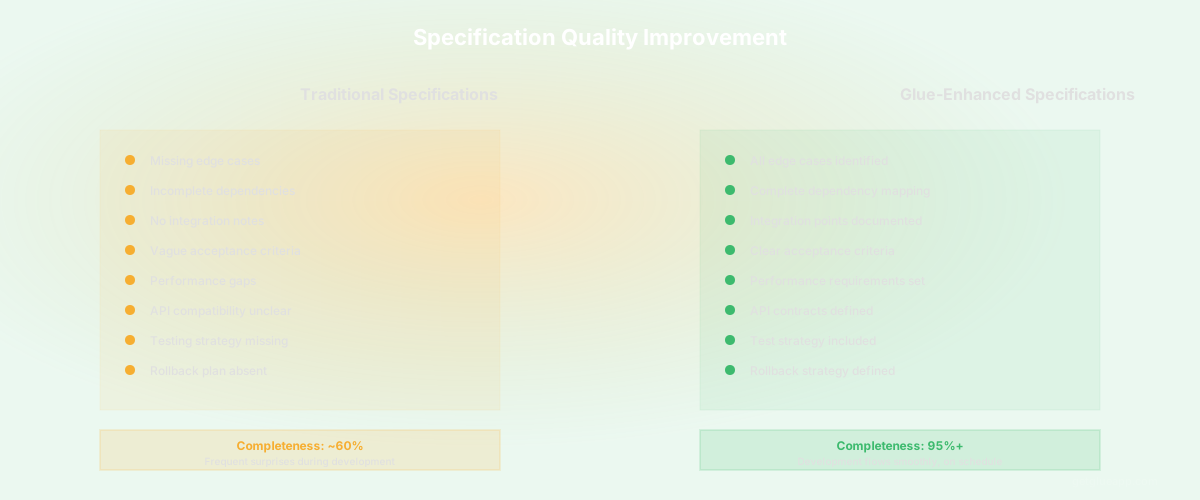
Now when engineering reads the spec, there are no surprises. The constraints are already baked in. The choices are justified by technical reality, not by assumptions. If an engineer comes back with "we can't do that," they're providing new information, not discovering something that should have been in the spec.
The spec is also more detailed because it's informed by technical reality. Instead of vague language, it's: "Use our existing event system, which already emits user activity events, to trigger notifications. Don't require new event instrumentation except for [specific new events]." Engineering knows exactly what leverage points exist.
Specs are rarely rewritten after engineering starts. Not because discovery isn't happening - it is - but because discovery happened before the spec was written, during the PM's research phase. By the time engineering gets the spec, it's already grounded in technical reality.
Specs are more detailed and precise because they're informed by codebase knowledge. They're not vague about architecture because the PM has literally asked the codebase about the architecture. They're not wrong about what's feasible because that's been validated through Glue.
PM and engineering spend less time in design meetings because both parties already have the same technical context. The spec already incorporates engineering input from the codebase itself. Conversations can focus on product priorities and trade-offs rather than technical discovery.
Estimates are more accurate because engineers aren't discovering surprising constraints during implementation. The effort is already factored in from the start.
Q: Does this mean PMs need to become technical? A: Not deeply technical. But PMs need to be able to ask natural language questions like "does this component exist?" and "what would change if we..." Glue makes those questions answerable without deep coding knowledge.
Q: What if the spec still discovers a constraint during implementation? A: That happens. Glue doesn't prevent all discovery - some constraints only become clear when you start building. But Glue prevents the most common ones: "we already have that," "that would require refactoring X," "we don't have that infrastructure."
Q: Do engineers still need to review specs if the PM has already asked Glue? A: Yes. Glue surfaces codebase reality. Engineering review surfaces design choices, trade-offs, and architectural alignment. Both are valuable and distinct.
Q: How much time do PMs spend querying Glue for a spec? A: Depends on the feature complexity. Simple features might require 30 minutes of Glue queries. Complex features might need a few hours. Compare that to spec revisions that take days or rework that takes weeks.
Keep reading
Related resources
