Comparison
GitHub Copilot writes code. Glue understands it. Learn why product managers and engineering leaders need Glue alongside Copilot, and how they work together.
At Salesken, we adopted Copilot early. The gains were real for boilerplate, but it never helped us understand our own codebase better or make better architectural decisions.
The AI coding conversation in 2026 is dominated by one idea: let AI write the code. GitHub Copilot pioneered this. Now there are Copilot Workspace, Copilot for Business, and a dozen agents trained to generate entire features. This is real progress - developers write less boilerplate, iterate faster, ship more.
But here's what nobody talks about: as AI writes more code, you need better codebase understanding. Not instead of code generation. Alongside it.
That's the gap Glue fills. Copilot writes code. Glue understands it. Together, they solve the full problem of shipping features faster and smarter.
GitHub Copilot is an AI code completion and generation tool. You describe what you want, and it writes code. It's built into your editor (VSCode, JetBrains, etc.). It makes developers faster at implementation.
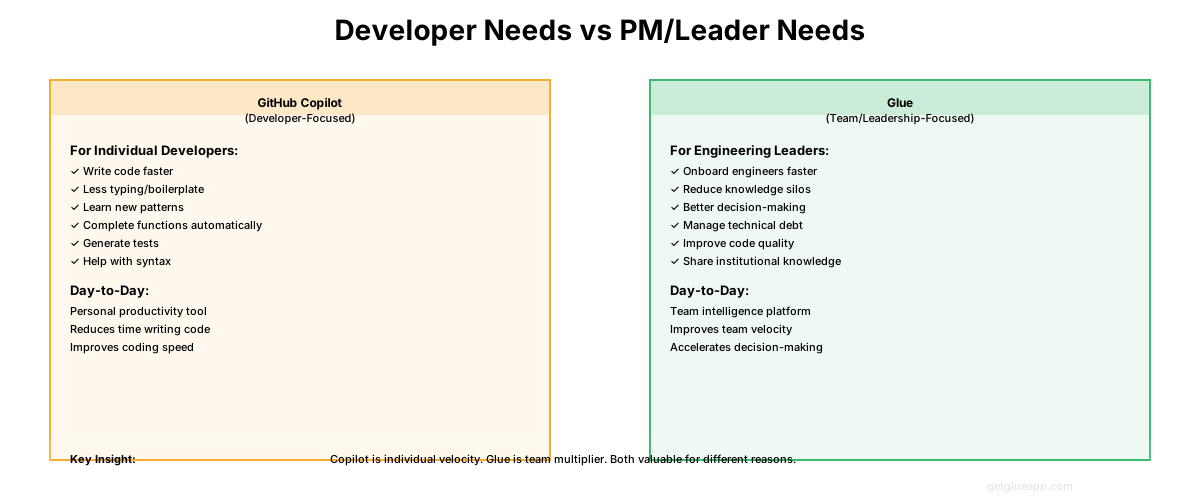
Glue is codebase intelligence for product managers and engineering leaders. Ask it questions about what features exist, what needs to be built, and what dependencies matter. It makes leaders faster at planning and decision-making.
Copilot accelerates the writing part of the job. Glue accelerates the understanding part. Both are necessary.
Copilot is remarkable at one thing: generating code that matches the context around it.
Show Copilot a function signature, and it completes the body. Describe a task in a comment, and it writes the implementation. It learns from your codebase (when you enable it) and generates code that matches your style and patterns. Copilot is particularly effective for writing boilerplate, implementing well-established patterns, speeding up iteration, reducing the friction of starting a new file or function, and cross-language work.
The improvement is measurable. Developer surveys consistently show Copilot reduces coding time by 20-40%, depending on the type of work. For teams doing a lot of routine implementation, this is significant.
Copilot has also expanded its ambitions. Copilot Workspace tries to elevate from line-level completion to full-task generation: write a GitHub issue, and Copilot spins up an environment to implement it. This is closer to autonomous agents, though still limited by scope and safety constraints.
Here's where the blind spot emerges. Copilot's training is based on patterns in code, not patterns in your business or architecture. It has no visibility into why code exists, what feature it serves, or how it fits into your competitive positioning.
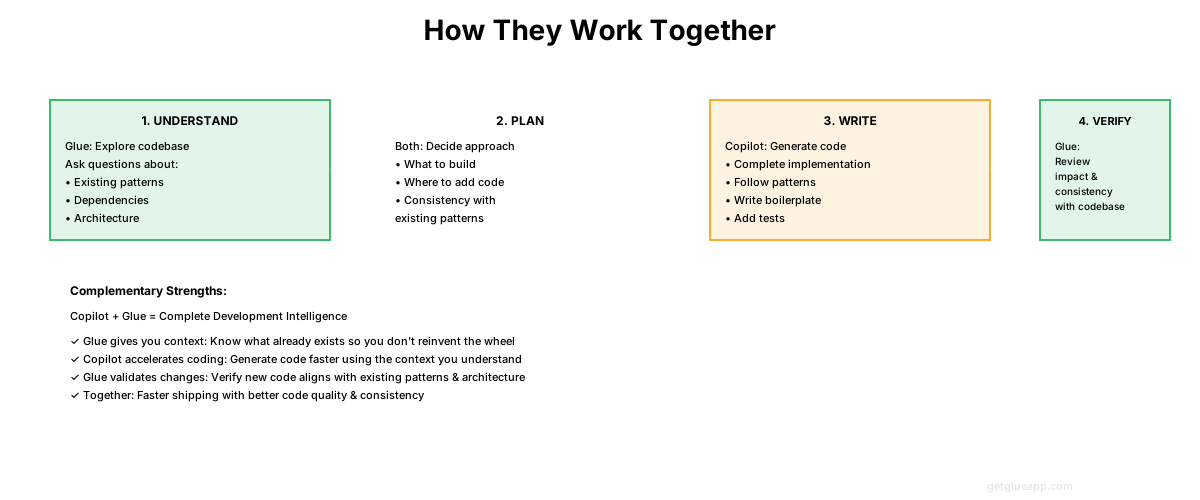
Specific things Copilot cannot do include understanding architectural implications - it generates code that compiles and runs but doesn't know whether it breaks your eventual consistency guarantees or duplicates work already done in your queue system.
It cannot map features to code - "How does checkout work?" is a business question, not a coding question. Copilot doesn't know.
It cannot identify what's missing - Copilot can generate invoice functionality if you ask it to, but can't tell you whether invoicing is already implemented three services upstream.
It cannot estimate accurately - "How long will adding subscriptions take?" Copilot has no way to answer.
It cannot see dependencies - Modify a core authentication utility, and Copilot won't warn you about the 47 services that depend on it. It cannot reason about product decisions - Should you implement feature X or Y? Copilot can implement either but can't tell you which is more valuable.
These aren't failures of Copilot - they're limitations of the problem it's designed to solve. Copilot is solving "write code faster." It's not designed to solve "understand what we have."
Here's the counterintuitive part: as AI gets better at writing code, the need for codebase intelligence increases.
When writing code was slow and expensive, teams were conservative. You planned carefully because mistakes were costly. You documented because it took time to understand things.
But Copilot makes generation cheap. Suddenly you can spin up 5 implementations of a feature and see which works best. You can refactor aggressively because if something breaks, you generate new code to fix it. This is progress - in theory.
In practice, cheap code generation leads to more code with less shared understanding, accidental duplication, architectural drift, feature fragmentation, and longer onboarding.
The paradox: Copilot makes implementation faster but understanding harder. In a world where code is generated, understanding becomes the constraint.
This is where Glue enters. Not instead of Copilot. Because of Copilot.
Here's what the practical workflow looks like in 2026:
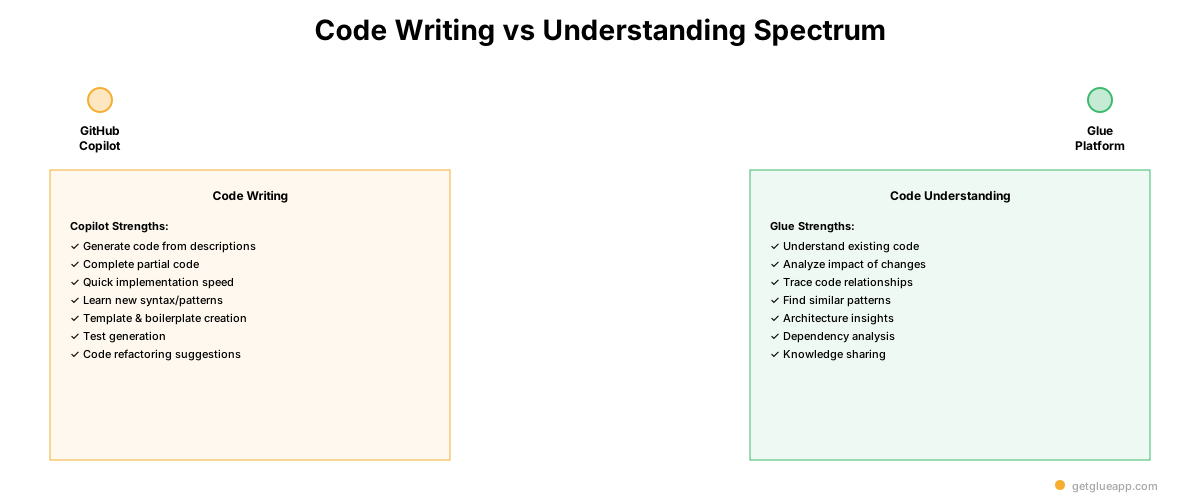
Phase 1: Understand (Glue) - PM: "What competitive features are we missing?" Glue: "You're missing these 12 things. Payment retry logic is partially there but insufficient. Invoicing is missing entirely. Estimated coverage: 62% vs competitor at 94%."
Phase 2: Plan (Glue + Human) - Engineering Lead: "If we're building invoicing, what's the scope?" Glue: "Invoicing would require modifications to orders service, new payment processing webhook, database schema changes, and updates to the billing dashboard. Similar work took 2-3 weeks."
Phase 3: Spec (Human) - Engineer reads Glue's output and writes a detailed implementation spec.
Phase 4: Build (Copilot) - Developer: "Here's my spec. Generate the implementation." Copilot generates code for all the files, runs tests, submits PR.
Phase 5: Review (Human + Glue) - Human review checks if this matches the spec. Glue query answers "Did this change break anything?" Phase 6: Monitor - Feature ships. Glue helps with the next research cycle.
In this workflow: Copilot handles the typing (faster, fewer mistakes), Glue handles the understanding (smarter decisions, fewer surprises), humans still make tradeoff decisions and catch edge cases, and the combination is faster and smarter than either alone.
What is the difference between Glue and GitHub Copilot?
GitHub Copilot is an AI code completion tool that suggests code as you type. Glue is a codebase intelligence platform that understands your entire codebase structure, dependencies, and architecture to provide context-aware insights for engineering and product teams.
Can Glue replace GitHub Copilot?
Glue and Copilot serve different purposes and work best together. Copilot helps individual developers write code faster, while Glue helps teams understand what their codebase does, track technical debt, and make informed product decisions based on code reality.
Does Glue integrate with GitHub?
Yes, Glue connects directly to your GitHub repositories to analyze your codebase structure, dependencies, code health, and development patterns without requiring any code changes or IDE plugins.
Keep reading
Related resources
