
Open-source developer tools in 2026 span six key categories: static analysis and linting, dependency scanning, code search and navigation, documentation generation, CI/CD infrastructure, and codebase visualization. The most important evaluation criteria for open-source tools are community health and maintenance velocity — not feature count. Top engineering teams use open-source tools for signal generation (linters, scanners, complexity metrics) but layer on codebase intelligence for context and prioritization, answering questions like "who owns this module?" and "what breaks if I refactor this?" that individual tools cannot.
Across three companies, I've relied heavily on open-source tools. The evaluation criteria I use now is very different from what I used a decade ago — community health and maintenance velocity matter more than feature count.
The open-source developer tool ecosystem has exploded over the last few years. There are tools for everything: static analysis, code quality, dependency scanning, documentation, codebase search. The explosion is useful - there are genuinely good solutions now where there used to be mediocre ones. But it's also paralyzing. Most teams can't tell which tools actually save time and which ones create noise.
I've spent years running different tools in different teams and codebases. I have strong opinions about what's actually worth your time and what's tooling theater. Here's the honest guide.
Static Analysis and Linting: Signal vs. Noise
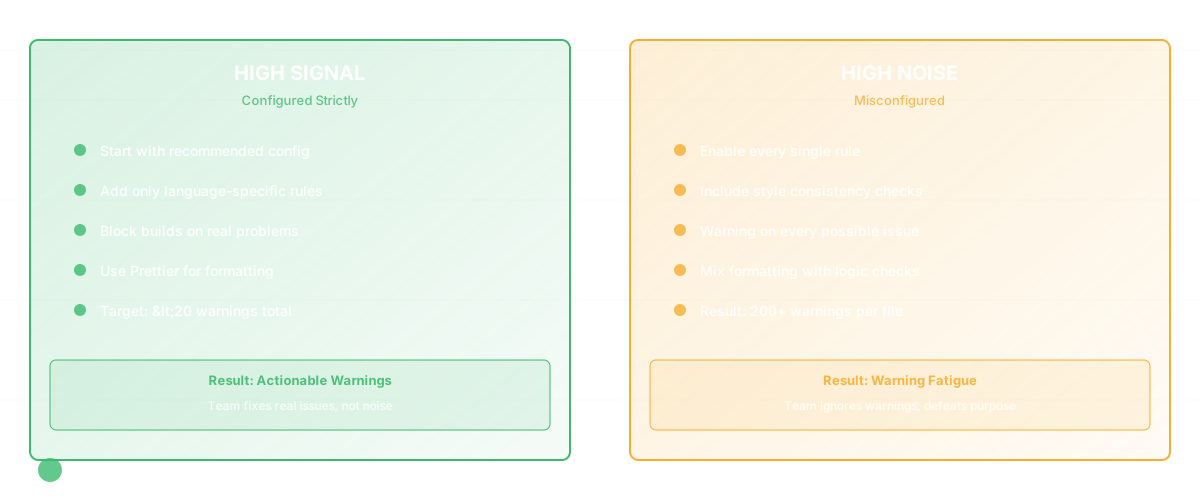
This is where the bloat is worst. Every language ecosystem has dozens of linters, static analyzers, and style checkers. Most teams end up with tools that generate hundreds of warnings, half of which nobody cares about.
ESLint (JavaScript/TypeScript) is the right choice if you're in this ecosystem. It's fast, configurable, and genuinely useful. But here's the real advice: configure it strictly. Don't enable every rule. Run the "recommended" config and add only the rules that prevent actual bugs in your codebase. If you have 200 ESLint warnings, you've configured it wrong. The tool should fail builds for real problems, not style inconsistencies. Use Prettier for formatting instead - it's non-configurable and that's the point.
Pylint (Python) is verbose and generates false positives. Ruff is faster and more pragmatic. If you're starting a new Python project, Ruff is worth it. If you have an existing codebase with Pylint warnings, migrating is not worth the effort.
rust-analyzer deserves mention even though it's not strictly a linter. For Rust, it's the best static analysis tool available and it's now the standard. It catches real problems.
Semgrep is worth knowing about. It's a static analysis tool that actually works across languages. It finds real security issues and real logic bugs, not style problems. If you're doing security-focused development, Semgrep is better than generic linters.
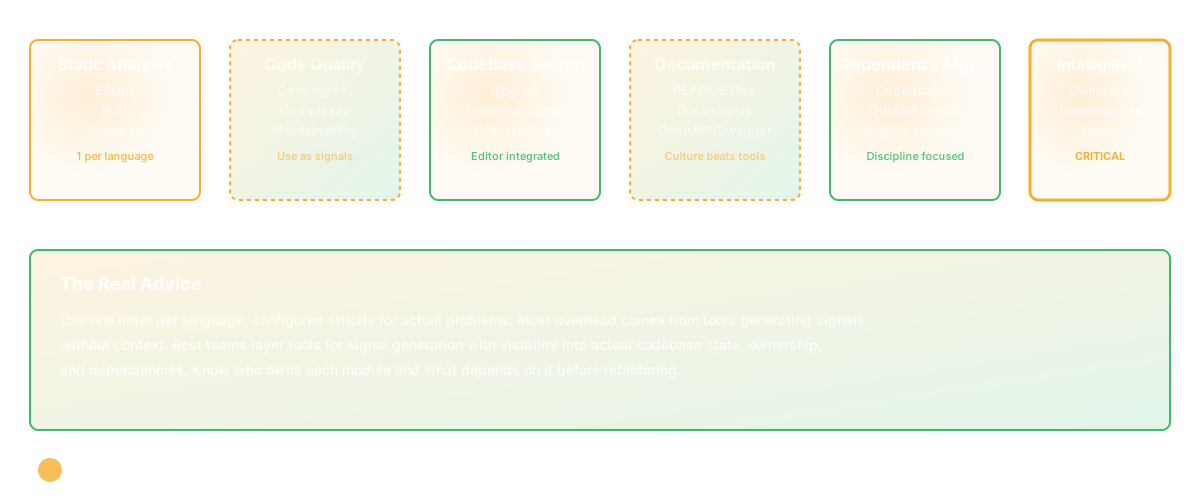
The pattern: one linter per language, configured strictly, focused on actual problems. Everything else is waste.
Code Quality Measurement: Avoid the Metrics Trap
This is where tools can do real harm. Complexity metrics, maintainability indexes, test coverage percentage - they all sound useful. Most of them are theater.
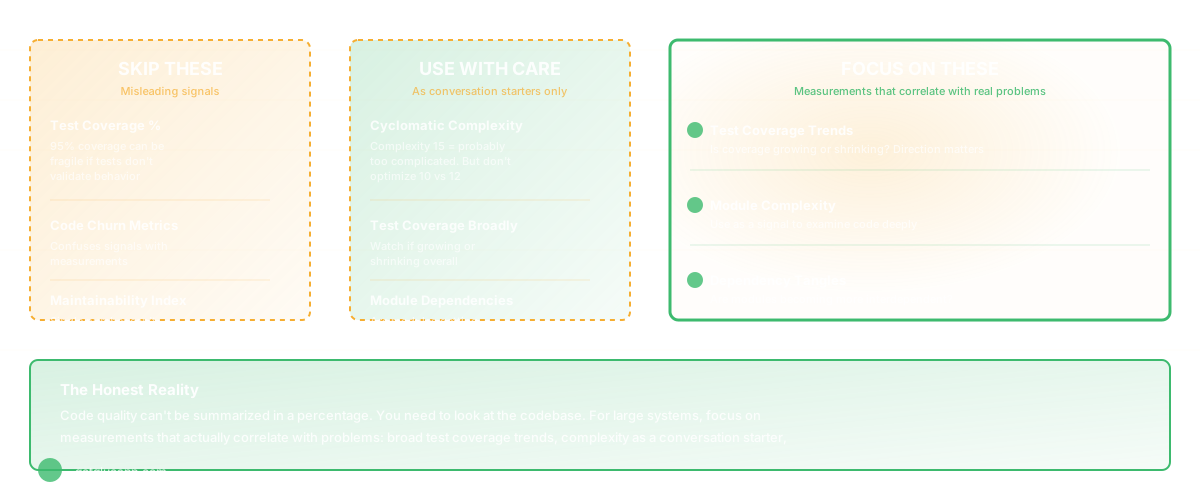
Test coverage percentage is the worst offender. A codebase can have 95% test coverage and still be fragile (if the tests don't validate behavior, they're just generating line numbers). Conversely, a well-tested codebase might have 70% coverage if the untested parts are truly impossible to break. Measure coverage if you need to, but don't optimize for the number.
Cyclomatic complexity is useful but only as a signal to look at a piece of code. A function with complexity 15 is probably too complicated. But complexity 10 isn't inherently better than complexity 12. Use it as a conversation starter, not a hard metric.
Skip: code churn metrics, maintainability indices, "technical debt" numeric scoring, and any tool that generates a single number claiming to represent code quality. They're confusing signals with measurements.
The honest reality is that code quality can't be summarized in a percentage. You need to look at the codebase. But since you can't do that manually for large systems, focus on measurements that actually correlate with problems: test coverage (broadly - not the percentage), cyclomatic complexity (as a signal to look deeper), and dependency relationships (are modules tangled?).
Codebase Search and Navigation
This has gotten genuinely better. Grep is no longer the right tool.
Ripgrep (rg) is faster than grep and has better defaults. If you're searching manually, use this.
Universal Ctags is essential. If you're using an editor that doesn't have symbol navigation and indexing, fix that. VSCode's built-in symbol search works well.
Sourcetrail was a visualization tool for codebases, but development stopped. Don't bother.
GNU Global is old and works, but most editors now have integrated alternatives that are better.
The real value here isn't in the tools themselves - it's in having search and navigation built into your editor and CI/CD pipeline. If you're using an editor without symbol indexing, that's the problem.
Documentation Tools: Admitting Defeat
Most documentation gets stale because keeping it current is work. The tools that work best are the ones that admit this and make it easy to update.
README-driven development is still the best approach. A README should live in the repo and should describe how to use the thing. Keep it updated when behavior changes. Most README files are accurate - they're the most-read file in a repo so people notice when they're wrong.
Automated documentation from code (Javadoc, docstrings, JSDoc) works only when your team actually maintains the comments. If you have a culture of commenting code as you write it, great. If you don't, generated documentation will be useless.
Docusaurus and mkdocs are fine for static doc sites. They're not the problem - inconsistent documentation is.
OpenAPI/Swagger for API documentation is worth doing if you have APIs. It generates documentation and generates client libraries. The documentation is only useful if you keep the spec updated, which requires discipline.
Skip fancy documentation tools. Invest in a culture of documentation instead. Tools matter less than discipline.
Dependency Management and Security Scanning
This is where you should spend energy.
Dependabot (now GitHub-native) is the baseline. It watches your dependencies and opens PRs for updates. Use it. Keeping dependencies current is cheaper than dealing with a security incident.
Snyk goes further: it scans for known vulnerabilities and tries to find you fixes. It's more sophisticated than Dependabot and more aggressive about pushing updates. In my experience, Dependabot + a habit of regular updates is better than Snyk unless you're in a highly regulated environment.
OWASP Dependency Check is open-source and free. It scans your dependencies against a database of known vulnerabilities. It's less sophisticated than Snyk but it's genuinely useful and it runs locally.
Cargo audit (for Rust) and npm audit are built-in and often sufficient. Use them before deploying.
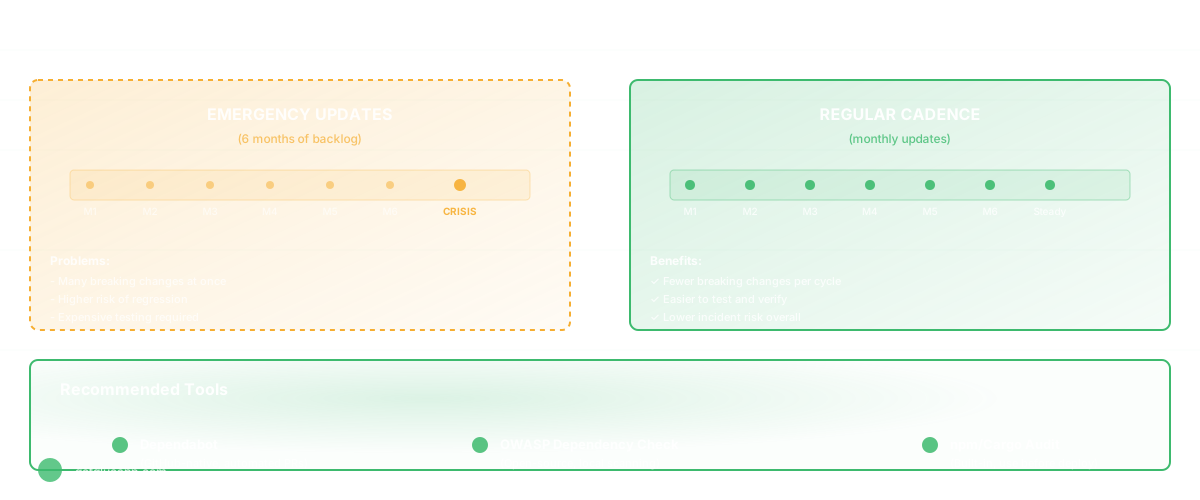
The real advice: keep your dependencies current. This means updating regularly, not monthly. The newer your dependencies, the fewer security issues you'll have. Tools help, but discipline matters more.
The Layer Above All Tools
Here's the thing that's missing: most of these tools generate signals (this module is complex, this dependency is outdated, this test coverage is low) but they don't help you act on those signals in the context of your product.
You can have ESLint catching style issues, Snyk catching vulnerabilities, and complexity metrics showing bloated modules - and still have no clear way to prioritize which issue to fix, who should fix it, or whether the fix actually solved the problem. You get a wall of warnings and no direction.
That's where the level above matters. When a complexity metric shows a module is too complicated, you need to know: Who owns this module? What was the last change made to it? What depends on it? If I refactor it, what breaks? Those are codebase intelligence questions, not linting questions.
The best engineering teams use open-source tools for signal generation (linters, scanners, complexity metrics) but then layer on visibility into actual codebase state. They can answer: where are the problematic patterns? Who needs to be involved in fixing them? How do we verify the fix actually worked?
Single tools are good at signal generation. They're not good at context and prioritization. For a team shipping real products, you need both.
Frequently Asked Questions
Q: Should we use all the static analysis tools available?
A: No. Each tool you run costs time and attention. Use one linter per language, configured to catch real problems. Use Dependabot for security. Use your editor's built-in symbol search. Focus on the code quality metrics that actually predict defects — anything beyond that is overhead unless you're addressing a specific pain point.
Q: How do we keep dependencies current without constant churn?
A: Regular updates beat emergency updates. Update dependencies monthly rather than dealing with six months of outdated libraries all at once. Automate where you can (Dependabot). Trust your test suite to catch breaking changes - if tests are weak, that's the real problem.
Q: What about tools for monitoring code health over time?
A: Most teams don't have good visibility into whether their codebase is getting better or worse. Watch the engineering efficiency metrics that matter: are modules getting more or less complex? Is test coverage growing or shrinking? Is deployment frequency increasing or decreasing? Are you shipping more bugs? Tools show you the numbers; discipline changes the numbers.
Related Reading
- Slack Alternatives for Engineering Teams
- Alternatives to Google Docs for Engineering Teams
- Engineer Productivity Tools: Navigating the Landscape
- Knowledge Management System Software for Engineering Teams
- Developer Experience: The Ultimate Guide
- Software Productivity: What It Really Means and How to Measure It