
Alternatives to Google Docs for engineering teams include docs-as-code tools (Docusaurus, GitBook) that version documentation alongside source code, structured wikis (Notion, Outline, Confluence) for collaborative internal knowledge, and codebase intelligence platforms (Glue, Backstage) that derive documentation directly from code. Google Docs fails engineering teams because it lacks code formatting, version control integration, and structural awareness of the codebase it documents.
Google Docs is great for drafting blog posts and collaborating on marketing copy. It is terrible for engineering documentation.
At UshaOm, where I led a 27-engineer e-commerce team, we tried to maintain our architecture documentation in Google Docs. For about six months. The breaking point was when a new engineer spent three days implementing a feature based on an architecture doc that was wrong — the system had been refactored four months earlier but the Google Doc still showed the old structure. Nobody updated it because nobody thought of Google Docs as a living document. It was a snapshot from the day someone wrote it.
If you've tried to maintain API documentation in Google Docs, paste a code block that lost its formatting, or searched for an architecture decision across 47 shared drives, you already know this. The tool wasn't built for how engineering teams work.
Here are the alternatives that actually match developer workflows.
Why Google Docs Breaks Down for Engineering Teams
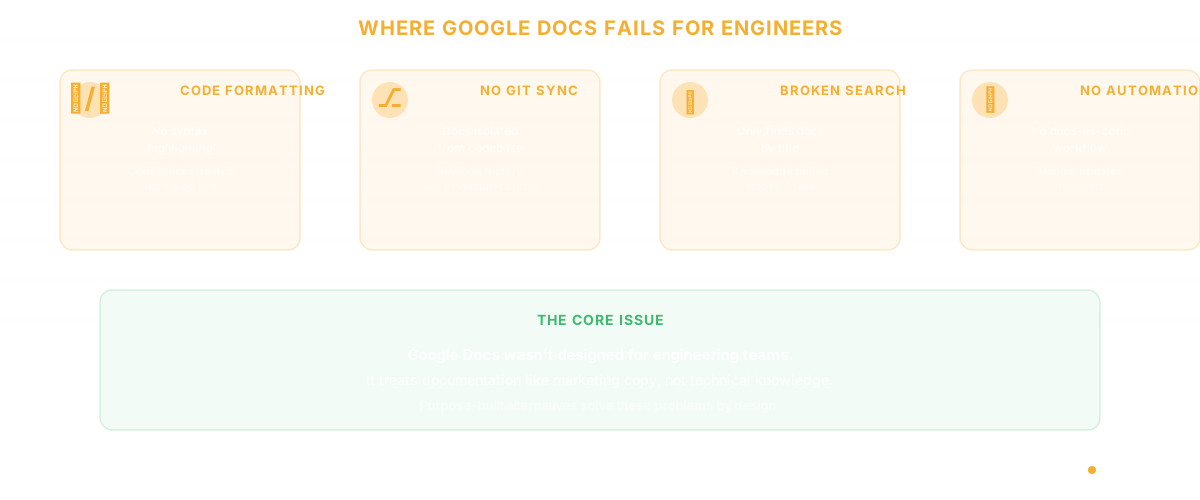
Before jumping to alternatives, it's worth understanding exactly where Google Docs fails for technical work. The problems aren't superficial:
Code formatting is an afterthought. Google Docs treats code blocks like styled text, not executable content. No syntax highlighting across languages, no inline code rendering, no diff views. Engineers end up screenshotting their IDE and pasting images - which are unsearchable and immediately stale.
No version control integration. Engineering teams live in Git. Their documentation tool should too. Google Docs has revision history, but it's per-document and disconnected from the codebase. When the code changes, the docs don't know.
Search across docs is painful. Google Drive search works for finding a specific document by title. It does not work for finding "that paragraph where we decided to use PostgreSQL instead of MongoDB." Technical knowledge gets buried.
No programmatic access for automation. Engineering teams want docs-as-code - documentation that can be generated, validated, and deployed alongside the application. Google Docs' API exists but wasn't designed for this workflow.
The 10 Best Alternatives to Google Docs for Engineering Teams
1. Notion - Best for All-in-One Team Wikis
Notion combines documents, databases, and project management in a single workspace. For engineering teams, the key advantage is structured knowledge - you can build databases of API endpoints, link them to project pages, and create views that filter by team or status.
Strengths: Flexible databases, good code block support, templates, API for automation. Limitations: Performance degrades with large workspaces, real-time collaboration can lag, no native Git integration. Pricing: Free for individuals, $10/seat/month for teams.
2. Confluence - Best for Enterprise Teams Already on Atlassian
If your team runs on Jira, Confluence is the natural documentation companion. The integration between issue tracking and documentation means you can link decisions to the tickets that prompted them.
Strengths: Deep Jira integration, structured spaces, macros for technical content, enterprise admin controls. Limitations: The editing experience feels dated compared to modern tools, search is notoriously unreliable, page load times frustrate users at scale. Pricing: Free for up to 10 users, $6.05/user/month for Standard.
3. GitBook - Best for Developer Documentation
GitBook bridges the gap between docs-as-code and a proper editing experience. You can sync documentation with a GitHub repository, edit in a clean WYSIWYG interface, and publish versioned documentation that stays in sync with your codebase.
Strengths: Git sync, versioned docs, clean reading experience, API documentation support, built-in search. Limitations: Best for public-facing docs - less suited for internal wikis, pricing escalates with team size. Pricing: Free for personal use, $8/user/month for teams.
4. Mintlify - Best for API and Product Documentation
Mintlify generates beautiful documentation sites from MDX files in your repository. If your primary need is customer-facing API docs, this is the most polished option available.
Strengths: MDX-based, auto-generated API references from OpenAPI specs, analytics on documentation usage, beautiful default themes. Limitations: Focused on external docs - not an internal wiki replacement, requires MDX knowledge. Pricing: Free tier available, $150/month for pro.
5. Backstage (by Spotify) - Best for Internal Developer Portals
Backstage isn't a Google Docs replacement in the traditional sense - it's an internal developer portal that centralizes service catalogs, documentation, and developer tools. For large engineering organizations, it solves the "where do I find information about this service?" problem.
Strengths: Service catalog, TechDocs for Markdown-based documentation, plugin ecosystem, open source. Limitations: Significant setup and maintenance overhead, requires dedicated platform team, steep learning curve. Pricing: Free (open source), but factor in infrastructure and maintenance costs.
6. Slite - Best for Lightweight Team Knowledge Bases
Slite focuses on making team knowledge searchable and organized without the complexity of tools like Confluence or Notion. Its AI-powered search actually surfaces relevant answers instead of just matching keywords.
Strengths: Excellent search, clean interface, good onboarding for non-technical users, AI-powered answers. Limitations: Fewer power features than Notion, limited customization, code support is basic. Pricing: Free for up to 50 docs, $10/member/month for Standard.
7. Outline - Best Open-Source Self-Hosted Option
If data sovereignty matters to your team, Outline is the strongest open-source documentation platform available. It's essentially what Notion would look like if it were self-hosted and focused purely on documentation.
Strengths: Self-hosted, open source, clean editor, API-first, Markdown-based, real-time collaboration. Limitations: Requires self-hosting infrastructure, smaller plugin ecosystem than commercial tools. Pricing: Free (self-hosted) or $10/user/month (cloud).
8. Docusaurus - Best for Docs-as-Code
Built by Meta, Docusaurus generates documentation websites from Markdown files in your repo. Perfect for teams that want their documentation to go through the same PR review process as their code.
Strengths: Docs live in your repo, versioned docs, React-based (customizable), great for OSS projects, free. Limitations: Static site generator - no real-time collaboration, requires technical setup, not suited for internal wikis. Pricing: Free (open source).
9. Tettra - Best for Curated Internal Knowledge
Tettra focuses specifically on internal knowledge management with a verification workflow - subject matter experts can verify that documentation is still accurate, and stale content gets flagged automatically.
Strengths: Knowledge verification workflow, Slack integration, simple UI, stale content detection. Limitations: Limited formatting options, no code-specific features, smaller team and ecosystem. Pricing: Starting at $8.33/user/month.
10. Glue - Best for Codebase-Driven Documentation
Here's the fundamental problem with every tool on this list: they all require engineers to manually write and maintain documentation. Glue takes a different approach entirely. Instead of asking developers to document their code in a separate tool, Glue's codebase intelligence agents analyze the code itself - mapping architecture, tracking dependencies, identifying ownership patterns, and surfacing the knowledge that's already embedded in your repository.
Strengths: No manual documentation overhead, always up-to-date (reads from the actual codebase), surfaces architecture, dependencies, and team knowledge automatically, bridges the gap between product and engineering. Limitations: Focused on codebase intelligence rather than general-purpose documentation. You'll still want a writing tool for RFCs and design docs. Best for: Engineering teams that want to eliminate the gap between what the code actually does and what the docs say it does. Product managers who need to understand the codebase without reading code.

How to Choose the Right Alternative
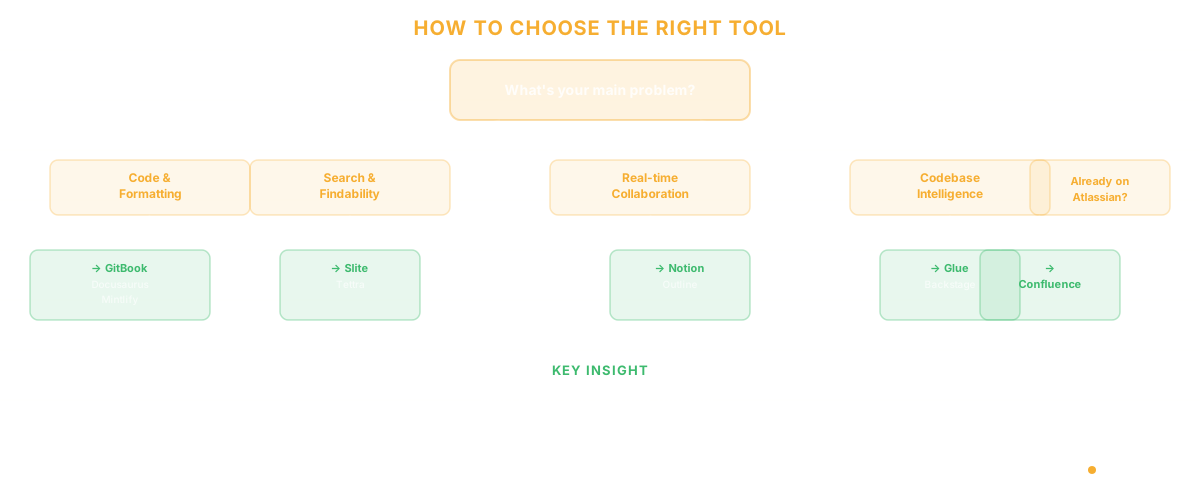
The right tool depends on what's actually broken in your current workflow:
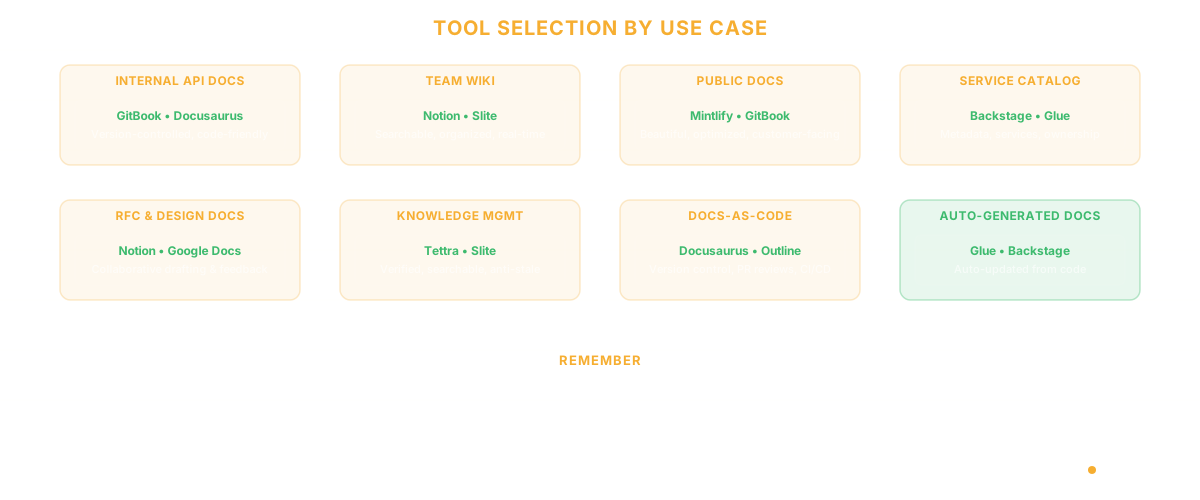
If your problem is formatting and code support: GitBook, Docusaurus, or Mintlify. These are purpose-built for technical content.
If your problem is findability: Slite or Tettra. Their search is built for answering questions, not just matching keywords.
For more on why engineering documentation fails, see our post on knowledge management systems for engineers. If your problem is stale documentation: Glue or Backstage. Both reduce the manual maintenance burden - Glue by reading the codebase directly, Backstage by centralizing service metadata.
If your problem is collaboration: Notion or Outline. They handle real-time editing and commenting well.
If your problem is "we're already on Atlassian": Confluence. Fighting the ecosystem usually costs more than accepting its limitations.
Frequently Asked Questions
What is the best free alternative to Google Docs?
For engineering teams, Docusaurus (open source, docs-as-code), Outline (open source, self-hosted wiki), and Backstage (open source, developer portal) are the strongest free options. Each serves a different use case — choose based on whether you need a docs site, an internal wiki, or a service catalog. For teams whose primary challenge is stale architecture documentation, consider tools that derive docs from code rather than requiring manual updates.
Is Google Docs used professionally in engineering?
Google Docs is common for drafting RFCs, meeting notes, and non-technical writing. However, most engineering teams supplement it with specialized tools for API documentation, internal wikis, and technical knowledge management because Google Docs lacks code formatting, version control integration, and structured technical content support.
What is the best alternative to Google Docs for collaboration?
For real-time collaboration on technical content, Notion and Outline offer the best experience. For asynchronous collaboration through code review workflows, GitBook and Docusaurus (with Git-based PRs) better match how engineering teams already work.
Related Reading
- Knowledge Management System Software for Engineering Teams
- Software Architecture Documentation: The Part That Always Goes Stale
- API Documentation: The Guide Nobody Writes
- Daily Standups via Slack Are Killing Your Engineering Team's Productivity
- Slack Alternatives for Engineering Teams
- The Product Manager's Guide to Understanding Your Codebase
- Glue vs Backstage
- Glue vs Notion