
Codebase health can be assessed by PMs through four standard engineering signals that require no custom dashboards: ownership concentration (git log showing how many engineers touch critical modules — a bus factor indicator), complexity hot spots (cyclomatic complexity scores identifying modules that are expensive to modify), test coverage by critical path (coverage maps for payment, auth, and core workflow logic rather than overall vanity metrics), and change frequency analysis (git churn identifying code that changes most often and may signal instability or active debt). These translate directly into actionable PM decisions about refactoring priority, staffing risk, and feature feasibility.
Across three companies, I've seen the same pattern: critical knowledge locked inside a handful of senior engineers' heads, invisible to everyone else.
Product managers at engineering-driven companies often ask the same question: "How healthy is our codebase?"
Most engineers answer with vague statements. "It's pretty good." "There's some debt." "The database schema is getting messy." These are honest answers, but they're not useful.
The real problem is that PMs expect custom reports and engineers expect to run queries. Both are expensive. What actually works is simpler: PMs need to understand what engineers already know from the tools they use every day, and engineers need to know what questions PMs actually care about.
This post isn't about running CLI commands. It's about translating what engineers see into information PMs can act on.
What Engineers Actually Look At
Good engineers develop instincts about codebase health. These instincts come from reading code, not from dashboards. But they're based on patterns that tools reveal. You don't need custom instrumentation. You need to know what the standard tools are telling engineers.
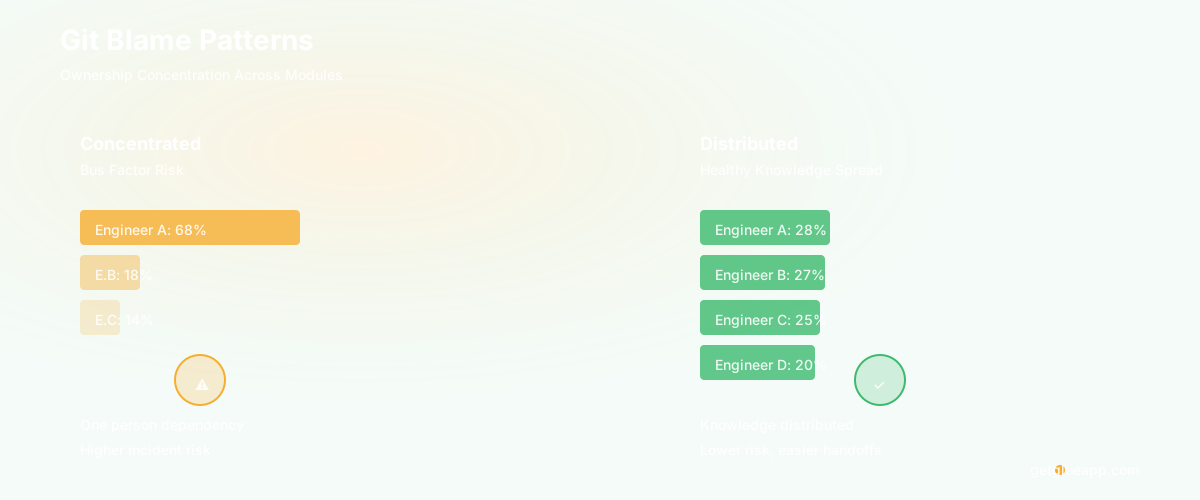
Git blame patterns reveal ownership and change frequency. When an engineer runs git blame on a file, they're not just finding who wrote the line. They're seeing the change pattern. If the blame shows the same three names over and over, that's concentration. If they see a long commit message trail in one week and then nothing for six months, that tells them something about the stability of that code.
For PMs: ask your engineer "what does the blame history look like for the payment processing module?" If they say "mainly one person, occasional reviews," you have a bus factor problem. If they say "balanced between four people," you have distribution. This is different from "how many people touch it" - it's about steady-state ownership.
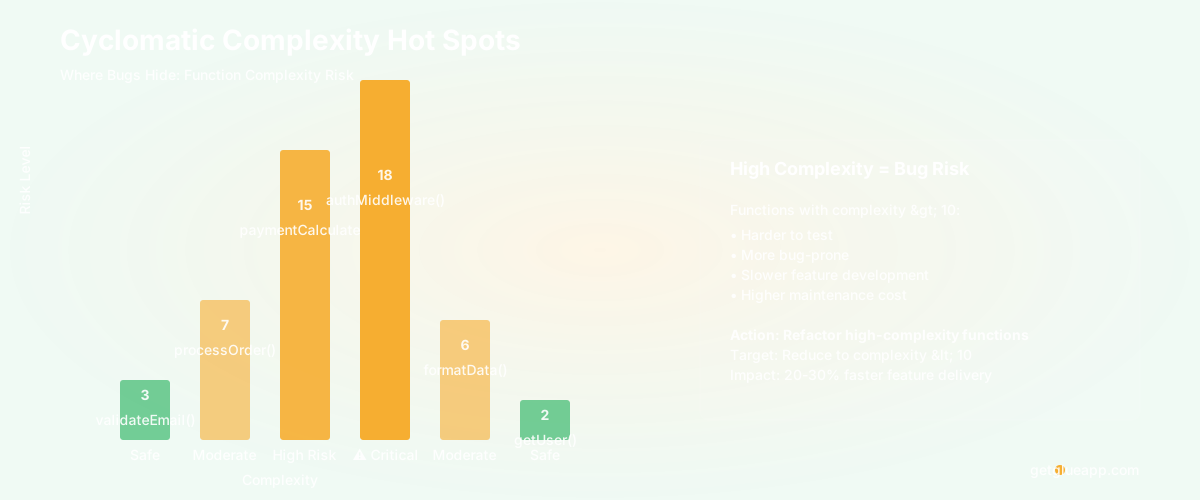
Cyclomatic complexity scores reveal where bugs live. Cyclomatic complexity measures how many paths a function can take. A function with low complexity is easy to test and easy to change. A function with high complexity is where bugs hide. Engineers know this intuitively - they avoid touching high-complexity functions because changes are risky.
For PMs: ask your engineer "what are our hot spots for cyclomatic complexity?" They run a tool, get a list, and can tell you "these five functions have complexity over 10. Bugs tend to cluster here. This is where we get production incidents." You now know where to push for refactoring.
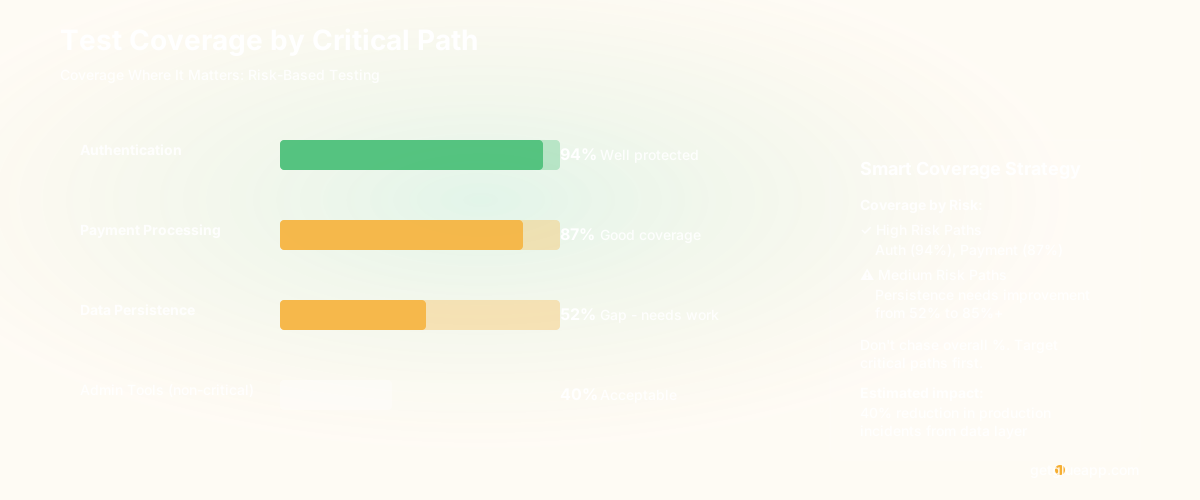
Test coverage maps show where the code is fragile. This one is usually measured badly. Most teams report overall test coverage (like 72% of the codebase). That's useless. What matters is: which critical paths have test coverage and which don't?
For PMs: ask your engineer "run a coverage map on the critical paths - authorization, payment, data persistence." You'll get something like: "Auth is 94% covered, payments are 87% covered, persistence is 52% covered." Now you know where to push for test investment. A risky payment flow with 87% coverage is worth improving. A non-critical module at 52% coverage is fine.
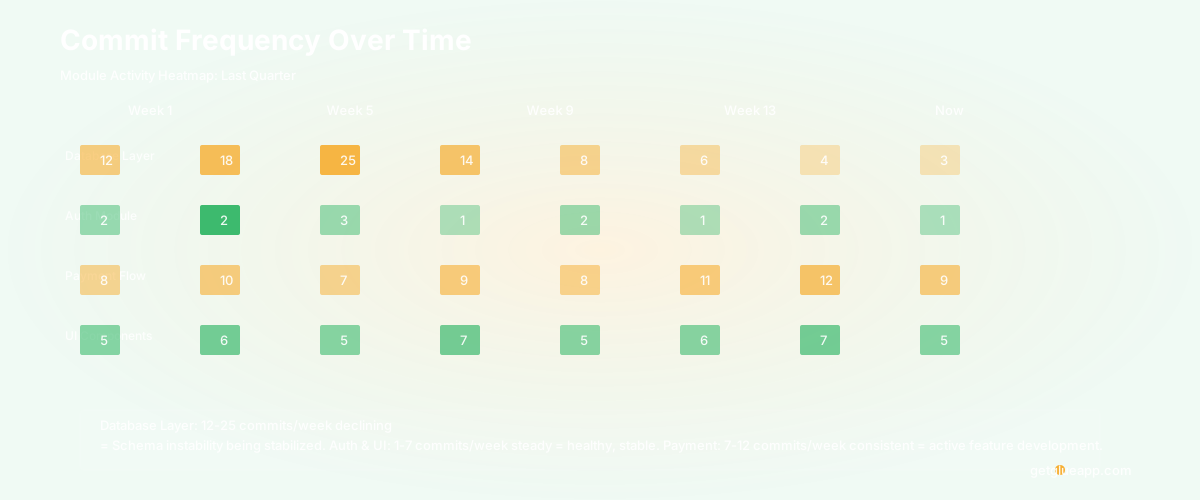
Commit frequency patterns show where change is concentrated. Some modules are touched frequently, others rarely. Frequent change can mean (1) it's a hot spot that needs refactoring, or (2) it's actively being developed. Rare change can mean (1) it's stable, or (2) it's abandoned.
For PMs: ask your engineer "which modules have the highest commit frequency in the last quarter?" If your database layer is getting 40 commits a week, something is wrong - either the schema is unstable or you're over-optimizing. If your authentication layer is getting 2 commits a week, either it's stable (good) or it's abandoned (bad - you'll find out when bugs appear).
Translating to PM Language
Engineers know these patterns. The translation problem is that engineers think in code and PMs think in features and risk.
Here's how to ask better questions:
Instead of "how healthy is the codebase," ask: "Which parts of the code are risky to change?" The engineer will tell you about high-complexity modules, low test coverage areas, and bus factor concentration. Now you know which features will take longer because the code is risky.
Instead of "do we have technical debt," ask: "Which features would get faster if we refactored the code underneath?" This forces the engineer to connect code quality to feature velocity. They'll say "if we refactor the data layer, adding new fields takes 4 hours instead of 12." Now you can cost-benefit the refactoring.
Instead of "how long will this feature take," ask: "How much of this feature touches hot spots?" Hot spots are high-complexity, frequently-changed modules. Features that avoid hot spots are faster. Features that touch multiple hot spots need more time. This helps you understand velocity variation.
Instead of "what's our test coverage," ask: "Which critical paths have low test coverage?" This is connected to risk. High coverage in payment processing matters. Low coverage in an internal admin tool doesn't.
What This Actually Reveals
At a 15-person engineering team building a SaaS product, I worked with the PM to ask these questions quarterly.
Q3 findings: Database schema module had high change frequency (25 commits in a month), high cyclomatic complexity (three functions over 10), and involved only two people. Translation: the schema was unstable, risky to modify, and a bus factor problem. Recommendation: allocate a sprint for schema stabilization.
Q4 findings: Authorization module had low change frequency (3 commits in a month), high test coverage (96%), and was touched by four different people. Translation: stable, well-tested, distributed knowledge. No action needed, but this is an example of good code.
Q1 (next year): Features touching the payment flow were consistently taking 30% longer than similar-complexity features elsewhere. Coverage was 87% (good) but the module had three functions with cyclomatic complexity over 12. Recommendation: refactor those three functions. Estimated impact: 20% faster feature development in that area.
None of these required custom dashboards. The engineer ran standard git and complexity analysis tools. The PM asked specific questions. The insights were actionable.
Why This Matters
Most codebase health discussions are abstract. "Technical debt is high." "Code quality is declining." These don't tell you what to do.
When you translate to specific, measurable signals ( - ) ownership concentration, complexity hot spots, test coverage by critical path, change frequency ( - ) you get information you can act on. For engineering managers, the Engineering Manager's Guide to Code Health provides a comprehensive framework for acting on these insights. You can prioritize refactoring. You can reduce bus factor. You can make sure critical features have the right level of testing.
The tools engineers use are basic - git, complexity analyzers, coverage reports. But the patterns they reveal are powerful. The key is asking the right questions and translating between engineer-speak and PM-speak.
Your engineer knows this stuff. They're just waiting for you to ask.
Frequently Asked Questions
Q: Should we measure overall test coverage?
Overall test coverage is a vanity metric. A 85% coverage number means nothing if the 15% that's not covered is critical payment logic. Ask for coverage maps by critical path instead. Understanding which paths matter most requires code quality metrics tied to actual change failure rate data.
Q: How often should we look at these metrics?
Quarterly is reasonable for strategy. Monthly is too noisy. Quarterly gives you signal about trends — especially DORA metrics like deployment frequency and cycle time — and lets you plan sprints accordingly.
Q: What if we don't have the tools to measure complexity or coverage?
Most languages have free tools. Python has McCabe for cyclomatic complexity. JavaScript has complexity plugins for ESLint. Coverage is built into most testing frameworks. Your engineer probably knows about them already - ask them what they use.
Related Reading
- Code Dependencies: The Complete Guide
- Dependency Mapping: A Practical Guide
- Software Architecture Documentation: A Practical Guide
- C4 Architecture Diagram: The Model That Actually Works
- Code Refactoring: The Complete Guide to Improving Your Codebase
- Knowledge Management System Software for Engineering Teams