
Refactoring means changing how code works internally without changing what it does externally. Most teams understand that definition. What most teams don't understand: the reason refactoring goes wrong isn't poor technique. It's poor diagnosis.
I learned this the hard way at Salesken. We had a real-time voice AI platform — speech-to-text, coaching hints during live sales calls, analytics after. In 2022, we decided to refactor the coaching engine because it was "messy." Two engineers spent six weeks cleaning it up. Beautiful code. Well-tested. The problem? The coaching engine wasn't our bottleneck. The analytics pipeline was. We refactored the wrong thing because we diagnosed by gut feel instead of data. The analytics pipeline — the code that actually slowed down feature development — remained untouched for another four months.
After that, I started measuring before refactoring. Not "this code looks bad." Instead: which modules have the highest change frequency and the longest cycle time per change? That intersection is where refactoring pays for itself.
What Is Code Refactoring?
Code refactoring is the systematic restructuring of existing code to improve its internal design without changing its external behavior. The output does the same thing. The user sees no difference. But the code becomes faster, clearer, or easier to change.
This is distinct from rewriting. Refactoring is incremental — you keep tests passing the whole way through. Rewriting is replacement: throw out the old, build from scratch. I've seen rewrites succeed (our STT integration at Salesken) and fail spectacularly (a full Magento rewrite attempt at UshaOm that we abandoned after three months). Refactoring is almost always the safer bet.
Why Refactoring Matters
Most teams view refactoring as technical debt repayment — necessary but not urgent. This framing is wrong. Refactoring directly impacts business outcomes.
When code is poorly structured, change takes longer. A feature that should take two weeks takes four because developers spend days understanding which parts touch each other. At UshaOm, where I led a team of 27 engineers building an e-commerce platform on Magento, the checkout module was a textbook example. Well-structured: new payment methods took 2-3 days to integrate. The product catalog module was the opposite — tangled, duplicated logic everywhere. Adding a new product type took 2-3 weeks. Same engineers. Same team. 5x productivity difference based on which module they were working in.
Refactoring also reduces incidents. Poor code structure means hidden dependencies. You change one thing, something else breaks. At Salesken, our analytics pipeline had circular imports between the event processor and the aggregation engine. Every change to one risked breaking the other. We spent a sprint untangling the dependency, and incidents in that area dropped 70% in the following quarter.
And refactoring makes hiring work. New developers ramp up faster on clean codebases. If your code is a maze, you'll lose good engineers — especially in Bengaluru's competitive market, where they have options.
When to Refactor and When to Leave It Alone
Not everything should be refactored. Bad code that nobody touches doesn't need fixing. Code in active use that slows down new work does.
The right time to refactor is when one of three conditions holds:
- Code is being actively changed. Feature work, bug fixes — if you're already in there, clean up as you go.
- Code is blocking new work. A module needs restructuring before you can add the features the PM is asking for.
- Code is causing reliability issues. High incident rate tied to a specific area.
Code that's stable and off the critical path should stay as-is. At Salesken, we had a batch reporting job written in a style I personally hated — deeply nested callbacks, no error handling patterns, inconsistent naming. But it ran once daily, hadn't failed in 14 months, and nobody needed to modify it. I left it alone. Refactoring would have been vanity, not value.
The key metric is opportunity cost. If refactoring lets you ship a feature two weeks faster, it's worth it. If it takes two weeks and saves one hour a month, it's not.
Types of Refactoring
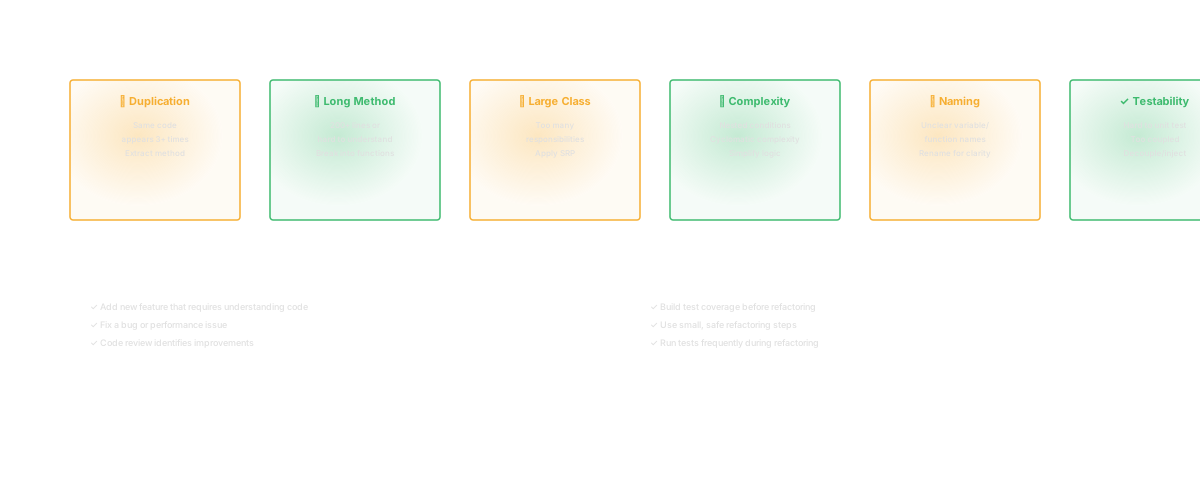
Extract Method. You have a function doing ten things. Pull one cohesive piece into its own function. Small, low-risk, immediately valuable. At Salesken, our audio processing pipeline had a 400-line function that handled frame decoding, silence detection, and buffer management. We extracted each into its own function. The individual functions became testable. We found two bugs that the monolithic version had hidden.
Rename. Deceptively powerful. A variable called x or tmp makes code hard to understand. Renaming to audio_frame_buffer or cached_stt_response takes thirty seconds. Most IDEs rename automatically, so risk is near zero. I've seen senior engineers dismiss renaming as trivial. It's not. Clear names are the cheapest form of documentation.
Move. Fix structural misplacement. A method on ClassA that logically belongs on ClassB. More risk because it affects callers, but essential for keeping architecture clean.
Decompose Conditional. Extract complex if statements into named methods. Instead of if user.created_at > 30.days.ago and user.trial_expired and user.has_card, write if user.should_convert_trial?. The business logic becomes readable to non-engineers.
Consolidate. Remove duplication. Same validation logic in three places? Write it once. At Salesken, we found the same email validation regex copy-pasted across 7 services. Three of them had slightly different versions. One was wrong. Consolidation fixed the bug and prevented the next one.
Simplify. Remove unnecessary complexity. Six-level inheritance chain? Flatten it. Factory pattern where simple instantiation works? Simplify. This is about removing engineering that was premature.
Identifying What to Refactor
This is the hard part. Teams drown in code that could be refactored. Which parts actually matter?
High churn. Files that change constantly. If a file is hard to change and changes often, refactoring it pays for itself immediately. At Salesken, we identified our top 10 most-changed files over 6 months. Five of them had cyclomatic complexity above 40. Those five files were responsible for an outsized share of our bugs.
High complexity. Functions with thirty branches are complex. Functions with three are simple. Tools like SonarQube flag this automatically. Start there.
Low bus factor. If one person understands a critical module and they leave, you lose knowledge. Code that's unclear concentrates knowledge. Refactoring it to be clearer is risk mitigation.
Dependency problems. Code that imports from ten different modules is fragile. Circular dependencies are worse. Dependency mapping reveals these patterns that are invisible from reading individual files.
Test coverage gaps. Code that's hard to test usually means it's poorly designed. Refactoring for testability is refactoring for good reason.
Start with high-churn, high-complexity code. That's where the payoff is biggest.
Best Practices
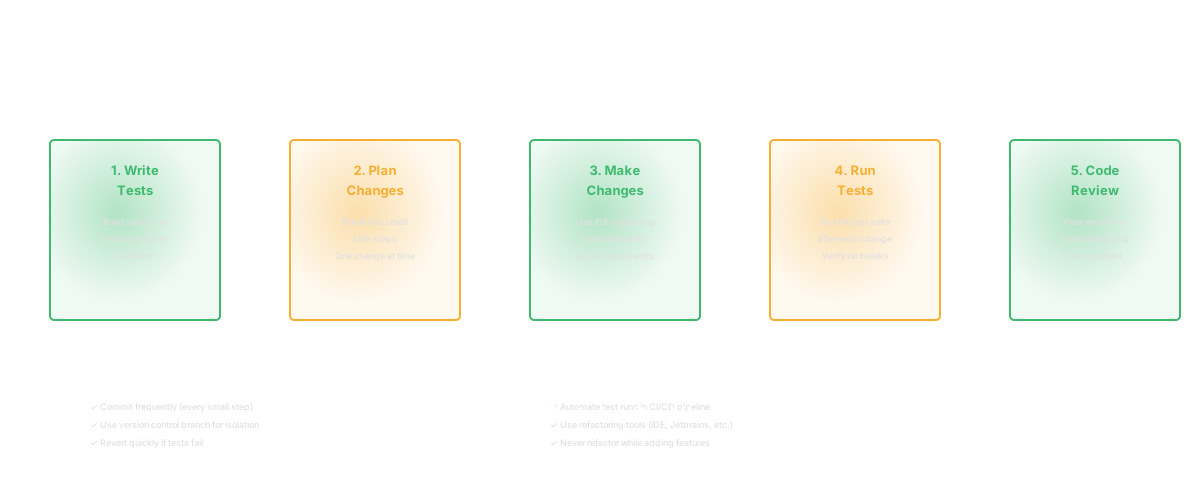
Start with tests. Before you refactor, write tests that verify current behavior. This is your safety net. At Salesken, we had a rule: no refactoring PR without a test PR first. The test PR proves what the code does. The refactoring PR proves you didn't change it.
Make small changes. One thing per commit. Rename. Commit. Extract. Commit. Move. Commit. This makes reverting safe and code review comprehensible. A PR that refactors five files is impossible to review. Five PRs that each refactor one file are easy.
Don't mix refactoring and features. This is the most common mistake I see. A PR that refactors three files and adds a feature is impossible to review because the reviewer can't tell which changes are behavioral and which are structural. Separate them. Always.
Measure before and after. If refactoring for performance, run benchmarks before and after. If refactoring for clarity, track cycle time on changes to that module — it should decrease.
Keep the system working. After each change, compile, run tests, verify locally. Don't accumulate a dozen changes and hope they work together.
Common Mistakes
Refactoring without tests. The most destructive pattern. You change code, it looks cleaner, but you've introduced bugs that surface in production. At UshaOm, an engineer refactored our shipping cost calculation "for clarity." Looked great. Broke the tax calculation for three Indian states. No tests had covered those states.
Refactoring the wrong thing. The coaching engine story I told at the start. Six weeks on code that wasn't the bottleneck. Measure first.
Over-engineering during refactoring. You start by renaming a variable. Now you're redesigning the whole module. Scope creep during refactoring is real and expensive. Set a clear scope before you start.
Not communicating. Your refactoring breaks a teammate's work in progress. Neither of you is happy. At Salesken, we added a Slack notification: "Refactoring [module name] this sprint — coordinate before changing files in this area." Simple. Prevented conflicts.
Refactoring in the AI-Assisted Coding Era
AI tools like Cursor and Claude Code are excellent at mechanical refactorings — extracting methods, renaming, consolidating duplication. These are pattern-matching problems.
The limitation: AI without codebase context suggests refactorings that ignore architecture. It might suggest moving a method to a class it doesn't know about, or extracting a function that already exists elsewhere. At Salesken, I watched an engineer use Copilot to refactor a service layer. Copilot suggested extracting a helper function. The exact same helper function already existed in a shared utils module two directories up. Now we had two copies.
The constraint is visibility. An LLM looking at a single file makes local improvements. An LLM with full codebase context — which modules depend on each other, which patterns are consistent, which code is stable — makes much better suggestions. Codebase intelligence provides that context layer.
FAQ
How often should teams refactor?
Continuously. Every time you touch code, leave it slightly cleaner. This prevents debt accumulation. At Salesken, we allocated roughly 20% of each sprint to cleanup — not as a separate project, but as part of feature work. "While you're in there, clean this up too."
How do I convince leadership that refactoring is worth it?
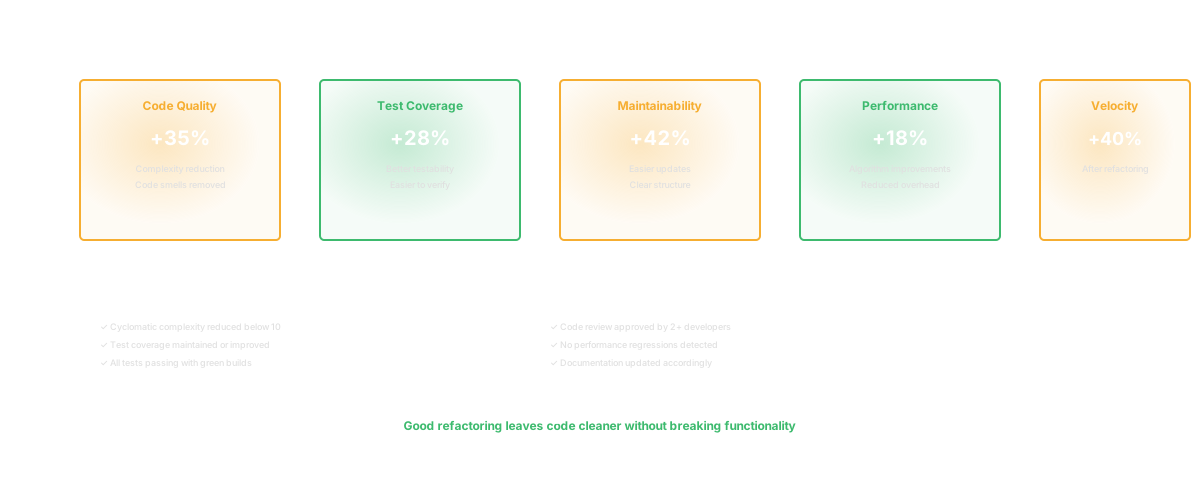
Tie it to velocity. Measure lead time for features in the module before and after refactoring. Show the cycle time improvement. At UshaOm, after refactoring our product catalog module, feature cycle time in that area dropped from 2.5 weeks to 4 days. That's a number a CTO can take to the board.
What's the difference between refactoring and optimization?
Refactoring improves structure. Optimization improves performance. Refactor for clarity first. Only optimize when measurement shows a real problem. I wrote about this tension in Clean Code — sometimes "clean" code is slower, and you need to make a deliberate choice.
How do we prevent over-refactoring?
Clear criteria: refactor code that's actively changing or blocking new work. Don't refactor stable code just because it's not pretty. The batch job I mentioned earlier — ugly, stable, untouched. Leaving it alone was the right call.
Related Reading
- Clean Code: Principles, Practices, and the Real Cost of Messy Code
- Design Patterns: When They Help, When They Hurt, and How to Choose
- Technical Debt: The Complete Guide for Engineering Leaders
- Code Dependencies: The Complete Guide
- Software Productivity: What It Really Means and How to Measure It
- Shifting Left: Where Software Quality Actually Lives