
The C4 model is a hierarchical framework for visualizing software architecture, created by Simon Brown. It organizes architecture diagrams into four levels of abstraction — Context, Container, Component, and Code — so different audiences see the right level of detail. The C4 model is the dominant alternative to UML for software architecture because it is audience-first: each level answers a specific question for a specific stakeholder, rather than cramming all information into one diagram.
Most architecture diagrams fail the same way. They try to show everything at once: boxes for services, arrows for calls, annotations for tech stack, color coding for teams, dotted lines for async flows. The result looks thorough in a review and is unreadable in practice. Two senior engineers staring at it will disagree about what it means.
Simon Brown created the C4 model to solve this. The key insight: different audiences need different levels of abstraction. A CTO needs the business view. A new engineer needs to understand one service. An architect needs the full structural shape. C4 gives each audience exactly what they need — no more, no less.
What Is the C4 Model?
The C4 model is a software architecture visualization method that uses four hierarchical levels to describe a system. The name "C4" comes from its four levels: Context, Container, Component, and Code.
Each level zooms in on the previous one:
- Context — the whole system as one box, surrounded by users and external systems
- Container — the system opened up to show its major technical building blocks
- Component — one container opened up to show its internal structure
- Code — one component at the class or database table level
The model was created by Simon Brown around 2010 and has become the standard approach for software architecture documentation at companies that have moved away from heavy UML notation.
Why C4 works: It separates diagrams by audience. You do not show a context diagram in an engineering design review. You do not show a component diagram to a business stakeholder. The right diagram for the right audience prevents the most common documentation failure: one-size-fits-none diagrams that everyone ignores.
The Four Levels of the C4 Model
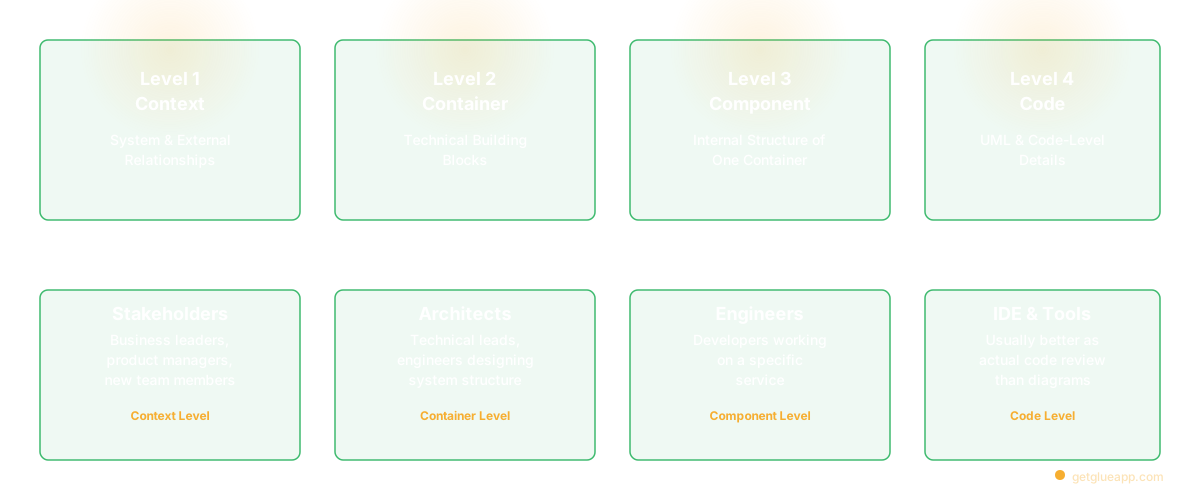
Level 1: C4 Context Diagram
The context diagram answers one question: What does this system do, and who uses it?
Everything inside the system appears as a single box. The diagram shows users (people interacting with the system), external systems (services or platforms the system integrates with), and the relationships between them.
Audience: Business stakeholders, product managers, anyone new to the project. A senior engineer joining the company should be able to read a context diagram in under 60 seconds and understand the system purpose and boundaries.
What to include:
- Your software system (one box, labeled with the system name and a brief description)
- People: users, administrators, operators — each as a labeled person icon
- External systems: CRMs, payment providers, identity providers, data sources, third-party APIs
- Relationships: labeled arrows showing how each person or system interacts
What not to include: technology choices, internal services, databases, implementation details. Context diagrams show what, not how.
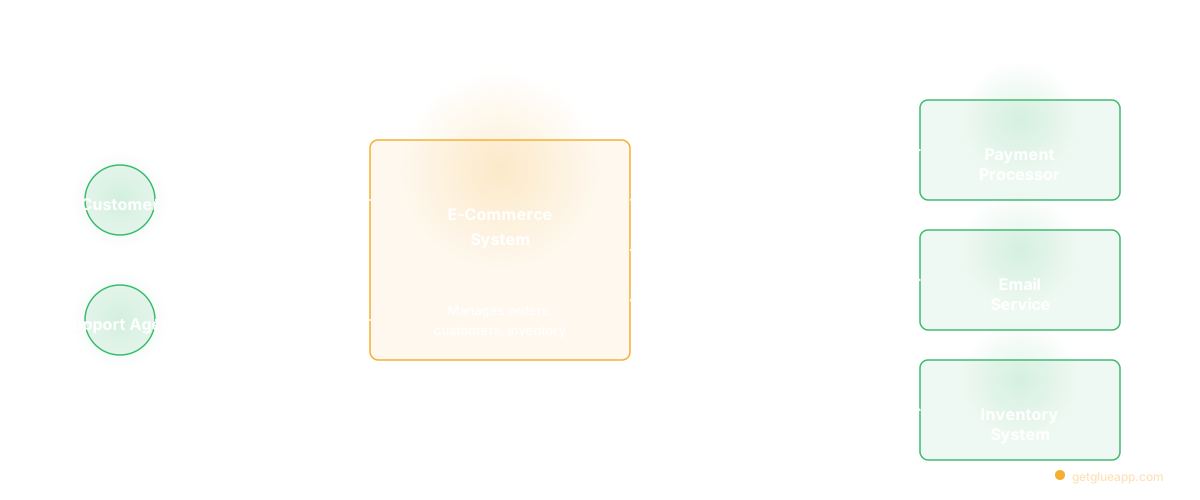
At Salesken, our Level 1 showed: sales reps, managers, the Salesken platform, telephony providers, CRM integrations, and the speech-to-text API. Nothing about how any of those worked. Just: what is it, who uses it, what does it depend on. A new PM could understand it in 30 seconds.
When to update: Context diagrams stay accurate for a long time. Update when the system adds or removes a major external dependency or when the user types change significantly.
Level 2: C4 Container Diagram
The container diagram answers: What are the major technical building blocks, and how do they communicate?
A "container" in C4 is not a Docker container — it is any separately deployable unit: a web application, mobile app, microservice, serverless function, database, message queue, or file store. The container diagram opens the system box and shows these units and their connections.
Audience: Technical leads, architects, engineers who need to understand the system overall shape. This is the most practically valuable level for most engineering work.
What to include:
- Deployable units: web apps, APIs, services, functions, databases, queues
- Technology labels: "React SPA," "Node.js API," "PostgreSQL 14," "Kafka 3.6"
- Communication protocols: HTTP, gRPC, AMQP, WebSocket, SQL, async events
- External systems (abbreviated from the context diagram)
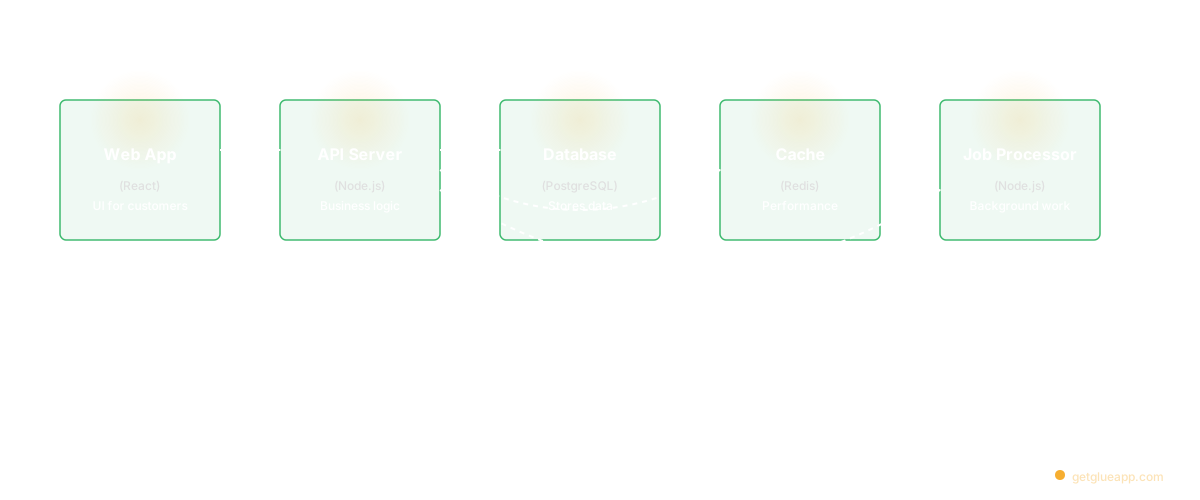
At Salesken, our Level 2 showed: the React dashboard, the Node API gateway, the coaching engine (Python), the analytics pipeline, the event bus (Kafka), PostgreSQL, Redis, and the connections between them. Stable enough to stay accurate for months. Specific enough to answer "which service handles this?" in 10 seconds.
When to update: When services are added, removed, or when communication protocols change significantly. Container diagrams should be reviewed when major features ship.
Level 3: C4 Component Diagram
The component diagram answers: How is this container organized internally?
It zooms into a single container and shows the major logical components — classes, services, repositories, controllers, processors — and how they interact. Not every class. The major groupings and their responsibilities.
Audience: Engineers actively working on that specific container. Component diagrams are not for everyone — they are deep technical documentation for the people who need to understand the internals.
When to create them: Not every container needs a component diagram. At Salesken, we maintained Level 3 diagrams for two services: the coaching engine (the most complex) and the payment integration (the most critical). For everything else, the container diagram plus reading the code was sufficient.
The rule: create a component diagram when onboarding new engineers to a complex container is slow and expensive. The diagram should cut that ramp-up time significantly.
Level 4: Code Diagram
The code diagram zooms into individual components to show the implementation — UML class diagrams, ER diagrams, sequence diagrams.
Simon Brown's own recommendation: Skip Level 4 in most cases. Code changes too frequently for diagrams to stay accurate. For most teams, reading the code directly is better than maintaining code-level diagrams.
When it is worth it: Database entity-relationship diagrams (ERDs) are the most valuable Level 4 artifact because the schema is relatively stable and difficult to infer from code. Sequence diagrams for complex flows (authentication, payment, event processing) can also be worth maintaining. Pure class diagrams rarely are.
C4 Model Notation
The C4 model does not enforce a rigid notation, but Simon Brown recommends consistent conventions:
People are represented as person icons with a name and optional description.
Software Systems are represented as boxes with rounded corners. The system being described is shown in a different color (usually blue) than external systems (usually gray).
Containers are represented as boxes with rounded corners, labeled with the name, technology stack in brackets, and a brief description. Example: "API Server [Node.js, Express] — Handles all client API requests."
Relationships are directed arrows with a label describing the interaction. Include the technology or protocol where relevant: "Reads/Writes [SQL]", "Sends events [Kafka, async]", "Calls [HTTP/JSON]."
The key rule: Every element should have a description. A box labeled "Auth Service" with no description is useless to someone who does not already know what it does. A box labeled "Auth Service — Validates user credentials and issues JWT tokens" is useful.
C4 Model vs UML
| C4 Model | UML | |
|---|---|---|
| Primary audience | Mixed — business to engineering | Primarily technical |
| Learning curve | Low — intuitive boxes and arrows | High — dozens of diagram types |
| Tooling | Structurizr, IcePanel, any diagramming tool | Specific UML tools required |
| Level of abstraction | Audience-appropriate by design | Inconsistent across diagram types |
| Adoption complexity | Can start in one afternoon | Requires training and conventions |
| Best for | Software architecture communication | Detailed technical specification |
C4 is not a replacement for all UML diagrams. Sequence diagrams, ER diagrams, and state machine diagrams all have value. C4 replaces the UML component and deployment diagrams traditionally used for software architecture communication with something simpler and more useful.
How to Create Your First C4 Diagram
Step 1: Start with the context diagram.
List every external system your software depends on or connects to. List every type of user. Draw your system as one box in the center. Add lines connecting users to your system and your system to external systems. Label every relationship.
This should take 20-30 minutes. If it takes longer, you probably do not have a clear picture of your system boundaries — and that is itself a useful finding.
Step 2: Create a container diagram.
List every deployable unit in your system: web apps, APIs, databases, queues, storage. Add the technology stack. Draw the connections and label each with protocol and direction. Keep it to 5-15 containers. If you have more, consider grouping closely related ones.
Step 3: Identify which containers need component diagrams.
Ask: which containers are the hardest to onboard new engineers to? Which have caused the most confusion? Those are your candidates for Level 3. Create component diagrams only for those.
Step 4: Pick your tooling and store diagrams in version control.
Architecture diagrams in Confluence or Google Slides go stale. Diagrams in Git get reviewed with code. Use Structurizr DSL, PlantUML, or Mermaid for code-based diagrams, or IcePanel for visual diagrams that export to code.
C4 Model Tools
| Tool | Type | C4 Validation | Best For |
|---|---|---|---|
| Structurizr | Code (DSL) | Yes, built-in | Teams that want Git-native diagrams |
| PlantUML + C4 | Code | Partial | Teams already using PlantUML |
| Mermaid | Code | Partial | Lightweight, GitHub-native |
| IcePanel | Visual | Yes | Non-technical stakeholder collaboration |
| draw.io | Visual | No | Quick diagrams, no tooling investment |
| Lucidchart | Visual | Partial | Enterprise teams |
The diagrams-as-code approach (Structurizr, Mermaid, PlantUML) has a significant advantage: changes go through code review, so diagrams can be updated with the PRs that change the architecture.
For teams that want diagrams derived from the actual codebase rather than manually authored, codebase intelligence tools generate C4-style architectural views from dependency analysis. For the structural layer (what exists and how it connects), derived diagrams beat manual ones because the map never drifts from the territory.
C4 Model Best Practices
Keep Level 1 under 10 elements. If your context diagram has 15+ external systems, group related ones. The point is scope, not completeness.
Use consistent naming everywhere. "User" vs "Customer" vs "End User" across diagrams causes confusion. Pick one term and use it across all levels.
Include technology in Level 2. Label containers with their tech stack. Technology labels make container diagrams self-explanatory.
Skip Level 3 unless onboarding is slow. Component diagrams go stale quickly. Use them only for complex services that onboard new developers regularly.
Version your diagrams in Git. Diagrams in Confluence go stale. Diagrams in Git get reviewed with code changes.
Add a last-reviewed date. Diagrams more than six months old without review should be flagged as potentially inaccurate.
When Not to Use C4
Data flow diagrams. C4 shows structural relationships, not how data moves through a system.
Runtime behavior. For the order of operations in a specific user flow, use sequence diagrams alongside C4.
Infrastructure diagrams. C4 is software architecture, not cloud infrastructure.
Simple systems. A single web app with one database does not need C4.
Common Mistakes
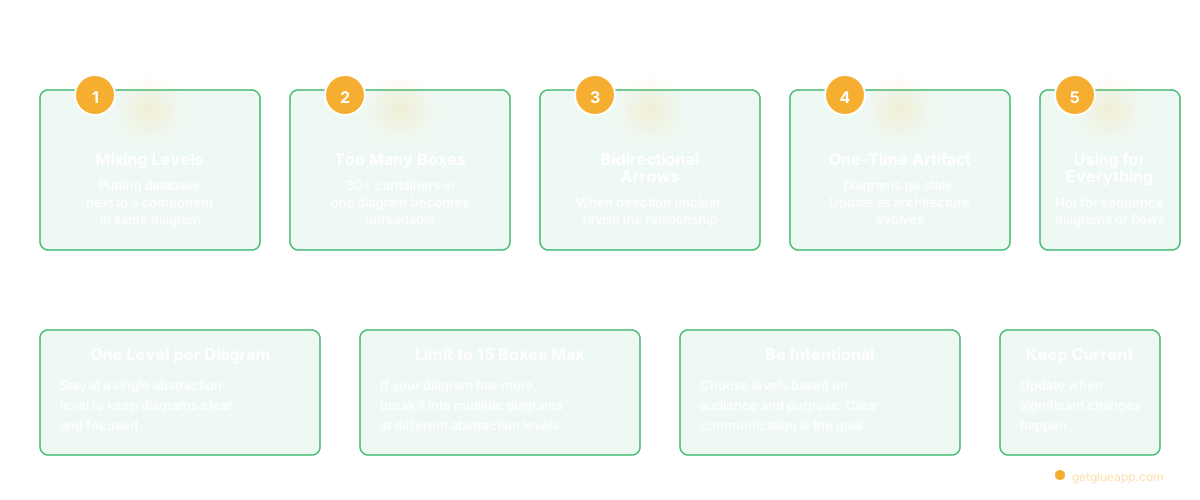
Mixing abstraction levels. Putting a database (Level 2 container) next to a repository class (Level 3 component) in the same diagram.
Too many elements. A container diagram with 30 containers is too detailed. If you have more than 15 boxes at Level 2, some detail belongs at Level 3.
Bidirectional arrows everywhere. Specify primary direction and protocol.
Creating diagrams once and never updating them. Context diagrams stay accurate for years. Container diagrams need updating when services are added. Component diagrams go stale quickly without active maintenance.
No technology labels. Label containers with their runtime and key dependencies.
FAQ
What is the C4 model in software architecture?
A hierarchical diagramming framework created by Simon Brown that describes software systems at four levels: Context (system overview), Container (major deployable units), Component (internal structure of one container), and Code (implementation details). C4 is audience-first — each level is designed for a specific stakeholder.
What does C4 stand for?
C4 stands for the four levels: Context, Container, Component, and Code.
What is a C4 context diagram?
The highest-level C4 diagram. Shows the software system as a single box, surrounded by users who interact with it and external systems it depends on. Audience: business stakeholders and anyone new to the project.
What is the difference between a C4 container and component?
A container is a separately deployable unit — a web app, microservice, database. A component is a logical grouping within a container — a controller, service class, or repository.
What is the difference between C4 and UML?
C4 is an opinionated, audience-first framework for communicating software architecture. UML is a formal modeling language with dozens of diagram types. C4 is simpler to learn and more useful for most architecture communication.
Do I need all four C4 levels?
No. Most teams use Levels 1 and 2 for all systems, Level 3 selectively for complex services, and Level 4 rarely.
What tools create C4 diagrams?
Structurizr DSL (Git-native, created by Simon Brown), PlantUML with C4 extensions, Mermaid, IcePanel, draw.io, and Lucidchart. Structurizr is the most complete implementation of the C4 model.
Related Reading
- Software Architecture Documentation: The Part That Always Goes Stale
- Dependency Mapping: How to Know What Will Break Before You Break It
- Code Dependencies: The Complete Guide
- Knowledge Management System Software for Engineering Teams
- Design Patterns: When They Help, When They Hurt, and How to Choose
FAQ