
Across three companies, I've seen the same pattern: critical knowledge locked inside a handful of senior engineers' heads, invisible to everyone else.
By Vaibhav Verma
When I was building early product teams, I realized something that changed how I think about the PM role: the best product decisions come from understanding technical constraints before you try to move them. I wasn't asking "What do we build?" in a vacuum. I was asking "What can we build given the architecture we have?"
Most PMs treat the codebase like a black box. They know features go in; code comes out. But this creates a chasm between what the PM thinks is feasible and what engineers know will take six months. PMs make specification decisions without understanding the cost. Engineers estimate features without confidence that the PM really understands what they're committing to. The gap between those two worlds is where schedules break, estimates balloon, and technical debt explodes.
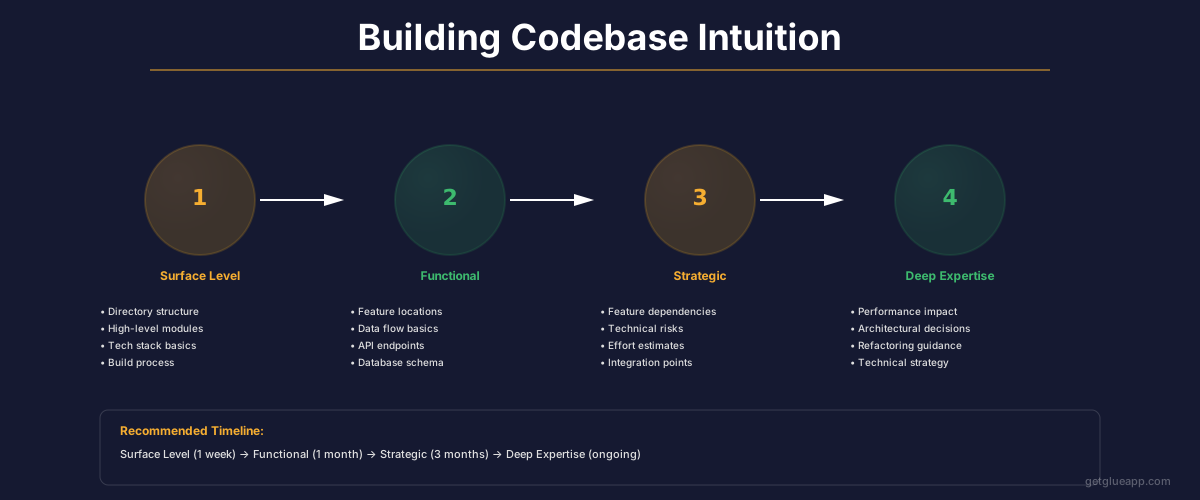
This guide is for product managers who want to build intuition about their codebase without learning to code. You don't need to write a single line of code to understand your system's architecture. You need to know what to look for, what to ask, and how to interpret what engineers tell you. That skill transforms you from someone who documents features into someone who makes better decisions about what's actually possible.
The PM's Codebase Literacy in 60 Seconds
You need to understand five things about your codebase: (1) how services talk to each other and what breaks if they don't, (2) what data structure decisions lock you into certain features or prevent others, (3) which code paths are under the most stress, (4) what external systems you depend on and how risky those dependencies are, and (5) what happens if you need to handle 10x more users. Understanding these five things means you can ask better questions, make faster decisions, and stop being surprised by estimation misses.
Why Codebase Understanding Matters Now
The cost of not understanding your codebase shows up in three places: decision speed, estimation accuracy, and technical debt accumulation.
First, decision speed. When you don't understand architectural constraints, every feature request becomes a conversation about feasibility that takes weeks to resolve. Is the feature technically possible? Will it require a database migration? Does it touch the critical path? You're asking these questions after you've already committed to timelines. Engineers are trying to figure out if it's even feasible. Contrast that with a PM who understands that your codebase has three separate user services that don't talk to each other ( - and asks before proposing a feature that requires them to share data). That PM saves two weeks of investigation and misaligned expectations.
Second, estimation accuracy. When PMs don't understand what they're asking engineers to build, they specify things that sound simple but require architectural surgery. "Just show the user's purchase history on their dashboard" sounds like a database query. But if the purchase history lives in a separate service and that service is only updated nightly, suddenly you're talking about building a new API, a cache layer, and a reconciliation strategy. Engineers know this. They estimate accordingly. But PMs often interpret a big estimate as the engineer being overcautious rather than seeing the actual complexity. Codebase literacy means you see the complexity before estimation.
Third, technical debt accumulation. Every time you specify something without understanding the architecture, you're potentially asking engineers to either (a) do it right and take longer, or (b) take a shortcut that creates debt. When you understand the codebase, you can ask "What's the architectural cost of this approach versus that approach?" and make intentional decisions about when to pay down debt versus when to incur it. You're not just asking engineers to "move fast," you're making informed tradeoffs between speed and sustainability.
The Five Architectural Concepts Every PM Must Know
Service Boundaries and Coupling
Your codebase is made up of services ( - don't get hung up on the exact definition; it might be microservices, it might be monolithic modules, the principle is the same). Each service has a clear responsibility. The payment service processes transactions. The recommendation service suggests products. The notification service sends emails. These services talk to each other through defined boundaries.
Understanding coupling means understanding what happens when one service needs to change. Low coupling means services can evolve independently. High coupling means a change in one service breaks others. For your roadmap decisions, this matters enormously.
Here's what this looks like in practice: Your product team wants to show users personalized recommendations in real time. That feature lives at the intersection of the user service, the recommendation service, and the cache layer. A naive specification says "show recommendations on the profile page." But if the recommendation service is tightly coupled to your nightly batch job, you're not actually capable of real-time recommendations without architectural work. If services have clean boundaries and APIs, you might be able to build this with a new endpoint and some caching. Coupling tells you which scenario you're in.
Ask your engineers: "Which services would need to change for us to build this feature?" If the answer is more than two or three services, or if changing one service requires changing another service's internal logic (not just API), you have high coupling. High coupling doesn't mean don't build the feature; it means you've found a place where technical debt is slowing you down. That's useful information for prioritization.
Data Model Decisions Lock You In
Data models are permanent. They determine what queries are fast, what queries are slow, what relationships you can represent, and what you'd have to migrate to change. A PM who doesn't understand this will often propose features that are technically possible but would require a complete database redesign.
The simplest version: Does your database denormalize data for speed or normalize it for consistency? This one choice affects dozens of future feature proposals. A denormalized schema means you can query fast but updates are expensive and risky. A normalized schema means updates are clean but queries require multiple joins. Neither is wrong, but the choice cascades forward.
Here's a concrete example: Your current data model stores "user.last_purchase_date" as a denormalized field in the user table. It's fast to query but slow to keep in sync. Now someone wants to show a real-time "trending categories from your purchase history" widget. A fast query against the denormalized data won't work ( - it's stale). You could normalize the data, but that means a migration and performance rework. Or you could build a separate analytics database. Data model literacy means you know before you start estimating which path you're taking.
Ask your engineers during a "codebase walk" ( - more on this below): "What are the three biggest decisions in our data model that affect product capability?" Listen for: cardinality constraints, relationship types, denormalization patterns, and schema flexibility. That's your data reality.
The Critical Path
Every system has a critical path ( - the sequence of code that runs for your most important user action). For an e-commerce site, it's payment processing plus inventory updates. For a SaaS product, it might be the authentication flow times the most common user action.
The critical path matters because you can't speed up your product faster than you can speed up your critical path. If your checkout flow takes 8 seconds because you're making 5 sequential database calls, you can't get checkout below 8 seconds without changing that code. You can improve everything else in the app, but checkout stays slow.
For PMs, understanding the critical path means you know where to focus optimization work. More importantly, it means you know which features interact with the slowest, most important part of your system and therefore have hidden complexity.
In your next engineering standup, ask: "What's our critical path for (most important user action)?" Ask what's slowing it down. If you understand it takes 4 database calls plus a call to an external API, you suddenly understand why adding a "real-time personalization" feature to checkout is expensive. It touches the critical path.
External Dependencies and Risk
Your codebase doesn't exist in isolation. You depend on third-party APIs, payment processors, cloud infrastructure, and databases. Each of these dependencies has failure modes that cascade into your product.
A PM who understands external dependencies asks different questions. You're not just asking "Can we build this feature?" You're asking "What happens if our payment processor goes down?" "What happens if this third-party API hits rate limits?" "How would we fall back if the recommendation service is unavailable?" These questions lead to more robust feature designs and better product decisions.
The highest-risk dependencies are usually those you use in the critical path ( - look at that: these concepts interact). If you depend on a third-party API for every user authentication, authentication becomes a single point of failure. If you depend on a third-party service for core product functionality that doesn't have a fallback, you've handed control of your product reliability to them.
Ask your engineers: "What are our top three external dependencies and what's the failure mode if each one breaks?" Then ask: "For each failure, what's our graceful degradation strategy?" If the answer is "our product is broken," you've found a risk worth understanding.
Scalability Constraints
Scaling isn't an afterthought. Your codebase has specific scalability constraints built in. Some systems scale horizontally ( - add more servers). Others have bottlenecks that no amount of hardware fixes.
For a PM, understanding scalability constraints means understanding your growth ceiling. If you have a feature that only works because you can hold all data in memory, you've got a hard cap on user growth or data volume. If you have a queue that processes things serially, you can't handle concurrent spikes.
This matters for product decisions. If you know your recommendation engine will hit its scalability ceiling at 1 million users and you're at 900,000 users, you need to start that rearchitecture now, not when you hit the wall. You're not going to hit growth and suddenly have nothing to ship for three months.
Ask: "What are the one or two scalability constraints that would become problems if we 10x our user base?" Get specific. Not "the database," but "queries against the user activity table take 30 seconds at current scale and would timeout at 10x."
How to Build Codebase Intuition (The Practical Framework)
Read Architecture Diagrams Like a PM
Get your team to draw the architecture. Boxes and arrows. Services and how they communicate. External dependencies and data stores. This is not a detailed system design document ( - don't ask for that). It's a one-page overview you can reference.
Once you have it, ask these questions while you read:
- Which service handles each user action?
- Which data stores are involved?
- Where are the external dependencies?
- What happens if any box goes down? (This tells you coupling.)
- What would change if we needed real-time data instead of batch?
You don't need to understand every detail. You're pattern-matching. You're building intuition about "this looks like a tightly coupled system" or "this service touches everything" or "we have a lot of external dependencies for authentication."
Run a Structured "Walk the Code" Session
Once a quarter, book a 30-minute "walk the code" session with a senior engineer. Here's the structure:
Preparation (by you, 5 minutes before): Pick one user action. "Show me what happens when a user clicks 'purchase.'" That's it. One action.
The walk (20 minutes): Engineer walks you through the code. You're looking for: Which services are involved? What database queries happen? Where are the slow parts? What could go wrong? What's tightly coupled?
Key phrase: "Walk me through this like I've never seen the code." They should be explaining business logic, data flows, and architecture decisions, not variable names.
The output (5 minutes): You write down three things: (1) the data flow in one sentence, (2) the slow/risky parts, (3) anything that surprised you.
Do this once per quarter with different user actions, and in six months you'll have built far more intuition than most PMs ever develop.
Learn the Vocabulary of Architectural Complexity
Engineers say certain phrases that signal architectural complexity. When you hear them, you're hearing a red flag that this feature is more complex than it sounds.
"Tight coupling" ( - two services are deeply dependent on each other's internals): This is expensive to change.
"Cross-cutting concern" ( - something that affects multiple services): This requires coordination across teams.
"Schema migration" ( - the database structure needs to change): This is risky and slow.
"Distributed transaction" ( - multiple databases need to stay consistent): This is hard. Very hard.
"Legacy code/golden codebase" ( - this code is old and brittle): Changes are slow and risky.
"Race condition" ( - two things might happen in the wrong order): This is a bug that's hard to track down.
"I don't know off the top of my head" ( - when an engineer can't quickly answer your question): This tells you the code is complex or undocumented.
When you hear these phrases, your response is: "Got it. What does that mean for timeline/risk/complexity?" Don't panic, but take it seriously.
Common Pitfalls PMs Make
Treating all features as equal complexity: A three-point feature and a three-point feature are not the same. One might be three points because it's small. The other might be three points because it's complex but well-contained. Understanding the codebase means you're not comparing points across different types of complexity.
Not asking about dependencies before estimating: "Can you estimate this?" before "What does this touch?" is backwards. You're asking engineers to estimate in a vacuum. Ask about dependencies first, then estimate.
Shipping specs without feasibility checks: The worst PMs write beautiful feature specs that are technically impossible or require massive rework. The best PMs run a 15-minute feasibility check with an engineer before writing the spec.
Assuming the codebase is unchanging: It's not. Refactors happen. Services get rewritten. Database schemas migrate. Your mental model of the codebase gets stale. Update it regularly. Ask about recent changes.
Not tracking why estimates miss: When an estimate is wrong, most PMs move on. The great ones ask "Why did we miss?" and update their model of codebase complexity. That is how you build intuition.
How Glue Helps
Glue gives you the ability to ask questions about your codebase without reading code or waiting for an engineer to explain it. You can ask "What services does the checkout flow touch?" and Glue will show you the answer directly. You can ask "What changed in the recommendation service last sprint?" and get the actual code changes. You can ask "Who owns the payment service?" and get the owner immediately.
This transforms codebase literacy from something you build through slow conversations into something you can access directly. You're building the same intuition faster.
Frequently Asked Questions
Q: I don't have the time to do quarterly "walk the code" sessions. What should I do instead?
Start with one. Pick one critical user action and do one 30-minute walk. The time investment is small relative to the decision quality improvement. If even one feature estimation becomes more accurate because you understand the architecture better, you've already saved the time investment.
Q: Isn't understanding the codebase the engineer's job, not the PM's job?
Engineers need to understand it better. But PMs making decisions about features, timelines, and tradeoffs need to understand it too. You don't need to code; you need intuition. Different skill; equally important.
Q: What if I ask about the critical path and no one can tell me clearly?
That tells you something important: the critical path is not well understood or not well monitored. That is a red flag worth raising with your CTO. You're not being pedantic; you're identifying a gap that affects product decisions.
Q: How do I know if my codebase understanding is good enough?
You'll know you've got it when you can ask "What's the estimated complexity of adding feature X?" and accurately predict whether the answer will be "2 weeks" or "2 months" before the engineer estimates. When your intuition is right, you've got the right mental model.
Related Reading
- AI for Product Management: The Difference Between Typing Faster and Thinking Better
- The Product Manager's Guide to Understanding Your Codebase
- AI Product Discovery: Why What You Build Next Should Not Be a Guess
- Cursor for Product Managers: The Next AI Shift Nobody Is Talking About
- Product OS: Why Every Engineering Team Needs an Operating System
- Software Productivity: What It Really Means and How to Measure It