
Product managers don't need to read code, but they need to understand five architecture concepts that determine every roadmap decision: service boundaries, data model constraints, the critical path, external dependencies, and scalability limits. Without this visibility, PMs make feasibility assumptions that engineering discovers are wrong weeks into development — a gap that codebase intelligence tools can close without requiring technical expertise.
At Salesken, our architecture documentation was a two-year-old diagram that no longer matched reality. When a new engineer asked how the payment service connected to the ML pipeline, nobody could answer from documentation alone.
By Vaibhav Verma
A few years ago, I sat in a roadmap review where our Head of Product confidently prioritized "add webhook support" as a two-week project. The engineering lead went quiet. After the meeting, he pulled me aside. "Webhooks would require us to rebuild the event pipeline. That's a quarter of work, minimum. She has no idea what she's asking for."
He wasn't wrong. And she wasn't stupid. She was making a decision about a system she couldn't see. She knew what the product should do. She had no way of knowing what the product was built on.
This is the central problem for product managers in software companies: you own the roadmap for a product whose foundation is invisible to you. You make prioritization decisions, feasibility judgments, and timeline commitments about a system you've never seen and can't read. And the only way to get information about it is to ask engineers, who are busy building and whose explanations are filtered through a technical vocabulary that often obscures more than it reveals.
You don't need to learn to code. But you do need to understand architecture. Not at the implementation level - at the decision level.
What Architecture Actually Means for Product Decisions
Software architecture is not a technical abstraction. It's the set of constraints that determine what your product can and cannot do efficiently.
Think of it this way. Your product has features that users see: a login page, a dashboard, a notification system. Behind each of those features is a set of systems - services, databases, APIs, queues - that make them work. Architecture is how those systems are organized, how they communicate, and what assumptions they were built on.
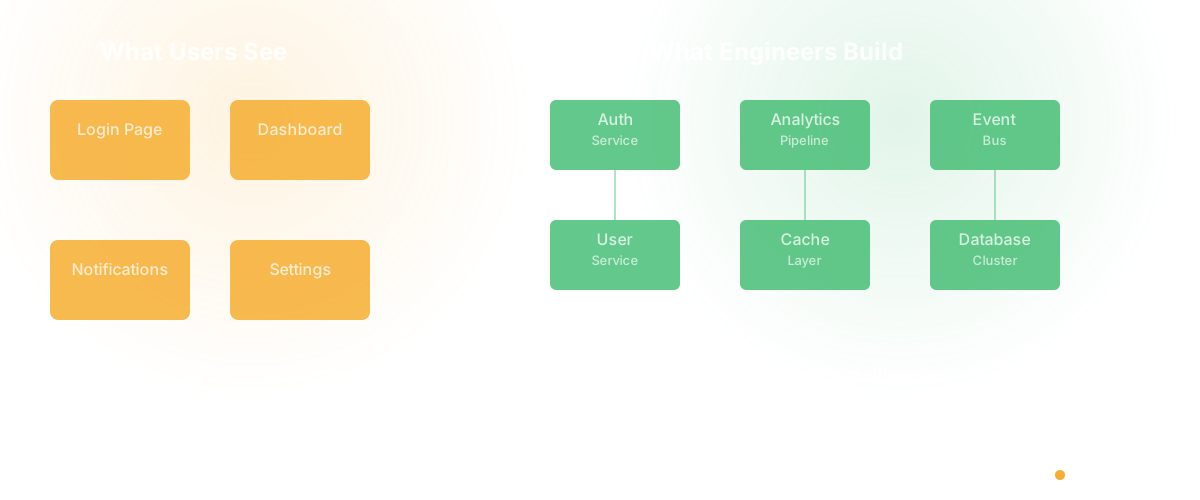
When a PM asks "can we add real-time collaboration?" the answer is not really about engineering effort. It's about architecture. Does your system support WebSocket connections? Is your data model designed for concurrent edits? Is your event system fast enough for real-time updates? If yes, it might be a few weeks. If no, it might be a quarter of rearchitecting.
The PM who understands this doesn't need to know what a WebSocket is at the protocol level. They need to know that their product's current architecture does or doesn't support real-time communication patterns, and what the implications are for their roadmap.
This is the difference between a PM who asks "how long will this take?" and a PM who asks "does our architecture support this pattern, or would we need to change something fundamental?" The first question gets a grudging estimate. The second gets a real conversation.
The Five Architectural Concepts That Drive Product Decisions
I'm not going to teach you computer science. I'm going to explain the five things about your architecture that directly affect every roadmap decision you make.
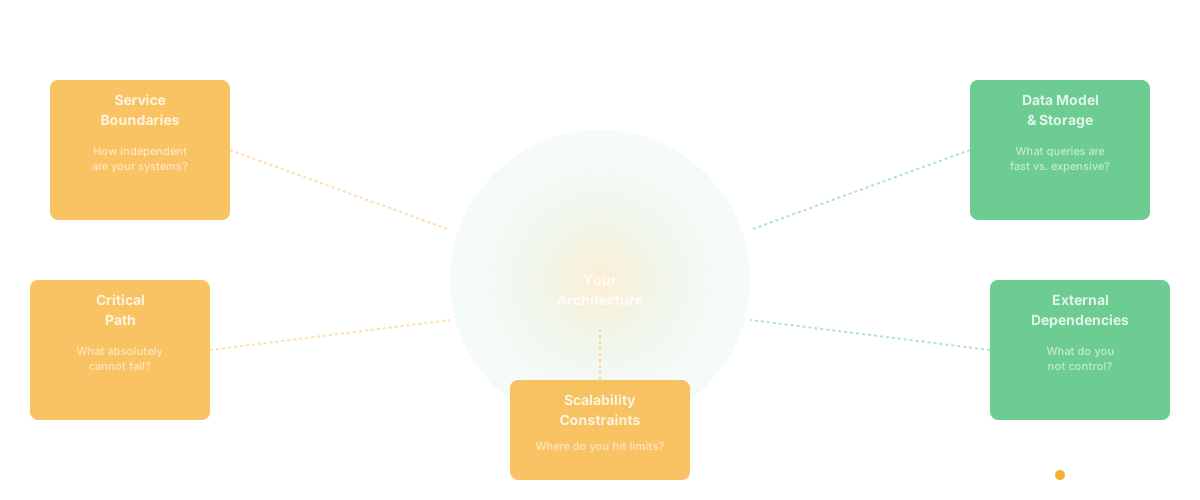
Service boundaries and coupling. Your product is built from components - sometimes called services, modules, or systems. Each one handles a specific domain: payments, authentication, notifications, user profiles. The question that matters for product is: how independent are these components?
In a well-bounded system, your team can change the notification service without touching payments. Features that live within one service are fast to build. Features that cross service boundaries are slow, because they require coordination between teams and systems that weren't designed to work together.
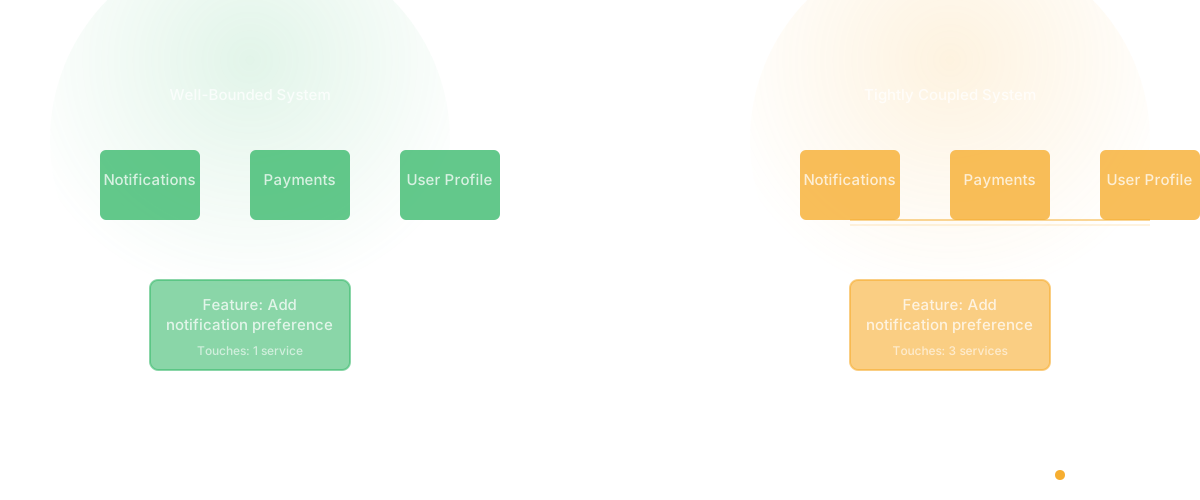
When your engineer says "that's a cross-cutting concern," they're telling you the feature touches multiple services. That's an architectural signal, and it means the timeline just multiplied.
Data model and storage. Where your data lives and how it's structured determines what queries are fast and what queries are expensive. If your product stores user activity in a format optimized for write speed (like an event log), running analytics queries against it will be slow. If you store it in a format optimized for reads (like a data warehouse), writes will be slower.
This matters for product because some features you want to build are trivial with one data model and nearly impossible with another. "Show users their activity over the last 90 days" sounds simple. If the data is stored in a way that makes that query efficient, it is simple. If not, it requires building a new data pipeline - a project, not a feature.
The critical path. Every product has a sequence of operations that absolutely cannot fail. For an e-commerce platform, it's browse, add to cart, checkout, payment. For a SaaS product, it's sign up, authenticate, access the core feature. This is your critical path, and it should be the most robust, well-tested, well-understood part of your architecture.
As a PM, you should know your critical path cold. You should know which systems it depends on, what happens if any of them fail, and what the recovery plan is. When you propose features that add complexity to the critical path, you should understand that you're adding risk to the thing that keeps your business running.
External dependencies. Your product relies on third-party services: Stripe for payments, AWS for infrastructure, SendGrid for email, Twilio for SMS. Each dependency is a point of potential failure that you don't control. When Stripe goes down, your checkout goes down. When AWS has a regional outage, your product goes down.
For product decisions, this means understanding which features create new external dependencies and what the blast radius is if those dependencies fail. Adding a new payment provider is not just an integration - it's a new failure mode.
Scalability constraints. Your architecture has limits. Your database can handle a certain number of concurrent connections. Your API can serve a certain number of requests per second. Your queue can process a certain number of messages per minute. These limits are usually invisible until you approach them.
The PM who understands scalability constraints can anticipate when a customer growth milestone will require architectural investment, rather than being surprised when the system starts degrading.
How to Learn Your Architecture Without Reading Code
The biggest mistake PMs make is assuming they need to become technical to understand architecture. You don't. You need to ask the right questions and understand the answers at the decision level.
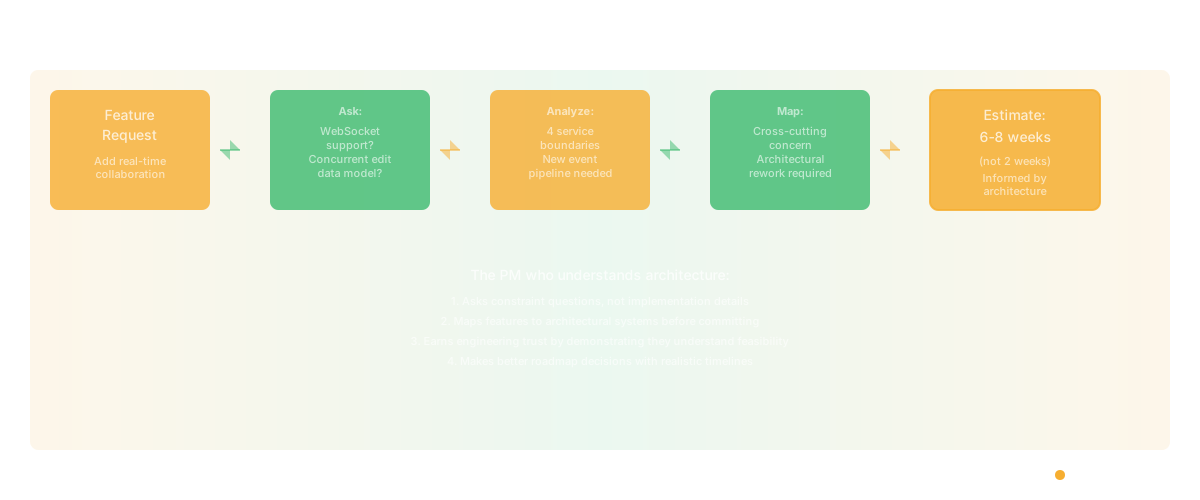
Request an architecture walkthrough. Not a deep technical dive - a thirty-minute session where your tech lead draws the major systems on a whiteboard and explains how they connect. Your goal is to leave with a mental model of the major components and their boundaries. Ask them to focus on what each system does, not how it does it.
Ask constraint questions, not implementation questions. "What features would be easy to add given our current architecture?" is a better question than "how does the database work?" The first question reveals architectural affordances and constraints. The second takes you into implementation details you don't need.
Learn the vocabulary of constraints. When your engineer says "that's tightly coupled," "that would require a migration," "we'd need to add a new service," or "the data model doesn't support that" - these are architectural signals. Each one tells you something specific about the feasibility and cost of what you're proposing. You don't need to understand the technical implementation. You need to understand the product implication: this will be harder/slower/riskier than it looks.
Map features to systems. Ask your engineering lead to help you create a simple map: which features depend on which systems? This gives you a dependency view of your product. When you propose changes to Feature X, you can see which systems it touches and anticipate the engineering complexity.
Use codebase intelligence tools. This is the approach I believe in most strongly, which is why I built Glue. Instead of relying on an engineer's explanation of the architecture (which is filtered through their perspective, limited by their time, and potentially outdated), you can query the codebase directly. "What services does the checkout flow depend on?" "What changed in the authentication module in the last month?" "Which parts of the codebase have the highest complexity?" These questions get you architectural understanding without requiring anyone to stop building and start explaining.
Why Your Roadmap Decisions Are Architecture Decisions
Here's the thing most PMs miss: every feature you ship changes the architecture. Not just obviously architectural features like "migrate to microservices." Every feature.
When you add a notification preference to user profiles, you've created a coupling between the notification service and the user service. When you add an analytics dashboard, you've created a dependency on a data pipeline that may not exist yet. When you prioritize speed over quality for three quarters straight, you've created architectural debt that will slow every future feature.
Product managers make architecture decisions every week. Most just don't realize it.
The PM who understands this becomes a fundamentally different kind of product leader. They don't just ask "should we build this?" They ask "what does building this do to our system's ability to build the next thing?" They think in systems, not just features. They earn the trust of engineering because they demonstrate they understand the constraints engineering operates within.
I've managed engineering teams for a decade, and I can tell you from that side: nothing earns an engineer's respect faster than a PM who understands why something is hard. Not a PM who can code. A PM who can say "I know this touches three services and requires a schema migration, so I'm not going to pretend it's a two-pointer."
The Architecture Gap Is the Product Gap
The reason most product-engineering relationships are strained isn't personality conflicts or misaligned incentives. It's an information asymmetry. Engineers can see the architecture. PMs can't. Every conversation between them crosses that gap, and information gets lost in the translation.
Closing that gap doesn't require PMs to become engineers. It requires making the architecture visible to people who aren't engineers. That's a tooling problem and a culture problem, and both are solvable.
The tooling part is what Glue does - gives PMs direct access to architectural understanding without requiring engineering context. The culture part is on you: invest the time to learn your system, ask good questions, and demonstrate that you take the technical reality seriously.
Your product is your architecture. If you can't see the architecture, you can't see the product. And if you can't see the product, you're navigating by feel.
Frequently Asked Questions
Q: Do product managers need to understand software architecture?
Not at the implementation level, but absolutely at the decision level. Architecture determines feasibility, cost, risk, and speed for every feature on your roadmap. A PM who doesn't understand architecture is making roadmap decisions without knowing the constraints they're operating within.
Q: How can PMs learn about their codebase without coding?
Ask constraint-focused questions ("what would be easy to add? what would require rework?"), request architecture walkthroughs focused on systems and boundaries rather than implementation, and use codebase intelligence tools that translate code into product-relevant insights without requiring you to read it.
Q: What architecture concepts should every PM know?
Five things: service boundaries (how independent are your systems), data model (what queries are fast vs. expensive), the critical path (what absolutely cannot fail), external dependencies (what you don't control), and scalability constraints (where your system hits its limits). Dependency mapping makes the first and fourth visible without reading code. You don't need implementation details - you need the product implications of each.
Related Reading
- AI for Product Management: The Difference Between Typing Faster and Thinking Better
- The Product Manager's Guide to Understanding Your Codebase
- AI Product Discovery: Why What You Build Next Should Not Be a Guess
- Cursor for Product Managers: The Next AI Shift Nobody Is Talking About
- Product OS: Why Every Engineering Team Needs an Operating System
- Software Productivity: What It Really Means and How to Measure It