Glossary
Codebase documentation explains system architecture, design decisions, and how components interact. Static documentation goes stale; the solution is generative documentation derived from code itself, staying current automatically as the codebase evolves.
At Salesken, our documentation was scattered across Confluence, Google Docs, README files, and Slack pinned messages. Finding anything took longer than writing it from scratch.
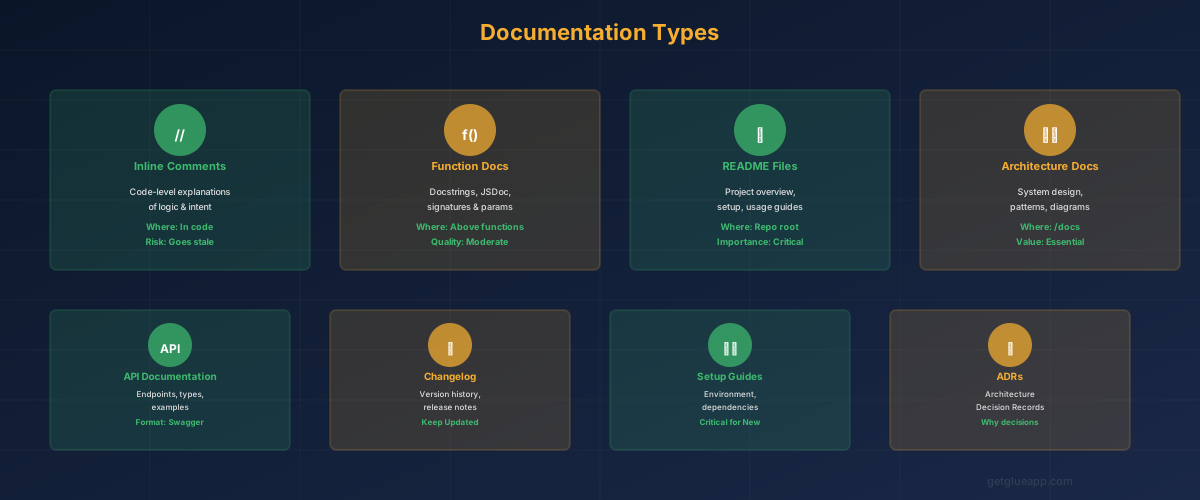
Codebase documentation is the written, structured knowledge about a software system - how it's organized, why architectural decisions were made, what each major component does, how they interact, how to extend it, and how to troubleshoot common issues. It lives in multiple forms: inline comments explaining non-obvious code, README files describing module purpose and usage, architectural decision records (ADRs) documenting design choices, API documentation specifying contracts and behavior, runbooks for operational tasks, and dependency graphs showing module relationships. Codebase documentation has a fundamental stability problem: the moment code changes, the documentation is wrong. This creates an organizational choice: maintain documentation (expensive, time-consuming, requires discipline) or accept that documentation is stale (risky, limits onboarding, constrains ability to modify the system). Most teams choose the latter and then wonder why new engineers take six weeks to be productive. An emerging alternative is generative documentation - deriving documentation directly from the codebase using code analysis and AI, which stays current automatically as the code evolves.
Documentation is often seen as an engineering concern, but it directly impacts product delivery speed. When new engineers join a team, their productivity depends on how quickly they understand the codebase. Good documentation accelerates this by weeks. Without documentation, new engineers slow the team (senior engineers spend time explaining), and the team's velocity drops. In a high-growth organization adding engineers monthly, poor documentation compounds: every new engineer represents a productivity loss for the existing team.
Documentation also affects code ownership and decision velocity. When the reasoning behind a major architectural decision is undocumented, future engineers make assumptions. These assumptions often differ from original intent. The result is "fixing" things that were intentional or making changes that violate the system's design. Documented decision rationale prevents this and empowers engineers to make changes confidently because they understand constraints.
From a product team perspective, documentation improves coordination. A PM asking "Can we support X in this module?" is better served when engineers can quickly reference documentation about module constraints and design. Without documentation, engineers answer from memory, which varies by experience level and recency of work with that module. Documentation is source of truth.
The fourth lever is auditing and compliance. Regulated industries require documentation of system architecture, data flows, and access controls. Hand-written documentation is a compliance liability - it goes stale, and auditors detect gaps quickly. Generative documentation reduces compliance risk by deriving documentation from the actual system.
A platform team has three major modules: authentication, data pipeline, and API. A new engineer joins, assigned to work on the API module. Old approach: the engineer spends a week reading code, asking questions, looking at recent PRs, and gradually building a mental model. During that week, the engineer is relatively unproductive. They might break things because they don't understand side effects of changes.
With good codebase documentation, the engineer's first day includes: reading a README that explains what the API module does, what it's not responsible for (those are other modules), the major design decisions and why they were made ("We use GraphQL because REST was scaling poorly with nested queries," "We batch database queries because N+1 queries were a performance bottleneck"), how to run tests, how to add a new endpoint, common patterns, and where to find docs for integrations with other modules.
The engineer's learning curve collapses from a week to 1-2 days. They start contributing meaningful changes by day three instead of week three.
Another scenario: A PM wants to add real-time notifications to the product. They ask the data pipeline team: "Can the pipeline trigger events in real-time, or is it batch only?" Without documentation, the team's answer depends on who answers and their recency of pipeline work. With documentation, the answer is precise: "The pipeline is designed for batch processing on hourly schedules. Real-time requires a separate event stream architecture. We evaluated this in ADR-7, and the tradeoff was cost ( - event streams are more expensive than batch) versus latency. We chose batch." That documented decision context changes the product discussion. The PM understands the tradeoff and can advocate for real-time if needed, or find a workaround that fits the batch architecture.
The traditional approach fails because documentation decays. A README is written at project launch, becomes outdated six months later, and no one updates it because there's no process for keeping it current. The solution requires two parts: a documentation structure and a maintenance mechanism.
Documentation structure includes:
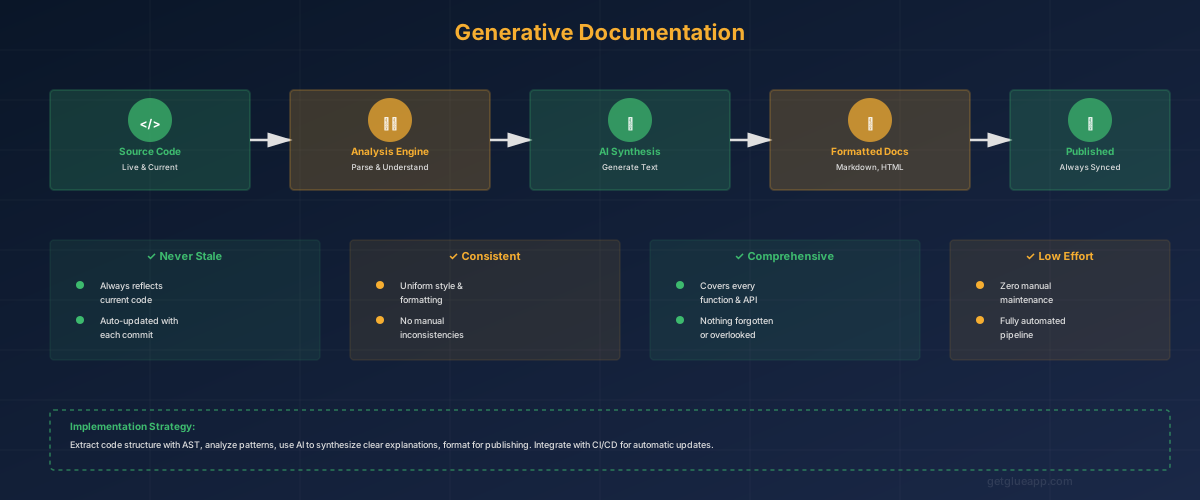
Maintenance mechanism is the harder part. Hand-written documentation requires discipline and time. Teams must reserve time for documentation updates in sprint planning and enforce the discipline. This works for some teams but fails at scale or when sprint pressure is high.
The modern approach is generative documentation: derive documentation from the source of truth (code), update it automatically as code changes. This requires tooling to:
Codebase intelligence tools like Glue enable this. A single query to the codebase can generate comprehensive documentation: module relationships, API surfaces, recent changes, dependency health, and more. Documentation generated from code stays current because the code is always the source of truth.
The PM's role is to advocate for documentation as operational infrastructure, not a nice-to-have. When sprint velocity drops, one root cause is often poor documentation ( - onboarding takes longer, context switching is higher). Treating documentation as code (versioned, reviewed, maintained) rather than as a separate artifact improves both quality and sustainability.
"We have documentation in Confluence." Static documentation in wikis has the same problem as README files: it goes stale. Confluence is useful for operational runbooks and meeting notes, but it cannot be the source of truth for architecture or API documentation. The source of truth must be tied to code somehow - either inline in code comments, or generated automatically from code analysis.
"Code comments are enough." Code comments explain individual functions. Documentation explains systems. A function comment says "This function calculates tax on an order." System documentation says "Tax calculation is handled by the tax service, which integrates with three external tax APIs and caches results for 24 hours. See TaxService.ts for implementation details." Both are needed.
"We don't have time to document." Teams that say this have already decided to pay documentation debt. New engineers take longer to ramp. Code quality suffers because engineers don't understand constraints. Changes introduce bugs because side effects aren't documented. Accumulated, the cost is higher than preventing the debt. The question isn't whether to document, but whether to do it proactively (in code, up front, automated) or reactively (in meetings, constant explanations, context switching).
Q: How much documentation is enough? Start with: module-level README for each major system, one architectural decision record for each significant design choice, API documentation that a user outside the team could follow, and one runbook for the most common operational task. Expand from there based on team pain points.
Q: Who should write documentation? Engineer who wrote the code, for initial documentation. Future updates by whoever modified it. If generative documentation is in place, the tooling maintains it automatically.
Q: Should product managers contribute to documentation? Yes, but carefully. Product managers can contribute to feature documentation (what does this feature do) and requirements documentation (why does the product work this way). Engineers should own technical documentation (how is it implemented).
Keep reading
Related resources
