
Code health metrics are quantitative measures of a codebase's maintainability, stability, and development velocity. The metrics that actually predict engineering outcomes are change failure rate (percentage of deployments causing incidents), mean time to recovery (MTTR), feature velocity trends, and module-level complexity growth — not vanity metrics like test coverage percentage or lint compliance scores. A codebase with 95% test coverage can still be a nightmare to work in if the tests don't cover critical paths. The recommended investment in code health is 20–30% of sprint capacity for ongoing refactoring, testing, and clarity improvements alongside feature work.
At Salesken, I started measuring code health after a quarter where our deployment times doubled. The codebase was degrading in ways that weren't visible until I built the right dashboard.
Most code health frameworks are measuring the wrong things. They look at test coverage, lint compliance, and code standards violations. These are easy to measure. They're also disconnected from whether your code is actually healthy.
I've seen codebases with 95% test coverage that are nightmares to work in. I've seen codebases with 60% coverage where new engineers ship features in days. The difference isn't test coverage. It's code health - something test coverage alone doesn't capture.
Here's the uncomfortable truth: test coverage is a hygiene factor, not a health indicator. You need it. Below 40% is dangerous - you're shipping without confidence. But above 70%, you're hitting diminishing returns fast. A module with 85% coverage and terrible naming is still hard to modify. A module with 75% coverage and clear architecture is fast.
The actual health indicators are three things. Understandability: can a developer who didn't write this understand it without spending 40 hours reverse-engineering? Modifiability: can they make changes safely and quickly? Resilience: when things break - and they will - does the system fail gracefully or catastrophically?

Understandability
Measure this by asking: how long does it take a mid-level engineer, new to this area of the codebase, to safely make a small change?
Small means: fix a single-line bug, add a log statement, change a constant, extend an existing function. Nothing that requires understanding the entire system, just the local area.
Track this. Pull three recent changes from different modules. For each one, ask: did the engineer who made this change work in this module before? How many code reviews did it take before merge? Did the PR sit in review longer than average? Did the change introduce a bug or regression?
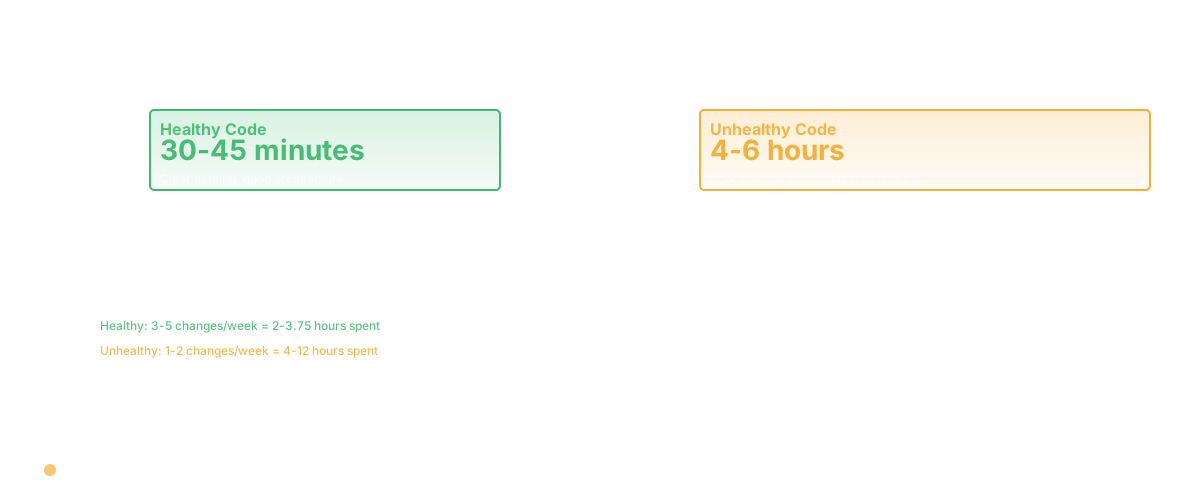
If engineers consistently take 4 - 6 hours to make a one-line change in a module, that module has an understandability problem. That's the opposite of healthy. Healthy modules, engineers take 30 - 45 minutes.
This correlates with measurable code properties. Variables with clear, specific names (not x or data or process, but customerName or transactionRetryCount). Functions that do one thing, clearly expressed in their name. Comments explaining the "why" - the business context or the subtle behavior that isn't obvious from the code. Modules with clear boundaries and few external dependencies.
Tools like Radon (Python), ESLint (JavaScript), and SonarQube measure some of these - cyclomatic complexity, cognitive complexity, function length. Use them as signals. A function that's 200 lines long and has cyclomatic complexity of 28 is almost certainly hard to understand. Refactor it.
Modifiability
Measure this by looking at change patterns. When an engineer needs to change something in this module, how confident are they?
The proxy: change frequency, change failure rate, and regression rate. If a module has a 5% change failure rate (changes that introduce bugs or get reverted), that's a healthy signal - engineers are confident enough to iterate. If it's 20%, engineers are being cautious, because changes here are risky.
Another proxy: do changes to this module usually touch just this module, or do they cascade across the codebase? If a change to the auth module requires changes to 15 other modules, that's low modifiability. High coupling. Healthy code is loosely coupled - changes are localized.
Test coverage matters here, but not the way you think. The relevant question isn't "percentage covered" but "can I run tests quickly and safely?" If your test suite takes 45 minutes to run, developers won't run it locally. They'll just push and hope. That's low modifiability. If tests run in 2 - 3 minutes, developers run them constantly. That's healthy.
Resilience
This is about what happens when things break. Does your code fail loudly and explicitly, or does it fail silently and cascade?
Measure this through incident data. When a bug is discovered in this module, how fast is the MTTR - mean time to recovery? How broad is the impact? Does a failure in one subsystem bring down others, or is it isolated?
Healthy code has good error handling. Explicit failures. Clear observability - when something goes wrong, you know immediately what went wrong and where. Unhealthy code has silent failures, cascading errors, and mysterious bugs that show up hours or days later.
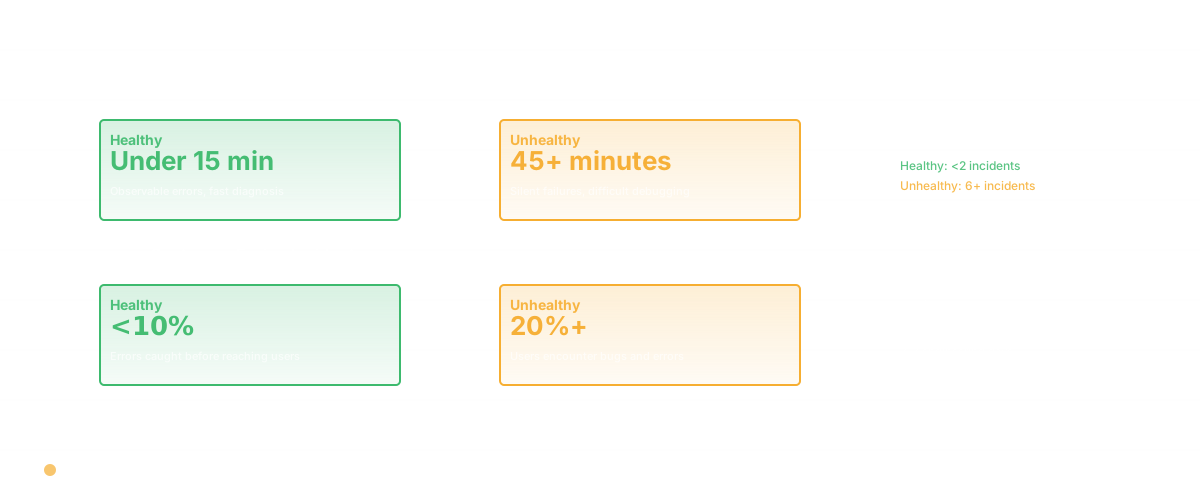
Measure this by looking at incident retrospectives. What percentage of incidents in this module had unclear root cause? More than 20% suggests poor observability. What percentage of incidents in this module were customer-facing vs. internal only? More than 10% customer-facing suggests poor resilience - errors aren't being caught early.
Putting It Together: A Health Score
Here's the framework. For each module or system:
Understandability score: based on function length distribution, variable naming clarity, comment density, and cyclomatic complexity. A simple rubric: high (engineers new to the code can make changes in 30 - 60 minutes), medium (60 - 120 minutes), low (120+ minutes or they give up).
Modifiability score: based on change failure rate, test coverage (70%+ is healthy, below 40% is risky), and coupling metrics. High: <5% change failure rate, loose coupling. Medium: 5 - 15%. Low: 15%+.
Resilience score: based on MTTR, incident frequency, and error handling patterns. High: MTTR under 15 minutes, <2 production incidents per quarter from this module. Medium: MTTR 15 - 45 minutes, 2 - 6 incidents. Low: MTTR 45+ minutes or 6+ incidents.
A module with High on all three is in excellent health. A module with Low on any of these is a concern worth addressing. A module with Low on two or more is critical.

Real Benchmarks From Research
Don't take my word for it. Here's what teams have measured:
Google's research (released in their DORA study): teams with high deployment frequency, low change failure rate, and low MTTR ship with higher quality and fewer defects. Teams with >80% test coverage have 4.5x fewer production incidents than teams with <40%. Not 10%, not 50% - 4.5x fewer. That's a massive difference.
Stack Overflow survey data (2023): engineers at companies with high code standards and high test coverage spend 35% less time on bug fixes and 25% more time on features. Not because they're smarter. Because the code is healthier.
LinkedIn's 2022 engineering report: 62% of engineers cite unclear code and poor documentation as their biggest productivity drag, more than meetings or interruptions. Understandability is material.
Connecting to Outcomes
Where I see most teams go wrong: they measure code health but disconnect it from business outcomes. "We have a code health score of 6.4 out of 10" means nothing to leadership. "Our code health in the payment module is low, which shows up as 18% change failure rate. Every time we touch that module, there's a 1-in-5 chance we introduce a bug and need emergency incident response. That costs us 2 - 3 engineering days per quarter." Now it matters.
Code health is an investment in velocity. Healthy code is faster to modify. Faster modification is faster shipping. The ROI on health is in the sprint velocity, the incident rate, and the new engineer ramp time.
Glue surfaces this. We measure code health across your dimensions - understandability, modifiability, resilience - and tie it to your outcomes. Not abstract scores, but "here's where your code health is dragging down your feature velocity."
The Health Maintenance Loop
Code health degrades slowly if unmonitored, fast if ignored. The loop that works: measure quarterly, address the bottom 20% of modules, repeat. Not a massive refactoring effort. Quarterly incremental improvements. A function that went from 35 lines and cyclomatic complexity 8 to 15 lines and complexity 4. A test suite that went from 40-minute runs to 3-minute runs. An error handling path that now explicitly logs failures instead of silent fails.
In a year of this, you'll have a codebase that's measurably healthier and measurably faster to ship from.
Frequently Asked Questions
Q: How do I convince my team that code health matters if we're hitting our sprint goals?
A: You're hitting sprint goals now because you haven't hit the debt wall yet. It's coming. When it does, you'll lose 30 - 40% of sprint capacity to debugging, incident response, and careful navigation around fragile systems. Track change failure rate and DORA metrics to see the warning signs before the wall hits. The time to invest in health is now, while you're shipping. Not when you're drowning.
Q: Should we stop shipping features to improve code health?
A: No. The health investment should be 20 - 30% of your sprint — refactoring, testing, clarity improvements alongside features. Monitoring cycle time helps you know when that investment is paying off. If you need more than that, you've let health degrade too far. But "we need a whole quarter for tech debt" is usually a sign that problems were ignored for too long.
Q: How do I measure code health if I'm using a language or stack that doesn't have good tooling?
A: You can always measure outcomes - change failure rate, MTTR, incident frequency, feature velocity. Those are language-agnostic. Tools that measure structural code properties are helpful but not essential if you don't have them for your language. Start with outcomes.
Related Reading
- Technical Debt: The Complete Guide for Engineering Leaders
- Code Refactoring: The Complete Guide to Improving Your Codebase
- DORA Metrics: The Complete Guide for Engineering Leaders
- Software Productivity: What It Really Means and How to Measure It
- Code Quality Metrics: What Actually Matters
- Cycle Time: Definition, Formula, and Why It Matters
- Building an Awesome List
- Open Source Developer Tools 2026
- Codebase Analysis Tools
- Codebase Health
- Glue vs SonarQube
- What Is Code Coverage?
- Coding Metrics That Actually Matter