Comparison
Notion documentation goes stale. Glue stays current because it's generated from your codebase. Learn the difference.
I've evaluated dozens of engineering tools across three companies. What matters isn't the feature list — it's whether the tool actually changes how your team makes decisions.
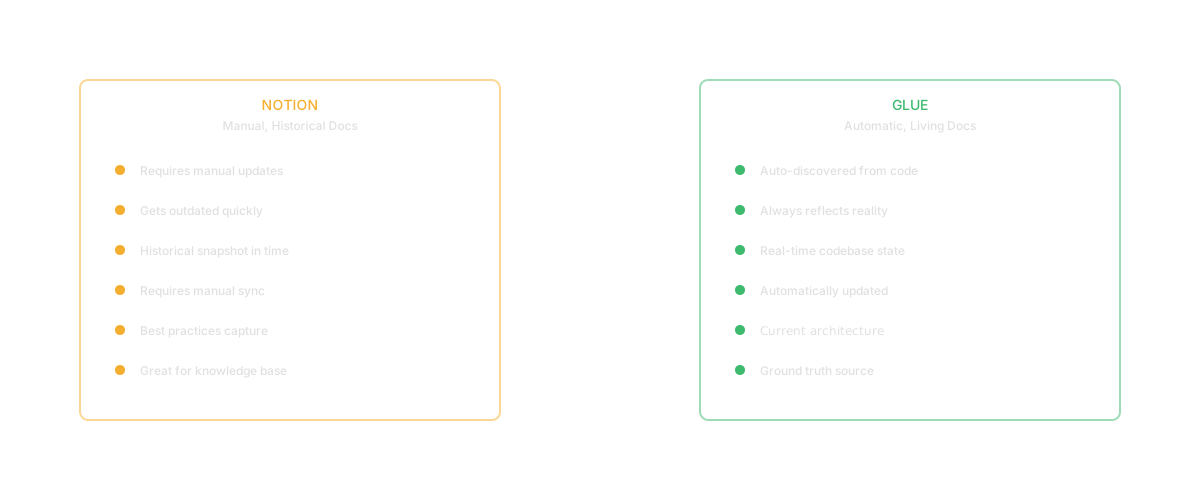
Notion is where teams document what they know. Glue surfaces what's actually true. Both are useful, but they answer different questions: Notion is documentation that teams write, Glue is documentation that comes directly from the codebase itself.
Notion is an excellent wiki and documentation platform. Engineering teams use it for architecture documents, runbooks, onboarding guides, team processes, and knowledge bases. It's flexible, collaborative, and becomes a centralized place where team knowledge lives.
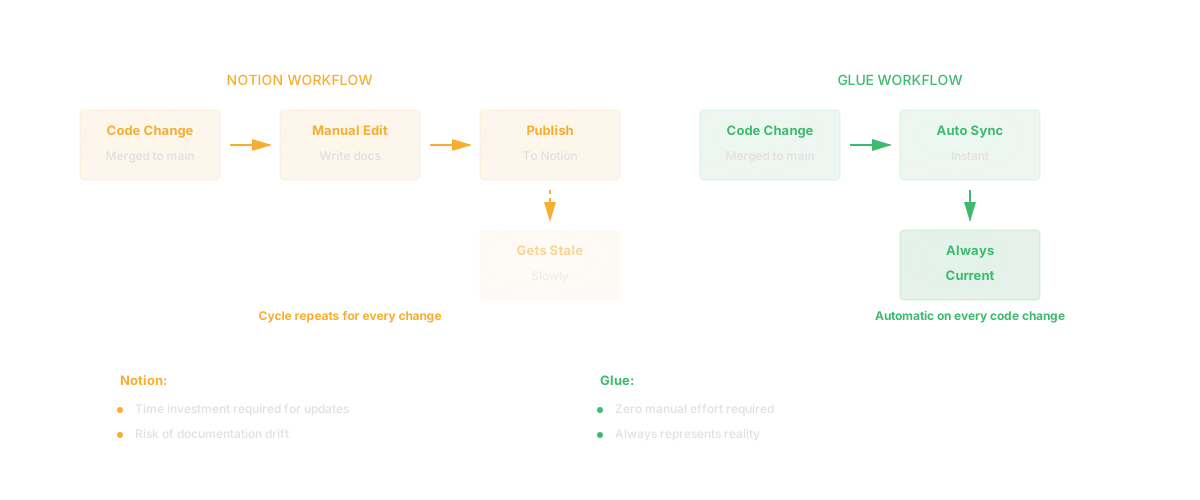
Notion excels at being a shared space where teams document processes, architecture decisions, and institutional knowledge. It's easy to write, easy to read, and integrates well with team workflows. For documentation that describes how a team operates - processes, standards, best practices - Notion is well-designed.
The problem with Notion is structural: it decays. The moment your codebase changes, Notion documentation can become out of date. An architecture doc written six months ago might describe a system that no longer exists. A runbook describing a deployment process might reference code that's been refactored. Teams struggle to keep documentation current because maintenance is manual.
Glue generates documentation directly from your codebase. It maps your actual architecture, shows real code ownership, tracks real dependencies, and reflects real code health. Because Glue's information is derived from the source of truth - the code itself - it's always current. When your codebase changes, Glue's understanding updates automatically. Glue is not a wiki. You don't write narratives in Glue or document team processes. Glue answers factual questions about your codebase that have only one right answer: the code itself.
Notion documentation goes stale because someone has to remember to update it. Glue documentation stays current because it comes directly from the code.

Think about it this way. You have an architecture document in Notion describing how payments are handled. It was written with care and detail. But two months later, your team refactored the payments module. Now Notion still says the old thing, but the code says something different. Which is true? The code. And someone has to manually update Notion to reflect that truth.
Glue avoids this problem entirely. When you ask "How are payments handled?", Glue looks at the actual payments code and tells you the current reality. It's not stale because it's not stored - it's derived.
| Capability | Notion | Glue |
|---|---|---|
| Team wiki and documentation | Best in class | Not designed for this |
| Process and procedure documentation | Excellent | Not applicable |
| Meeting notes and records | Comprehensive | Not applicable |
| Collaborative writing | Native | Not applicable |
| Current codebase understanding | Manual updates required | Always current |
| Architectural mapping | Manual creation | Automatic from code |
| Code ownership information | Manual documentation | Direct from code |
| Dependency visualization | Manual documentation | Direct from code |
| Code quality metrics | Not applicable | Automatic |
If you need to document team processes, Notion is the right choice. If you're creating onboarding guides, runbooks, or procedure documentation, Notion is excellent. If you need a space for meeting notes and decisions, Notion works well. If you want narrative documentation about why decisions were made, Notion is designed for that. If you need flexible documentation that captures institutional knowledge and team standards, Notion is the tool.
If you need accurate, current information about your codebase's actual architecture, Glue is required. If you want documentation that can't go stale, Glue provides that - it updates automatically when code changes. If you need to understand code ownership and dependencies, Glue derives this from the code itself. If you're trying to answer "what's actually in this module?" rather than "what does our documentation say about this module?", Glue is the source of truth. If you want to avoid documentation debt, Glue's automatic derivation prevents it.
Q: Should we delete our Notion documentation? No. Use Notion for process documentation, decisions, and narrative knowledge that doesn't change with code. Use Glue for factual codebase information. They serve different purposes.
Q: Can Notion documentation be automated? Notion is a wiki platform - it requires manual writing and updating. That's different from Glue, which derives information from the code automatically.
Q: Does Glue replace Notion for architecture documentation? Glue replaces the need to manually write and maintain current architecture documentation, yes. But Notion is still useful for documenting decisions and philosophy behind architecture, which code doesn't capture.
Q: Can we use both together? Yes. Use Glue for current facts about your codebase. Use Notion for process documentation, decisions, and institutional knowledge. They're complementary.
Q: What if our Notion documentation is more detailed than what Glue shows? Glue provides the accurate current state. Notion might have richer narrative. For factual accuracy, code is the source of truth. For context and decisions, Notion captures that narrative.
Q: Is Glue for engineers only? No. PMs, CTOs, and engineering leaders use Glue to understand their product's technical reality. Notion is useful for teams across the organization.
Keep reading
Related resources
