Comparison
Jira tracks work. Glue understands the codebase impact. Together they provide complete visibility into software development.
At Salesken, our Jira board had 1,200 tickets. Half were duplicates. A quarter were stale. The engineers who needed context couldn't find it in the noise.
Jira is the world's most widely used project management tool. It's exceptional at what it does: tracking issues, organizing work into sprints, maintaining backlogs, and providing visibility into what the team is working on. But there's a critical gap: Jira knows about tickets. It doesn't know about code.
Jira is a comprehensive issue and project management platform. It tracks bugs, features, and tasks from creation through completion. It manages sprints, backlogs, roadmaps, and dependency workflows. It integrates with development tools (git, CI/CD) to show which commits and PRs are related to tickets. For engineering teams, Jira is the system of record for what work is planned and what's in progress.

Jira is genuinely good at this. Most of the world's software teams use it because it solves the fundamental problem of organizing and tracking work.
Here's what Jira can't do: it can't tell you anything about the codebase that the tickets are affecting.
A PM opens a ticket: "Fix the login flow performance issue." Jira can track that ticket through development. But Jira can't answer:
A ticket says "completed" in Jira. But did it actually fix the problem? Is the code in better shape, or just different? Jira doesn't know.
Glue answers the questions Jira can't. It analyzes the actual codebase to understand:
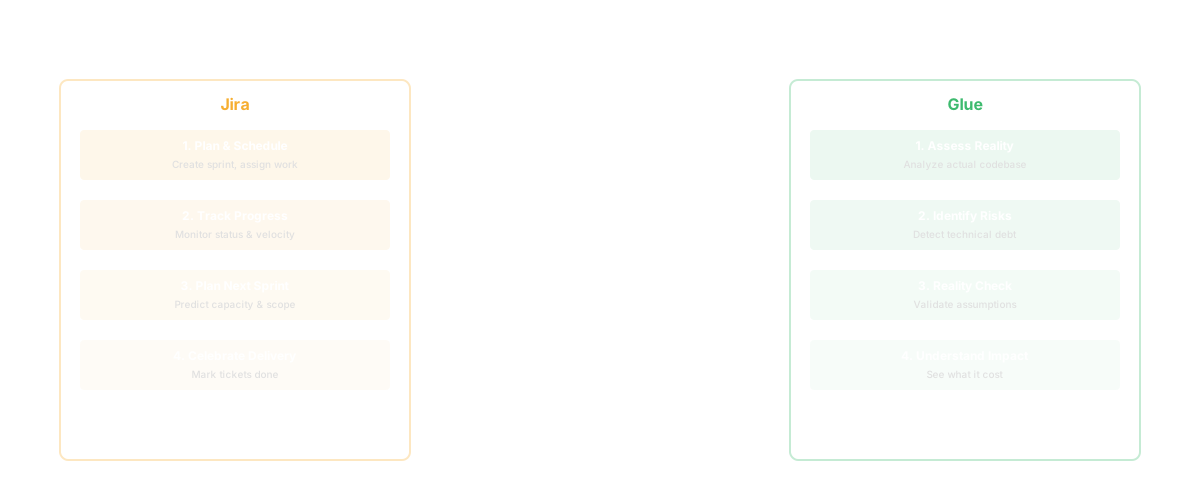
Glue connects codebase reality to ticket reality. It's the bridge between "what are we building" (Jira) and "what code is actually happening" (Glue).
Jira is the contract between product and engineering. It says: "We'll build X." Glue is the audit of that contract. It shows: "Here's what actually happened in the code when we built X."
Think of a specific scenario. A ticket says the team fixed a database query performance issue in the user service. Jira shows it was completed in Sprint 12 and related to three commits. That's valuable, but incomplete. Glue shows: the user service is depended on by 8 other modules, the query change touched the data access layer, that layer has high coupling to three other systems, and similar performance issues were "fixed" in two other modules in the last 6 months. This suggests a structural pattern - the data layer needs refactoring, not just query optimization.
Or another scenario. A ticket comes in: "Weird behavior when creating invoices." Jira can assign it, track it, link it to commits. Glue shows: the invoice creation code has unclear ownership (three teams claim responsibility), it has recent changes from 5 different developers in 3 weeks, and it's relied on by 12 other modules. This is a structural risk pattern that explains why a "weird behavior" emerges - it's too complex and too contentious to maintain safely.
| Capability | Jira | Glue |
|---|---|---|
| Issue tracking and workflow | Comprehensive | Not applicable |
| Sprint and backlog management | Yes | Not applicable |
| Roadmap visualization | Yes | Not applicable |
| Ticket-to-code linkage | Basic (via git) | Not applicable |
| Work planning and prioritization | Yes | Not applicable |
| Codebase impact analysis | No | Core |
| Ownership and responsibility | Limited | Yes |
| Architectural pattern recognition | No | Yes |
| Root cause identification | No | Yes |
| Issue clustering and patterns | No | Yes |
| Verification of completion | Limited | Yes |
| Structural risk identification | No | Yes |
You can't really "choose" Jira vs. Glue because they solve different problems. Jira is mandatory for work management. The question isn't whether to use Jira; it's whether to add Glue on top of it.
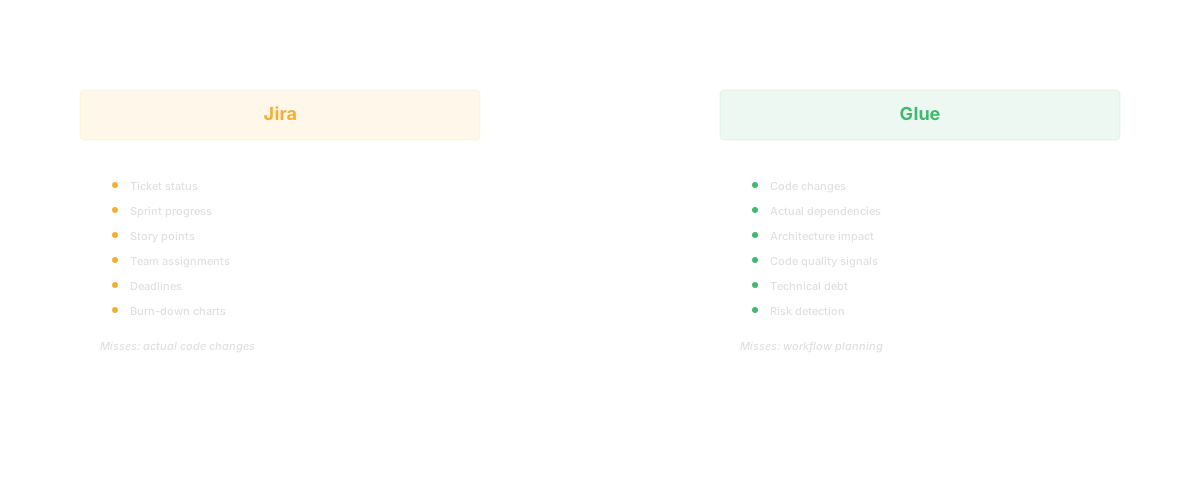
Use Jira for what it's built for: organizing work, tracking progress, managing delivery.
Add Glue when you want to understand the codebase impact of the work you're tracking in Jira. When your PM is creating tickets, Glue helps answer: "Is this ticket well-scoped based on what the code actually looks like?" When your EM is assigning tickets, Glue helps answer: "Who should actually own this code?" When your CTO is reviewing a ticket as completed, Glue helps verify: "Did we actually fix the root cause?" Choose Glue if you've noticed that fixes don't stick - similar issues keep getting filed. That's often a structural problem that Jira alone can't diagnose.
Q: Should Glue replace Jira?
No. Jira is irreplaceable as a work management tool. Glue is a companion that adds codebase intelligence to your Jira workflow.
Q: Can I link Glue insights into Jira tickets?
Yes. Many teams create custom Jira fields or link to Glue insights within ticket descriptions to surface ownership, architectural impact, and structural patterns.
Q: How does Glue help with Jira ticket triage?
When a new ticket comes in, Glue can show which modules are affected, who owns them, and what architectural patterns might be relevant. That helps your team assign and scope the ticket better.
Q: If Jira is linked to git commits, doesn't it already know the code impact?
Jira can show which commits relate to a ticket, but it doesn't analyze what those commits mean for the codebase structure. It knows "this ticket touched these 5 files." Glue knows "this ticket touched a critical module that's now even more complex and that's a risk."
Q: Can Glue insights help us close tickets faster?
Not directly, but yes indirectly. Understanding architectural context helps engineers fix root causes instead of symptoms, which means the fix sticks and you don't re-open the ticket three months later.
Q: What if a Jira ticket says "done" but Glue suggests it didn't fix the root cause?
That's when the two tools reveal insight together. The ticket is technically complete (code was changed), but the structural problem remains. This should trigger escalation: either the ticket's scope was too narrow, or the approach was wrong.
Q: Does Glue create tickets in Jira automatically?
Glue doesn't create tickets, but you can use Glue's insights to manually create better-scoped tickets that address root causes instead of symptoms.
Keep reading
Related resources
