If you have spent time in software organizations, you have encountered the term "what is DevOps" at least a dozen times with a dozen different answers. Some people call it a job title. Others call it a culture. Many point to a specific set of tools. The confusion exists because DevOps is genuinely broad. According to the 2024 State of DevOps Report from DORA (Google's DevOps Research and Assessment team), organizations with mature DevOps practices deploy code 973 times more frequently than their low-performing counterparts while maintaining lower failure rates. That gap explains why the topic matters.
This guide cuts through the noise. It explains what DevOps means in practice, how it relates to Agile and SRE, what the lifecycle looks like, and how to adopt it whether you are an engineer, a team lead, or a product manager trying to understand why your releases work the way they do.
DevOps in Plain English
DevOps is the practice of bringing software development (Dev) and IT operations (Ops) together so that building, testing, deploying, and monitoring software happens as one continuous flow rather than a series of handoffs between separate teams.
Before DevOps, the typical pattern looked like this: developers wrote code and threw it over the wall to an operations team. Operations deployed it, often manually, and dealt with whatever broke. Developers blamed infrastructure. Operations blamed code quality. Releases happened monthly or quarterly, and each one was stressful.
DevOps eliminates the wall. The same team (or closely collaborating teams) owns the full lifecycle from writing code to running it in production. This ownership model changes behavior: if you are the one who gets paged at 2 AM when something breaks, you write more resilient code and build better monitoring.
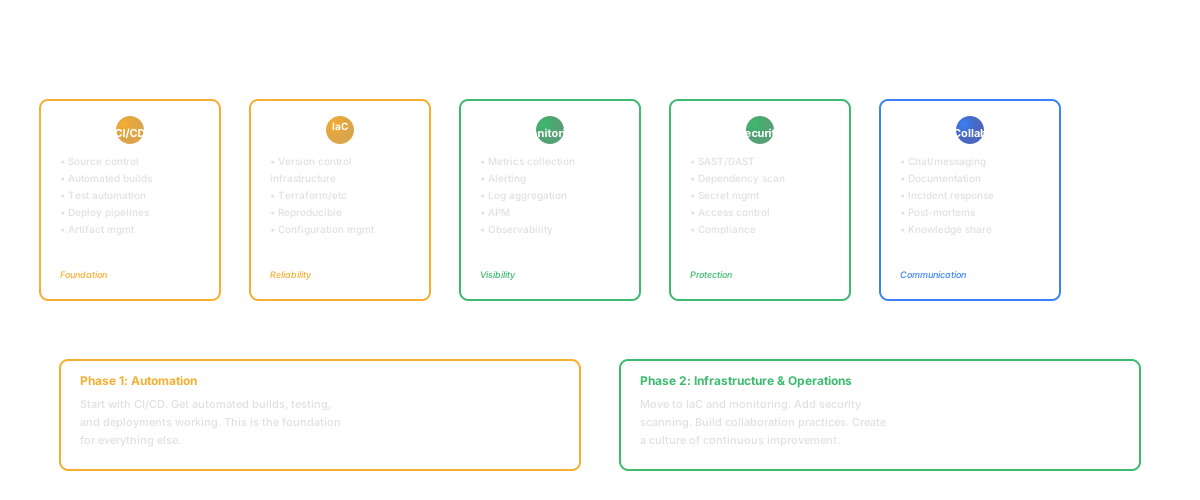
In practice, DevOps combines three things:
Culture: Shared ownership, blameless postmortems, and continuous improvement. Teams collaborate across traditional boundaries.
Practices: Continuous integration, continuous delivery, infrastructure as code, automated testing, and monitoring. These practices make frequent, reliable releases possible.
Tools: The automation layer that enables the practices. CI/CD pipelines, container orchestration, configuration management, and observability platforms.
None of these three elements works in isolation. Tools without the right culture become shelfware. Culture without practices remains aspirational. Practices without tools stay manual and error-prone.
The common misunderstanding is that DevOps means "hiring a DevOps team." Organizations that create a separate DevOps team and expect it to "do DevOps" for everyone else often recreate the exact silo problem DevOps was designed to solve. Instead of one wall between Dev and Ops, they now have two walls: Dev to DevOps, and DevOps to Ops. True DevOps is a property of how all teams work, not a team name.
Another misconception is that DevOps is only for large organizations. In practice, small teams benefit the most from DevOps practices because they have fewer people to absorb the pain of manual processes. A five-person startup that automates deployments and monitoring from day one avoids building the manual habits that become expensive to replace later.
DevOps vs Agile vs SRE
These three terms overlap enough to cause confusion, but they solve different problems at different layers.
Agile
Agile is a set of principles for managing software development work. It emphasizes iterative delivery, customer feedback, and adaptation over rigid planning. Scrum, Kanban, and other frameworks implement Agile principles. Agile primarily addresses how teams plan and build software.
DevOps
DevOps extends Agile thinking beyond development into operations. Agile improved how teams write code. DevOps improves how that code gets to production and stays healthy there. You can practice Agile without DevOps (and many teams do), but you will hit a ceiling: iterating fast on features means nothing if deployments are slow, risky, and manual.
SRE (Site Reliability Engineering)
SRE is Google's implementation of DevOps principles, formalized as a discipline. SRE teams focus on reliability through error budgets, service level objectives (SLOs), and automation. If DevOps is the philosophy, SRE is one opinionated implementation of that philosophy with specific practices around reliability.
How they relate: Agile shapes your sprint process. DevOps shapes your delivery pipeline. SRE shapes your reliability standards. Mature teams practice all three.
The confusion between these terms is understandable because they overlap in their goals (delivering better software faster) and their tooling (CI/CD, monitoring, automation). The key distinction is scope. Agile scopes to the development team and its planning process. DevOps scopes to the full lifecycle from code to production. SRE scopes to the reliability and performance of what runs in production. A team can adopt one without the others, but the compounding effect of all three is what separates high-performing organizations from the rest.
The DevOps Lifecycle
The DevOps lifecycle is often represented as an infinity loop, reflecting the continuous nature of the process. It typically includes eight phases:
Plan
Teams define what to build based on product requirements, user feedback, and business goals. Planning in a DevOps context includes infrastructure considerations alongside feature scope. What will this feature require in terms of compute, storage, and networking?
Code
Developers write and review code collaboratively. Version control (Git) is foundational. Trunk-based development and short-lived branches reduce merge conflicts and keep the codebase integrated.
Build
Code is compiled, bundled, and packaged automatically. Build systems (Webpack, Gradle, Maven, esbuild) create deployable artifacts. Builds should be fast, reproducible, and run on every commit.
Test
Automated tests run at multiple levels: unit tests, integration tests, end-to-end tests, security scans, and performance tests. The goal is fast feedback: developers should know within minutes whether their change broke something.
Release
Artifacts are versioned and promoted through environments (staging, canary, production). Release processes should be automated and repeatable. Feature flags allow decoupling deployment from release, meaning code can ship to production without being visible to users.
Deploy
Code reaches production through automated pipelines. Good deployment practices include blue-green deployments, canary releases, and automatic rollbacks. The goal is making deployment boring: a non-event that happens multiple times per day. If you want to go deeper on this, our CI/CD pipeline guide covers the mechanics.
Operate
The system runs in production. Operations includes scaling, incident response, capacity planning, and cost management. Infrastructure as code (Terraform, Pulumi, CloudFormation) ensures environments are reproducible.
Monitor
Observability tools collect metrics, logs, and traces from production. Monitoring closes the loop: what happens in production informs what gets planned next. Alerts notify teams of problems before users notice.
The loop is continuous. Monitoring insights feed back into planning. Production behavior shapes the next iteration of code. There is no "done." There is only the next improvement.
Key DevOps Practices
Several practices form the backbone of effective DevOps adoption.
Continuous Integration (CI)
Every developer merges code to the main branch multiple times per day. Each merge triggers an automated build and test suite. CI catches integration problems early, when they are cheap to fix, rather than late in a release cycle when they are expensive.
Continuous Delivery (CD)
Every change that passes CI is automatically deployable to production. Continuous delivery does not mean every change ships immediately. It means every change could ship at any time. The team decides when to release, but the pipeline is always ready.
Infrastructure as Code (IaC)
Server configurations, network rules, and cloud resources are defined in version-controlled files rather than configured manually through a console. IaC makes environments reproducible, auditable, and scalable.
Monitoring and Observability
Teams instrument their applications to collect metrics (quantitative measurements), logs (event records), and traces (request paths through distributed systems). Observability is the ability to understand a system's internal state from its external outputs.
Blameless Postmortems
When incidents occur, teams analyze what happened without assigning blame to individuals. The focus is on system improvements: what process, tooling, or design change would prevent this class of failure? Blameless culture encourages transparency, which improves learning.
ChatOps and Collaboration
Operational activities surfaced in shared communication channels. Deployments, alerts, and incident management happen where the team already communicates. This reduces context switching and improves response times.
Feature Flags
Feature flags (also called feature toggles) allow teams to deploy code to production without making it visible to users. A flag wraps new functionality in a conditional: if the flag is on, the user sees the new feature; if off, they see the existing behavior. This decouples deployment from release, which is one of the most important mental shifts in DevOps. Deployment becomes a technical event (code reaches production). Release becomes a business event (users can access the feature). Separating these two events reduces risk, enables gradual rollouts, and gives product managers control over launch timing without involving the deployment pipeline.
Version Control Best Practices
Git is the foundation of modern DevOps, but how teams use Git matters as much as whether they use it. Short-lived branches (less than a day), frequent merges, and small pull requests keep the codebase integrated and reduce the "merge day" pain that many teams experience. Trunk-based development, where developers commit directly to main or merge from very short-lived branches, is the practice most strongly correlated with high deployment frequency in DORA's research.
DevOps Tools Landscape
The DevOps tool ecosystem is enormous. Rather than list every option, it helps to organize tools by the lifecycle phase they serve.
| Phase | Common Tools |
|---|---|
| Plan | Jira, Linear, ClickUp, GitHub Issues |
| Code | GitHub, GitLab, Bitbucket, VS Code |
| Build | Jenkins, GitHub Actions, CircleCI, GitLab CI |
| Test | Jest, Playwright, Selenium, k6 |
| Release | ArgoCD, Spinnaker, Harness |
| Deploy | Kubernetes, Docker, Terraform, Pulumi |
| Operate | PagerDuty, Opsgenie, AWS CloudWatch |
| Monitor | Datadog, Grafana, Prometheus, New Relic |
No single tool covers the entire lifecycle well. Most teams assemble a toolchain that fits their stack, scale, and team preferences. The trap to avoid is tool sprawl: adding tools faster than the team can learn and maintain them. According to a 2023 GitLab survey, the average DevOps team uses 12 tools, and 69% of practitioners want to consolidate.
When choosing tools, prioritize integration over features. A monitoring tool that integrates with your deployment pipeline (automatically correlating deploys with metric changes) is more valuable than a monitoring tool with more dashboards but no pipeline awareness. The value of DevOps tools comes from connecting the lifecycle phases, not from optimizing any single phase in isolation.
DevOps Culture and Team Structure
Tools and practices are the easier parts of DevOps adoption. Culture is the harder part and the more important one.
Shared Ownership
In a DevOps culture, the team that builds a service also runs it. "You build it, you run it" is the foundational principle. This ownership drives better design decisions because the consequences of poor choices land on the same people who made them.
Cross-Functional Teams
DevOps teams include (or have close access to) developers, operations engineers, QA, and security. Rather than organizing by function (a dev team, an ops team, a QA team), organizations using DevOps organize by product or service.
Psychological Safety
Blameless postmortems only work if people feel safe admitting mistakes. A 2024 Google study on team effectiveness confirmed that psychological safety remains the number-one predictor of high-performing teams. Without it, incidents get hidden, near-misses go unreported, and the organization loses its ability to learn from failure.
Continuous Improvement
DevOps is not a destination. Teams should regularly reflect on their processes, measure their performance using frameworks like DORA metrics, and experiment with improvements. The best DevOps teams treat their delivery pipeline as a product that gets better every sprint.
Learning from Failure
Every incident is a source of learning. Teams that treat outages and deployment failures purely as problems to fix miss the opportunity to understand systemic weaknesses. The most effective DevOps organizations maintain an "incident library" of past failures and their root causes, creating institutional memory that prevents the same failure from recurring. This library becomes particularly valuable as new team members join and need context about why certain safeguards exist.
Measuring DevOps Success
How do you know if your DevOps adoption is working? The DORA framework provides four key metrics:
- Deployment Frequency: How often your team deploys to production. Elite teams deploy multiple times per day.
- Lead Time for Changes: Time from code commit to running in production. Elite teams measure this in less than one hour.
- Mean Time to Recovery (MTTR): How quickly you restore service after an incident. Elite teams recover in less than one hour.
- Change Failure Rate: What percentage of deployments cause failures requiring remediation. Elite teams keep this below 5%.
These metrics matter because they are outcome-oriented. They do not measure activity (number of commits, number of deploys). They measure the results that matter: speed, stability, and resilience.
Our DORA metrics guide goes deeper into benchmarking, measurement strategies, and improvement playbooks for each metric.
Beyond DORA, consider tracking:
- Developer satisfaction: Do engineers feel productive? Regular surveys catch cultural problems that metrics miss.
- Mean time to detect (MTTD): How long before the team knows something is wrong? Detection speed determines recovery speed.
- Infrastructure costs per deployment: Efficiency matters. DevOps should reduce the cost of delivery, not just increase the speed.
Getting Started with DevOps
If your team is early in its DevOps journey, start small and iterate. Trying to adopt everything at once leads to tool fatigue and cultural whiplash.
Step 1: Automate Builds and Tests
If you do nothing else, set up a CI pipeline that builds your code and runs tests on every push. GitHub Actions, GitLab CI, or CircleCI can be configured in a day. This single step catches integration bugs early and establishes the habit of automated feedback.
Step 2: Automate Deployments
Move from manual deployments to a pipeline that can deploy to staging automatically. Start with staging, not production. Get comfortable with the process before automating production releases.
Step 3: Add Monitoring
Instrument your application with basic metrics and alerting. You need to know when something breaks before your users tell you. Start with uptime monitoring and error rate tracking.
Step 4: Practice Incident Response
Run your first blameless postmortem after the next incident. Document what happened, why, and what the team will change. Share the writeup broadly. This single practice shifts culture more than any tool purchase.
Step 5: Measure and Iterate
Start tracking DORA metrics. Even rough measurements provide a baseline. Compare quarter over quarter and celebrate improvements. Measurement makes DevOps progress visible to the entire organization.
A Note for Product Managers
DevOps is not just an engineering concern. If you are a product manager, understanding your team's deployment pipeline helps you plan releases, set expectations with stakeholders, and identify bottlenecks that slow feature delivery. You do not need to configure a Kubernetes cluster, but knowing the difference between "deployed" and "released" will change how you think about roadmaps.
Conclusion
DevOps is not a tool you install or a team you hire. It is a set of practices, cultural norms, and automation strategies that make software delivery faster, safer, and more sustainable. Start with the basics: automate your build, test, deploy cycle. Add monitoring so you know when things break. Cultivate a culture of shared ownership and blameless learning.
The organizations that do this well do not just ship faster. They ship with confidence. Every release is a non-event, and every incident is a learning opportunity. That is what DevOps looks like when it works.
DevOps is also not something you finish. The best teams continuously refine their practices, adopt new tools that reduce friction, and challenge assumptions about what is possible. A team that deploys weekly and considers that successful should ask: what would it take to deploy daily? The answer to that question always reveals the next constraint worth removing.
Frequently Asked Questions
What is DevOps in simple words?
DevOps is the practice of combining software development and IT operations so that building, testing, deploying, and running software happens as one continuous, automated process rather than a series of manual handoffs between separate teams. The goal is to deliver software faster and more reliably by eliminating the traditional wall between the people who write code and the people who run it in production.
Is DevOps a job title or a methodology?
Both, depending on context. DevOps started as a methodology and cultural movement focused on breaking down silos between development and operations teams. Over time, the industry created "DevOps Engineer" as a job title, typically describing someone who builds and maintains CI/CD pipelines, manages infrastructure as code, and supports developer workflows. The methodology is the bigger idea. The job title describes a specialization within that idea. Organizations that treat DevOps purely as a role ("hire a DevOps person and we're done") tend to miss the cultural transformation that makes it effective.
What is the difference between DevOps and Agile?
Agile focuses on how teams plan and develop software, emphasizing iterative delivery and customer feedback. DevOps extends that thinking into how software gets deployed, monitored, and operated in production. You can practice Agile without DevOps (many teams iterate on features while still deploying manually once a month), but the combination is more powerful: Agile helps you build the right thing, and DevOps helps you deliver it reliably. Think of Agile as optimizing the development process and DevOps as optimizing the full delivery lifecycle.
Do product managers need to understand DevOps?
Yes. Product managers do not need to configure pipelines or write infrastructure code, but understanding how software moves from commit to production helps them plan releases more accurately, communicate timelines with confidence, and spot process bottlenecks that delay features. Knowing concepts like feature flags, deployment frequency, and rollback capabilities helps PMs make better tradeoff decisions. If a feature can be deployed behind a flag and released incrementally, that changes the risk profile and the launch strategy.