
At Salesken, I learned the hard way that measuring the wrong thing is worse than measuring nothing — it gives you false confidence while the real problems compound.
The Hook
Your team deployed code 47 times last month. Another team in your org deployed once. Who's performing better?
If you said "the team that deployed more," you've just fallen into the most common trap with DORA metrics. That number alone tells you nothing about your delivery performance - it's the combination of frequency, speed, stability, and recovery that actually matters. This guide shows you exactly what to measure and why.
What Are DORA Metrics? (Featured Snippet Definition)
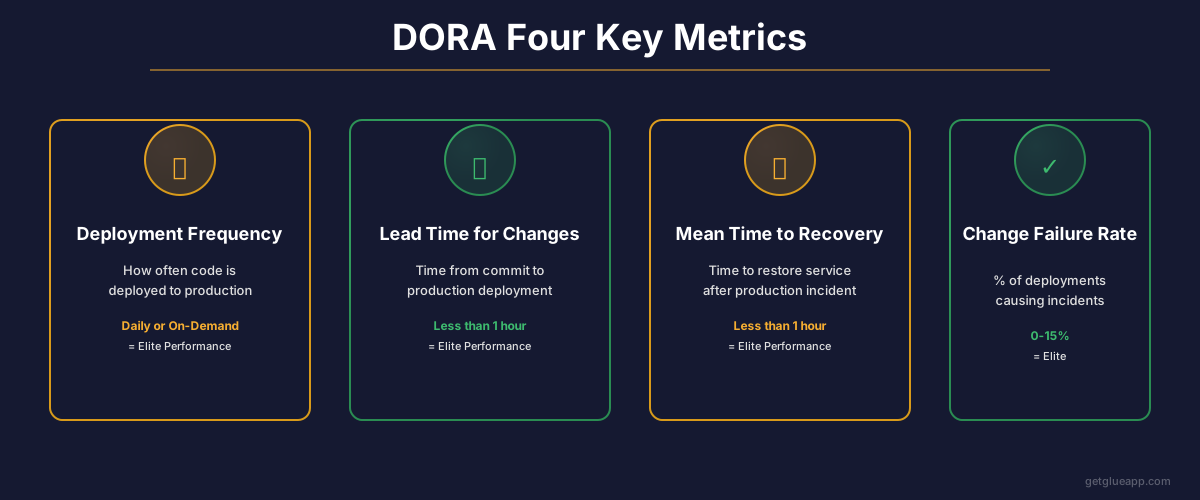
DORA metrics are a set of four evidence-based key performance indicators created by the DevOps Research and Assessment team that measure software delivery and operational performance. The four primary metrics are deployment frequency, lead time for changes, change failure rate, and mean time to recovery. These metrics help engineering leaders identify whether their teams are in the Elite, High, Medium, or Low performance category.
DORA stands for DevOps Research and Assessment, a research program started in 2014 that collected data from thousands of software delivery teams to identify the capabilities that drive high performance.
Why DORA Matters: The Accelerate Research Behind the Metrics
The four key metrics weren't pulled from thin air. They came from five years of rigorous research published in the book "Accelerate" by Nicole Forsgren, Jez Humble, and Gene Kim. The researchers analyzed responses from over 23,000 software professionals and found that four metrics consistently separated high-performing teams from struggling ones.
What made this research transformative: it wasn't based on opinions or vendor claims. It was statistical analysis of actual team data. And the results challenged conventional wisdom. Deployment frequency and change failure rate aren't at odds with each other. High-performing teams deploy more often AND have lower failure rates. This fundamentally changed how the industry thinks about DevOps.
The research showed that elite-performing teams don't just move faster. They move faster while maintaining stability, recovering from incidents quicker, and delivering more value to customers. That's the promise of DORA metrics - they measure what actually matters.
The Four DORA Metrics Explained in Depth
1. Deployment Frequency: How Often Your Team Ships
Deployment frequency measures how many times your team deploys code to production in a given time period - typically measured as per day or per week.
The Formula: Total number of deployments to production / number of days in the period
Example: If your team deployed 15 times in a 20-working-day month, your deployment frequency is 0.75 deployments per day, or about 3-4 per week.
What It Really Measures:
- Your ability to get code from development to production without friction
- Whether you're batching changes (risky) or releasing small, frequent changes (safe)
- Your team's confidence in the deployment process
Why This Matters: Teams that deploy more frequently get feedback faster. If a change breaks something, the blast radius is smaller. You can revert or fix it quicker. Frequent deployment also means your team isn't sitting on risky, large batches of untested code.
Elite Benchmark: On-demand deployments (multiple per day) High Benchmark: Between once per day and once per week Medium Benchmark: Between once per month and once per week Low Benchmark: Fewer than once per month (sometimes measured in quarters)
2. Lead Time for Changes: The Speed from Code to Customer
Lead time for changes measures how long it takes from when a developer writes code to when that code runs in production. This includes code review, testing, and any approval processes.
The Formula: Time from first commit to code reaching production (in days or hours)
Example: A feature is committed on Monday morning, code review is completed by Tuesday afternoon, tests run Wednesday morning, and it deploys to production Wednesday afternoon. Lead time: approximately 1.5 days.
What It Really Measures:
- Whether your development process is efficient or bottlenecked
- How much manual approval and gate-keeping slows you down
- Your team's ability to turn ideas into customer value quickly
Why This Matters: Fast lead time means you can respond to customer feedback, market changes, or bugs with urgency. If it takes three months to get a fix to production, you're losing customers. If it takes three hours, you're competitive.
Elite Benchmark: Less than one day (often measured in hours) High Benchmark: One day to one week Medium Benchmark: One week to one month Low Benchmark: More than one month (often several months)
3. Change Failure Rate: How Many Deployments Break Things
Change failure rate measures what percentage of deployments result in a degradation of service that requires a fix, rollback, or hotfix.
The Formula: Number of deployments causing failures / total number of deployments in the period × 100
Example: Your team deployed 40 times in a month. 4 of those deployments caused incidents (bugs in production, performance issues, downtime). Your change failure rate is 10%.
What It Really Measures:
- Whether you're catching problems before production
- The quality of your testing strategy
- Whether you're deploying changes that are too large and complex to verify
Why This Matters: A high change failure rate is expensive. Every failed deployment requires incident response, customer communication, and damage control. Elite teams have figured out how to move fast without sacrificing stability - and this metric proves it.
Elite Benchmark: 0 to 15% (most top performers under 5%) High Benchmark: 15 to 30% Medium Benchmark: 30 to 45% Low Benchmark: 45% or higher (every other deployment breaks something)
4. Mean Time to Recovery (MTTR): Speed of Incident Response
Mean time to recovery (often called "mean time to repair") measures how long it takes from when an incident is detected until it's resolved and the system is stable again.
The Formula: Total downtime or time to resolution across all incidents / number of incidents in the period
Example: You had 3 production incidents last month. The first took 30 minutes to resolve, the second took 2 hours, the third took 45 minutes. Your MTTR is (0.5 + 2 + 0.75) / 3 = approximately 1.1 hours.
What It Really Measures:
- How quickly your team detects problems
- How well-documented your incident response process is
- Whether you have the right monitoring and observability in place
- Your team's ability to stay calm under pressure
Why This Matters: Even elite teams have incidents. What separates them is recovery speed. A 10-minute incident that's detected and fixed in 5 minutes costs you almost nothing. The same incident that goes undetected for an hour could lose you customers and revenue.
Elite Benchmark: Less than one hour High Benchmark: Less than one day Medium Benchmark: Between one day and one week Low Benchmark: More than one week (some teams take months to recover from incidents)
Industry Benchmarks: How Your Team Compares
Here's a complete benchmark table from DORA research showing what elite, high, medium, and low-performing teams look like:
| Metric | Elite | High | Medium | Low |
|---|---|---|---|---|
| Deployment Frequency | On-demand (multiple/day) | Once/day - Once/week | Once/month - Once/week | Less than once/month |
| Lead Time for Changes | Less than 1 hour | 1 hour - 1 day | 1 day - 1 month | More than 1 month |
| Change Failure Rate | 0-15% | 15-30% | 30-45% | 45%+ |
| Mean Time to Recovery | Less than 1 hour | Less than 1 day | 1 day - 1 week | More than 1 week |
What This Means for Your Organization:
- If all four metrics are in the elite range, you're in the top tier of software delivery teams globally.
- If two metrics are elite and two are high, you're still performing above average.
- If you're in the medium range, there are clear opportunities for improvement.
- If you're in the low range, your deployment process is likely a bottleneck on the entire organization.
DORA's 5th Metric: Reliability (Added 2023)
In 2023, DORA added a fifth metric to address a gap in the original four. That metric is reliability, which measures your system's ability to handle demand and recover from degradation.
Reliability Measures:
- Availability - what percentage of time is your system up and functioning?
- Performance - does your system respond within acceptable latency?
- Scalability - can your system handle traffic spikes without degrading?
This metric recognizes that teams can be fast and frequently deploying, but if the system is unreliable, you're not actually delivering value. It brings operational stability into focus alongside delivery speed.
How to Implement DORA Measurement: A Step-by-Step Approach
Measuring DORA metrics sounds simple until you start collecting the data. Here's how to actually do it.
Step 1: Define Your Deployment
Before you count anything, define what counts as a "deployment" in your organization. Does a Kubernetes pod update count? What about a database schema change? What about a feature flag flip?
For most organizations, a deployment is when code changes go from the staging or pre-production environment to the production environment where customers can access it.
Action: Document this definition and get your team to agree on it.
Step 2: Set Up Tracking for Deployment Frequency
Start here because this is the easiest metric to measure. Look at your deployment logs, Git commits to the main branch, or your CI/CD pipeline records.
If you use cloud platforms, most have built-in deployment tracking:
- GitHub Actions: Check your deployment logs
- GitLab: Use DORA metrics dashboard (built into GitLab)
- Jenkins: Count successful production builds
- AWS CodeDeploy: Track deployment history
Action: Pull your deployment data for the last three months to establish a baseline.
Step 3: Calculate Lead Time for Changes
This is where it gets harder. Lead time requires you to track the time from when code is first committed to when it reaches production.
You'll need to correlate:
- Git commit timestamp
- Code review completion time (from your PR/MR data)
- Test execution start and completion
- Deployment timestamp
Some tools that help with this:
- GitHub has a built-in lead time calculation in your insights dashboard
- GitLab DORA metrics dashboard calculates this automatically
- Jira can be configured to track this if your workflow includes transition dates
- Linear B, GetDX, and Glue specifically exist to calculate these metrics
Action: Don't try to backfill years of data. Start measuring from today forward. Three months of good data beats three years of estimated data.
Step 4: Track Change Failure Rate
This is the trickiest metric because it requires defining what counts as a "failure." Is it:
- Any production incident?
- Only incidents caused by your deployment?
- Only incidents that required a rollback?
- Only incidents that caused customer-facing impact?
Most organizations define it as: deployments that directly caused an incident requiring a fix or rollback within 24 hours of deployment.
Action: Create a simple incident log. When an incident happens, mark which deployment caused it. At the end of each month, divide incidents by total deployments.
Step 5: Measure Mean Time to Recovery
This requires having an incident tracking system (PagerDuty, Opsgenie, VictorOps) or at minimum a detailed incident log.
Track:
- Detection time - when did someone notice the problem?
- Notification time - how long until the on-call person was alerted?
- Response time - how long until work began?
- Resolution time - when did the system stabilize?
MTTR = sum of (resolution time - detection time) for all incidents / number of incidents
Action: Make sure your incident tracking system captures at minimum the detected and resolved timestamps.
Tools for DORA Measurement: An Honest Look
Built-In Options (Free or Included)
GitHub Insights: If you use GitHub, you already have the start of DORA metrics. Go to Insights > Deployment > Deployment frequency and Lead time for changes. It works, but it's basic.
GitLab DORA Metrics: GitLab built native DORA dashboards directly into the product. If you're on GitLab Premium or above, this is solid and requires no extra tooling.
Jira Insights: Jira can calculate some of these if you've configured your workflow properly, but it's not designed specifically for DORA metrics.
Dedicated DORA Tools
Glue: Specializes in DORA metrics and engineering metrics. Integrates with GitHub, GitLab, Bitbucket. Gives you benchmarking against similar companies. Price: starts at $300/month.
GetDX: Focuses on DORA metrics and engineering intelligence. Similar feature set to Glue. Price: similar (enterprise pricing).
Glue: Broader engineering metrics platform that includes DORA. Better for organizations wanting more than just DORA. Price: enterprise deals typically $10k+/year.
Glue: Helps product leaders understand code health and delivery patterns, including deployment metrics. If your team uses Git already, Glue gives you insights without heavy instrumentation.
What We Recommend
- Starting out: Use your built-in Git platform metrics (GitHub Insights or GitLab DORA dashboard). Get comfortable with the definitions first.
- Growing team (20-100 engineers): Glue or GetDX adds benchmark data showing how you compare to peer companies. Worth the investment.
- Large organization: Multiple teams often need different measurement approaches. Glue or Glue can scale across the org.
Don't buy a tool hoping it will solve your delivery problems. First, commit to measuring manually. Then, buy a tool to automate what you're already doing.
DORA Metrics by Company Size: What's Realistic?
Your company size and stage dramatically affect what DORA benchmarks you should target.
Early-Stage Startup (0-20 engineers)
You probably should be elite category:
- Deployment Frequency: Multiple times per day (you're moving fast to find product-market fit)
- Lead Time: Hours (your team is small enough to communicate quickly)
- Change Failure Rate: Can be higher because you're learning (15-30% is acceptable)
- MTTR: Depends on customers. If you're early-stage with few customers, incidents are less critical
Why: Small teams move fast naturally. You don't have process weight yet.
Growth-Stage (20-100 engineers)
This is where DORA matters most:
- Deployment Frequency: Target at least daily, ideally multiple times per day
- Lead Time: Less than one day
- Change Failure Rate: Under 15%
- MTTR: Less than one day
Why: You're big enough to have process, small enough to still be agile. This is where you win or lose momentum.
Scale-Stage (100-500 engineers)
You have multiple teams with different deployment cadences:
- Deployment Frequency: At least daily (but may vary by team)
- Lead Time: Less than one day (high-performing teams)
- Change Failure Rate: Under 15% (for most teams, some teams can be higher if they're experimenting)
- MTTR: Less than 4 hours (you have customers who depend on you)
Why: You need consistency, but you also need to allow teams autonomy. Not every team needs to deploy multiple times per day if their domain doesn't require it.
Enterprise (500+ engineers)
Enterprise delivery benchmarks are different:
- Deployment Frequency: Varies widely by team (monthly to daily depending on department)
- Lead Time: Hours to days (depends on governance requirements)
- Change Failure Rate: Typically higher (20-40%) due to system complexity
- MTTR: Varies (could be hours for customer-facing, days for internal systems)
Why: Enterprise has legitimate constraints: compliance requirements, complex systems, multiple teams. The goal isn't to match startup metrics - it's to improve your metrics relative to your constraints.
Common Mistakes: How Teams Game DORA Metrics (and Why It Doesn't Work)
Mistake 1: Deploying More Just to Increase Frequency
The Trap: Your deployment frequency is 2 per week, and you want to hit daily. So you start deploying smaller changes, splitting work into unnecessary pieces just to increase the count.
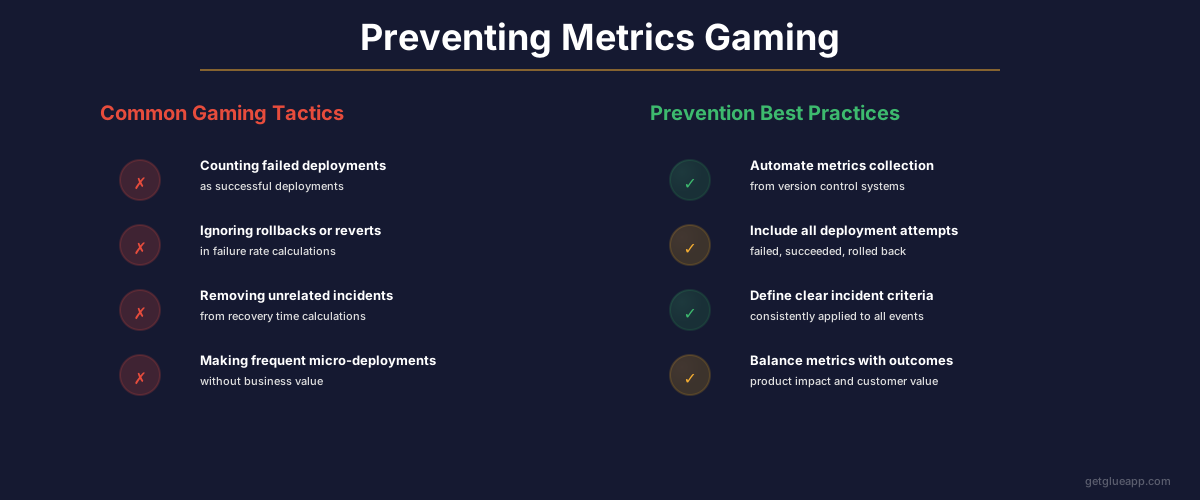
Why It Backfires: You're measuring the symptom, not the disease. If you artificially pump up deployment frequency without reducing lead time or improving change failure rate, you're not actually shipping value faster. Reviewers catch on. Morale drops. You burn out your team.
The Right Way: Deployment frequency should increase as a natural result of eliminating bottlenecks in your process, not as a goal in itself. Fix code review time. Fix test flakiness. Fix approval processes. Frequency increases naturally.
Mistake 2: Lowering Change Failure Rate by Deploying Less
The Trap: Your change failure rate is 25%, so you decide to deploy less frequently. Fewer deployments = fewer failures, right?
Why It Backfires: You're just hiding the problem. Now you're sitting on more code, which means larger deployments, which means larger blast radius when something breaks. Your change failure rate might look better, but you've actually made the problem worse.
The Right Way: Fix the root causes of failures: bad testing, unclear requirements, lack of observability, poor communication. Don't optimize for the metric - optimize for the thing the metric measures.
Mistake 3: Only Measuring Deployment Frequency, Ignoring the Others
The Trap: You focus entirely on deploying more often and ignore quality metrics.
Why It Backfires: You become a team that deploys broken code frequently. Change failure rate and MTTR will spike. Customers get frustrated. You lose trust.
The Right Way: Treat DORA metrics as a system. All four metrics matter together. They tell a complete story only when you look at them together.
Mistake 4: Changing Definitions to Look Better
The Trap: Your deployment frequency looks low, so you redefine what counts as a "deployment." Now feature flags count. So do database migrations that run automatically. Suddenly your numbers look better.
Why It Backfires: You're lying to yourself. The business knows what actually shipped. Metrics lose meaning when definitions keep changing.
The Right Way: Define your metrics once, document the definitions, and stick with them. Consistency matters more than the absolute numbers.
How to Improve Each DORA Metric: Actionable Steps
To Improve Deployment Frequency
- Identify the bottleneck: Where does code sit waiting? Code review? Testing? Approval?
- Automate tests: Manual testing slows you down. Invest in test automation.
- Parallel CI/CD: Don't make teams wait for tests to finish sequentially.
- Reduce approval gates: Do you really need 3 people to approve every change? Can you trust your team?
Realistic Timeline: 2-3 months to see meaningful improvement
To Improve Lead Time for Changes
- Make code review fast: Set a 4-hour review SLA. Most reviews should be same-day.
- Reduce PR scope: Smaller PRs review faster. Smaller PRs have fewer bugs. Win-win.
- Automate style and format: Don't spend review time on indentation. Use linters.
- Reduce approval chain: Who actually needs to sign off? Get rid of unnecessary steps.
Realistic Timeline: 1-2 months to see improvement
To Improve Change Failure Rate
- Invest in testing: Unit tests, integration tests, end-to-end tests. Test the critical paths.
- Add observability: If you can't see what's happening in production, you can't catch failures.
- Use feature flags: Deploy code that's not live yet. Reduce blast radius of failed deployments.
- Require staged rollouts: Deploy to 5% of users first, monitor, then increase.
Realistic Timeline: 3-6 months (testing culture takes time)
To Improve Mean Time to Recovery
- Add monitoring and alerting: You can't recover from what you don't know is broken.
- Create runbooks: Document how to respond to common incidents.
- Practice incident response: Run game days. Most teams have never practiced recovering from an incident.
- Make rollback easy: If you can roll back a deployment in under 5 minutes, your MTTR plummets.
Realistic Timeline: 1-2 months to see improvement
The Glue Connection: How Code Intelligence Powers DORA Metrics
If you're measuring DORA metrics manually - pulling data from GitHub, calculating lead time with spreadsheets, tracking changes in Jira - you're doing it wrong. It's error-prone, time-consuming, and you're always looking at last month's data.
That's where tools like Glue come in. Glue connects to your Git repositories and gives you real-time visibility into:
- How quickly code moves from commit to production
- Which teams are deploying frequently and which are bottlenecked
- Where the delays happen in your process (code review, testing, deployment)
- Which changes cause production incidents
The key insight: DORA metrics aren't just for DevOps teams anymore. Product leaders need this data to understand whether engineering is moving fast or slow. Engineering managers need it to identify process bottlenecks. Executives need it to understand delivery velocity.
With Glue, you get all four DORA metrics automatically, benchmarked against similar companies, with breakdowns by team and project. No manual calculation. No gaming the metrics because the data is transparent and real-time.
FAQ: Questions About DORA Metrics
Q: Is deployment frequency really the right metric? What if my changes take weeks to build? A: Deployment frequency is about how often you ship code, not how long features take to build. Use feature flags. Build the feature in small, daily commits to main, hide it behind a flag, then flip the flag when it's ready. This lets you deploy daily while features take weeks.
Q: Should every team in our company aim for elite DORA metrics? A: No. A critical internal tool team might have lower deployment frequency than a customer-facing team, and that's fine. DORA metrics should be context-specific. An internal admin panel doesn't need to deploy multiple times per day.
Q: What if our change failure rate is high because we're in a regulated industry? A: Then you'll have higher change failure rate because of compliance checks, longer testing cycles, etc. That's okay. The metrics help you understand your constraints, not escape them. The question is: within your constraints, are you improving?
Q: Can DORA metrics be gamed? A: Yes, easily. That's why transparency is critical. If your metrics are real-time and verifiable from the source systems (Git, CI/CD, incident tracking), people can't game them. If they come from self-reported spreadsheets, they will be gamed.
Q: How do DORA metrics relate to velocity? A: They measure different things. Velocity measures output (story points completed). DORA measures delivery (how fast code reaches customers). A team can have high velocity but low deployment frequency if they're not shipping work to production. DORA metrics tell you if engineering work is actually reaching customers.
Q: If I'm a solo engineer or a startup, do DORA metrics matter? A: They're less critical early on, but they still matter. As soon as you have more than one person on the team, bottlenecks emerge. Measuring DORA metrics helps you spot them early and fix them before they become cultural problems.
Q: What's a "healthy" change failure rate? Isn't zero better? A: A change failure rate of zero means you're probably not moving fast enough or taking enough intelligent risks. Elite teams typically run at 5-15% change failure rate. The goal is not zero failures - it's failures that are small, quick to detect, and quick to recover from.
The Bigger Picture: Beyond DORA Metrics
DORA metrics are essential, but they're not the complete story. They tell you how fast you're delivering and how stable your delivery process is. They don't tell you:
- Are you building the right things? (Product metrics)
- Is your code maintainable? (Code quality metrics)
- Are your customers happy? (Customer satisfaction metrics)
- Are your engineers happy? (Retention, satisfaction)
Use DORA metrics as one lens into your engineering organization. But pair them with product metrics, quality metrics, and team health metrics to get the full picture.
This guide was last updated February 2026. DORA metrics continue to evolve. For the latest research, visit dora.dev.
Related Reading
- DORA Metrics: The Complete Guide for Engineering Leaders
- Cycle Time: Definition, Formula, and Why It Matters
- Deployment Frequency: The DORA Metric That Reveals Your True Engineering Velocity
- Change Failure Rate: The DORA Metric That Reveals Your Software Quality
- Lead Time: Definition, Measurement, and How to Reduce It
- Software Productivity: What It Really Means and How to Measure It