Glue

AI codebase intelligence for product teams. See your product without reading code.

Product

  • How It Works
  • Benefits
  • For PMs
  • For EMs
  • For CTOs

Resources

  • Blog
  • Guides
  • Glossary
  • Comparisons
  • Use Cases

Company

  • About
  • Authors
  • Support
© 2026 Glue. All rights reserved.
RSS
Glue
For PMsFor EMsFor CTOsHow It WorksBlogAbout
GUIDE

CI/CD Pipeline: The Definitive Guide to Continuous Integration & Delivery

Build a CI/CD pipeline that actually works. Covers pipeline stages, tool comparison, security integration, and the metrics that matter for deployment velocity.

SS
Sahil SinghFounder & CEO
June 4, 202617 min read
Engineering Productivity

A CI/CD pipeline is the backbone of modern software delivery. It is the automated system that takes code from a developer's machine, tests it, secures it, and delivers it to production. Every company that ships software at speed, from two-person startups to organizations with thousands of engineers, depends on a CI/CD pipeline that works reliably. And yet, most teams treat their pipeline as an afterthought. They set it up once, bolt on steps as needed, and only revisit it when builds are so slow that engineers start skipping them.

I have set up CI/CD pipelines for teams at every stage, and the difference between a team with a fast, reliable pipeline and a team with a slow, flaky one is night and day. The first team deploys ten times a day with confidence. The second team deploys once a week with dread. The pipeline is not just infrastructure. It is a multiplier on everything your engineering team does.

This guide walks through what a CI/CD pipeline is, how to build one, how to secure it, and how to measure whether it is actually working.

What Is a CI/CD Pipeline

A CI/CD pipeline is an automated workflow that moves code from version control to production through a series of defined stages. "CI" stands for Continuous Integration: the practice of merging code changes into a shared repository frequently, with each change validated by automated builds and tests. "CD" stands for Continuous Delivery (code is always in a deployable state) or Continuous Deployment (code is automatically deployed to production after passing all checks).

The "pipeline" metaphor is apt. Code enters one end, passes through a sequence of gates, and exits the other end either deployed to production or rejected with specific feedback about what went wrong. Each stage performs a specific validation. If any stage fails, the pipeline stops and notifies the team.

Without a CI/CD pipeline, software delivery depends on manual processes: running tests locally, building artifacts by hand, deploying through SSH sessions or manual scripts. These processes are slow, error-prone, and do not scale. A 2023 CircleCI report analyzing over 50 million workflows found that teams with optimized pipelines deploy 200 times more frequently than teams without them.

The core promise of a CI/CD pipeline is fast, reliable feedback. When an engineer pushes code, they should know within minutes whether it passes all quality gates. When it does, it should reach production with minimal manual intervention. When it does not, the failure should be specific enough to fix without investigation.

Pipeline Stages Explained

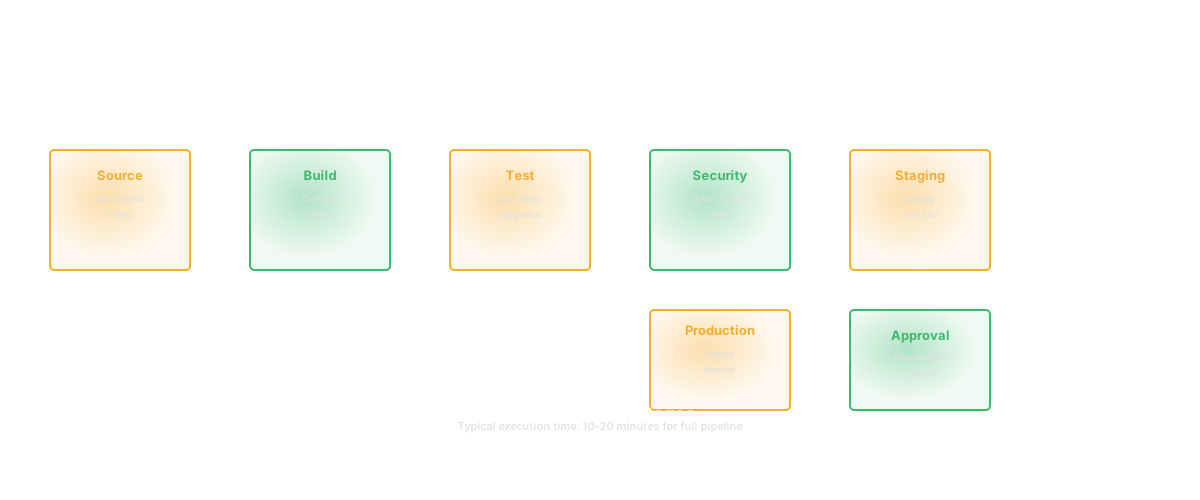
A typical CI/CD pipeline has five to seven stages. Each serves a specific purpose and catches a different category of problems.

Source stage. The pipeline triggers when code is pushed to the repository. The trigger can be a push to any branch, a push to specific branches, or a pull request event. This stage checks out the code and prepares the environment. Configuration here determines which events start the pipeline and which branches are protected.

Build stage. The code is compiled (for compiled languages) or bundled (for interpreted languages). Dependencies are resolved and installed. Build artifacts are created. This stage catches syntax errors, missing dependencies, and compilation failures. A fast build stage is critical. If the build takes 10 minutes, every subsequent stage starts 10 minutes late.

Test stage. Automated tests run against the built code. This typically includes unit tests (fast, isolated, testing individual functions), integration tests (testing how components work together), and sometimes end-to-end tests (testing complete user workflows). The test stage is where most defects are caught. According to the National Institute of Standards and Technology (NIST), fixing a defect in production costs 30 times more than fixing it during testing. The test stage of your CI/CD pipeline is your most cost-effective quality gate.

Security and analysis stage. Static analysis tools scan the code for vulnerabilities, code quality issues, and policy violations. Dependency scanners check for known vulnerabilities in third-party libraries. Secret detection tools ensure that API keys, passwords, and credentials have not been committed. This stage is increasingly critical as supply chain attacks become more common.

Staging/pre-production stage. The code is deployed to an environment that mirrors production. Smoke tests and acceptance tests run against this deployment. This stage catches issues that only appear in a deployed context: configuration problems, environment-specific bugs, and infrastructure mismatches.

Deployment stage. The code is deployed to production. Deployment strategies include blue-green deployments (switching traffic between two identical environments), canary deployments (rolling out to a small percentage of users first), and rolling deployments (updating instances incrementally). The choice of strategy affects your risk profile and rollback speed.

Monitoring stage. After deployment, the pipeline monitors key metrics: error rates, latency, resource utilization. If metrics deviate from baselines, the pipeline can trigger an automatic rollback. This stage closes the feedback loop by ensuring that a successful deployment also means a successful release.

CI/CD Tools Compared

The tool market is crowded. The right choice depends on your infrastructure, team size, and existing toolchain.

GitHub Actions is the default choice for teams already on GitHub. It is tightly integrated with the repository, supports a massive marketplace of pre-built actions, and offers generous free tiers for open-source projects. Configuration lives in YAML files within the repository. The learning curve is gentle, and the community support is extensive.

GitLab CI/CD is built into GitLab and offers a complete DevOps platform. If your team uses GitLab for source control, this is the natural choice. It supports complex pipeline configurations, includes built-in container registry and security scanning, and scales from small teams to enterprise deployments.

Jenkins is the veteran. It is open-source, infinitely extensible through plugins, and runs on your own infrastructure. Jenkins gives you complete control but requires significant maintenance. It is best suited for teams with dedicated DevOps engineers who need custom behavior that hosted solutions cannot provide.

CircleCI focuses on speed and developer experience. It offers strong caching, parallelism, and reusable configuration (orbs). CircleCI is a good fit for teams that prioritize fast execution and are willing to use a hosted service.

Buildkite takes a hybrid approach: the orchestration is hosted, but the agents (build runners) run on your infrastructure. This gives you the convenience of a hosted service with the security and performance of on-premise builds. Buildkite is popular with security-conscious teams and teams with resource-intensive builds.

Dagger is a newer entrant that lets you define pipelines as code in your preferred programming language (Go, Python, TypeScript) rather than YAML. This approach makes pipelines testable, composable, and portable across CI providers. If you are frustrated with YAML-based configuration, Dagger is worth evaluating.

For teams practicing trunk-based development, the tool choice is particularly important. That model requires fast execution (under 10 minutes) and reliable feedback. Any tool that supports parallelism, effective caching, and fast startup times will work. Avoid tools that introduce queuing delays during peak commit times.

Building Your First Pipeline

If you are starting from scratch, keep it simple. A minimal CI/CD pipeline has three stages: build, test, deploy. You can add sophistication later. Complexity should grow with the complexity of your system, not ahead of it.

Step 1: Choose your trigger. For most teams, the pipeline should run on every push to the main branch and on every pull request. PR pipelines run the build and test stages but do not deploy. Main branch pipelines run everything including deployment.

Step 2: Define the build step. Install dependencies and compile the code. Cache dependencies between runs to avoid reinstalling them every time. A clean build that takes 5 minutes can often be reduced to 30 seconds with proper caching.

Step 3: Run tests. Start with your existing test suite. If you do not have tests, start with a linting step. A pipeline that only checks code formatting is still better than no pipeline. It establishes the workflow of "every push gets validated." You can add test coverage incrementally.

Step 4: Deploy to staging. Set up a staging environment that mirrors production. Deploy automatically after tests pass. Run basic smoke tests against the staging environment to catch deployment-specific issues.

Step 5: Deploy to production. Start with manual approval for production deploys. This means the pipeline prepares the deployment but a human clicks "approve" before it executes. Once you trust the pipeline, remove the manual gate and deploy automatically.

Step 6: Add notifications. The pipeline should notify the team when it fails. Slack, email, or your team's communication tool of choice. Fast feedback on failures is the entire point. A failure that nobody sees for an hour is a failure that blocks everyone for an hour.

Start there. Get it working. Then iterate. Add security scanning when you have a reliable build. Add performance testing when your staging environment is stable. Add canary deployments when your production traffic supports it.

"First make it work, then make it right, then make it fast." - Kent Beck

That progression applies perfectly to pipeline construction. A working pipeline that runs in 20 minutes is better than a theoretical pipeline that runs in 5. Ship the simple version. Observe where it is slow or unreliable. Optimize based on real data, not guesses.

Security in CI/CD (Shift Left)

"Shift left" means moving security checks earlier in the development process, into the CI/CD pipeline, rather than relying on security reviews at the end. The principle is straightforward: the earlier you catch a vulnerability, the cheaper it is to fix.

Traditional security models audit the application before release. The audit finds issues. The team fixes them. The release is delayed. This model does not work when you deploy multiple times per day. Security must be automated and embedded in the pipeline.

Dependency scanning. Tools like Dependabot, Snyk, and Renovate scan your project dependencies for known vulnerabilities. A single vulnerable dependency in your package.json or requirements.txt can expose your application to attacks. These tools run automatically and block merges when critical vulnerabilities are detected.

Static Application Security Testing (SAST). Tools like Semgrep, CodeQL, and SonarQube analyze your source code for security patterns: SQL injection, cross-site scripting, insecure deserialization, hardcoded secrets. SAST runs on the code itself, not on a running application, so it can be integrated early in the workflow.

Secret detection. Tools like GitLeaks and TruffleHog scan commits for accidentally committed secrets: API keys, database passwords, private certificates. Secret detection should run as a pre-commit hook (catching secrets before they reach the repository) and in the pipeline (catching anything the hook missed).

Container scanning. If your application runs in containers, scanning the container image for vulnerabilities in the base image and installed packages is required. Tools like Trivy, Anchore, and Docker Scout perform this analysis.

"The only truly secure system is one that is powered off, cast in a block of concrete and sealed in a lead-lined room." - Gene Spafford

That quote is extreme, but the underlying point matters. Perfect security is unachievable. The goal of shift-left security is not to prevent all vulnerabilities but to catch the common, known ones automatically, so your security team can focus on the nuanced, application-specific risks. For a deeper treatment of shift-left principles, see our guide on shift-left testing.

Measuring CI/CD Pipeline Performance

A slow or unreliable CI/CD pipeline is almost worse than no pipeline at all. It trains engineers to avoid pushing code. Measuring performance is necessary to maintain value.

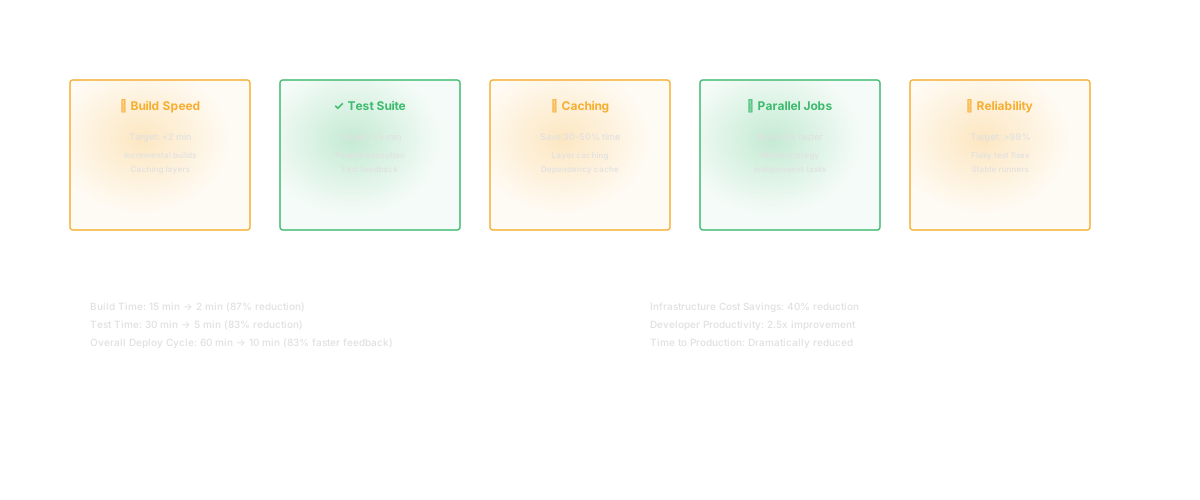
Pipeline duration. How long does the full workflow take from trigger to deployment? The target depends on your context, but a general benchmark is under 10 minutes for the build-and-test cycle. A study by the DORA team found that elite performers have a lead time (commit to production) of less than one day. If your pipeline alone takes an hour, you are burning a significant portion of that budget.

Success rate. What percentage of runs pass? A low success rate (below 90%) indicates either flaky tests, unreliable infrastructure, or code that is being pushed without local validation. Track this over time and investigate sustained drops.

Flaky test rate. A flaky test is one that fails intermittently without a code change. Flaky tests are pipeline poison. They train engineers to ignore failures and retry until the build passes. Track which tests are flaky and either fix or remove them. A test suite with a 5% flake rate will produce at least one spurious failure in most runs.

Queue time. How long does a run wait before it starts executing? If you are running out of build agents during peak hours, engineers are waiting in line to get feedback. Scale your build infrastructure to minimize queue time, or use cloud-based runners that auto-scale.

Mean time to fix. When the pipeline breaks, how long until it is green again? A broken build blocks the entire team. If it sits unfixed for hours, your pipeline is costing you more than it saves. Establish a team norm that fixing a broken build is the top priority.

Track these metrics using DORA metrics as your framework. DORA provides a well-researched benchmark for comparing your performance against industry standards.

Glue can provide visibility into how your CI/CD pipeline performance connects to broader engineering health. By analyzing commit patterns, build outcomes, and deployment frequency alongside codebase complexity, Glue helps identify whether pipeline problems are infrastructure issues or symptoms of deeper code quality concerns. For example, if your test stage is slow because the test suite has grown without pruning, Glue can surface which test files correspond to which code modules, helping you prioritize test optimization efforts.

CI/CD for Microservices

Microservices architectures introduce specific challenges that monolithic applications do not face.

Pipeline per service. Each microservice should have its own pipeline. Changes to Service A should not trigger the build for Service B. This requires your system to detect which services were affected by a code change and trigger only the relevant workflows. Monorepo tools like Nx, Turborepo, or Bazel provide this change-detection capability.

Service dependency management. When Service A depends on Service B's API, changes to Service B's contract need to be validated against Service A. Contract testing (using tools like Pact) ensures that API changes do not break consumers. This testing runs in the provider service's pipeline.

Environment management. Testing a microservice in isolation is insufficient. You need an environment where multiple services can run together. Docker Compose works for local development. Kubernetes namespaces or ephemeral environments (like those created by Tilt or Telepresence) work for CI. The goal is to test service interactions without requiring a full staging environment for every run.

Deployment ordering. When multiple services need to be updated together (database migration plus API change plus frontend update), the deployment order matters. Your pipeline needs to handle ordered, coordinated deployments. Feature flags can decouple these changes so each service can be deployed independently.

Shared libraries. If multiple services depend on a shared library, changes to that library should trigger pipelines for all dependent services. This is versioning and dependency management at the build system level.

Microservices CI/CD is not harder than monolith CI/CD. It is different. The complexity shifts from a single large pipeline to many small pipelines that need to coordinate. Invest in change detection, contract testing, and ephemeral environments early. They become exponentially harder to add later.

"A distributed system is one in which the failure of a computer you did not even know existed can render your own computer unusable." - Leslie Lamport

Lamport's observation applies directly to microservices pipelines. A failing pipeline for Service B can block deployments for Service A if they share a dependency. Build your CI/CD system with the assumption that any individual pipeline can fail, and design the overall system to remain functional when it does. Independent pipelines, clear dependency boundaries, and contract tests are your tools for making Lamport's warning manageable.

Advanced Patterns

Once your CI/CD pipeline is stable and fast, these patterns can improve it further.

Pipeline as code. Define your configuration in the same repository as your application code. This means pipeline changes go through the same review process as code changes. It also means you can version, branch, and roll back configuration just like code.

Progressive delivery. Combine your pipeline with feature flags and observability to release features gradually. Deploy the code, then use flags to expose it to 1% of users, then 10%, then 50%, then 100%. At each stage, monitor error rates and user behavior. If something goes wrong, turn off the flag. This pattern is the safest way to deploy to production because the blast radius is always controlled.

Caching and parallelism. Cache build artifacts, dependencies, and Docker layers between runs. Run independent stages in parallel. A pipeline that runs tests for three microservices sequentially takes three times longer than one that runs them in parallel. Most tools support both caching and parallelism natively.

Self-healing pipelines. If your pipeline detects a production issue (elevated error rate, increased latency), it can automatically trigger a rollback to the last known good deployment. This requires good monitoring, clear rollback procedures, and confidence in your deployment tooling. Self-healing workflows are advanced but they reduce MTTR to near-zero for deployment-caused incidents.

Multi-environment promotion. Instead of building artifacts separately for each environment, build once and promote the same artifact through dev, staging, and production. This ensures that what you tested is exactly what you deploy. Environment-specific configuration is injected at deployment time, not build time.

The CI/CD pipeline is not a project you finish. It is a system you maintain and improve continuously. Every month, look at your metrics. Identify the slowest stage. Find the flakiest tests. Remove unnecessary steps. Add new checks as your security and quality requirements evolve. A pipeline that was fast six months ago may be slow today because the codebase grew. Treat your pipeline with the same care you treat your production code, because in a very real sense, it is production infrastructure.


FAQ

What are the stages of a CI/CD pipeline?

A typical pipeline has five to seven stages: source (code checkout triggered by a push or PR), build (compilation and dependency resolution), test (unit tests, integration tests, and sometimes end-to-end tests), security and analysis (SAST, dependency scanning, secret detection), staging (deployment to a pre-production environment with smoke tests), production deployment (blue-green, canary, or rolling deploy), and monitoring (post-deployment health checks with automatic rollback capability). Not every pipeline needs all stages. Start with build, test, and deploy, then add stages as your needs grow.

Which CI/CD tool is best?

There is no single best tool. GitHub Actions is the strongest choice for teams on GitHub due to its tight integration and large marketplace. GitLab CI is ideal for GitLab users who want an all-in-one platform. Jenkins offers maximum flexibility for teams willing to maintain their own infrastructure. CircleCI and Buildkite excel at speed and are good fits for teams with performance-sensitive builds. The most important factors are execution speed, reliability, team familiarity, and integration with your existing toolchain.

How long should a CI/CD pipeline take?

The build-and-test cycle should complete in under 10 minutes for most applications. The full workflow from commit to production should complete in under an hour. DORA research shows that elite-performing teams have a lead time of less than one day from commit to production. If your pipeline exceeds 15 minutes for the core build-and-test stages, invest in parallelism, caching, and test optimization. Slow pipelines cause engineers to batch changes, which undermines the continuous integration principle.

What is shift-left testing?

Shift-left testing means moving testing and security checks earlier in the development process, closer to when the code is written. Instead of finding bugs in QA or vulnerabilities in a pre-release security audit, shift-left integrates these checks into the CI/CD pipeline so they run automatically on every code change. The principle is that defects caught early are cheaper to fix. NIST research estimates that a defect found in production costs 30 times more to fix than one found during development. Shift-left testing automates that early detection through SAST tools, dependency scanners, contract tests, and comprehensive unit and integration test suites.

FAQ

Frequently asked questions

[ AUTHOR ]

SS
Sahil SinghFounder & CEO
RELATED

Keep reading

guideJun 14, 202613 min

Feature Flags: The Complete Guide to Safe, Fast Feature Releases

Feature flags decouple deployment from release. Learn implementation patterns, management best practices, and how to avoid the flag debt trap.

SS
Sahil SinghFounder & CEO
guideJun 16, 202614 min

Shift Left: How Moving Testing Earlier Cuts Defect Costs by 100x

Shift left testing and security catches defects when they are cheapest to fix. Learn implementation strategies, tools, and how to measure the ROI of shifting left.

SS
Sahil SinghFounder & CEO
guideJun 17, 202619 min

Software Development Lifecycle (SDLC): Every Phase Explained for 2026

Understand every phase of the SDLC: planning, analysis, design, development, testing, deployment, and maintenance. Includes model comparisons and modern AI-augmented workflows.

SS
Sahil SinghFounder & CEO