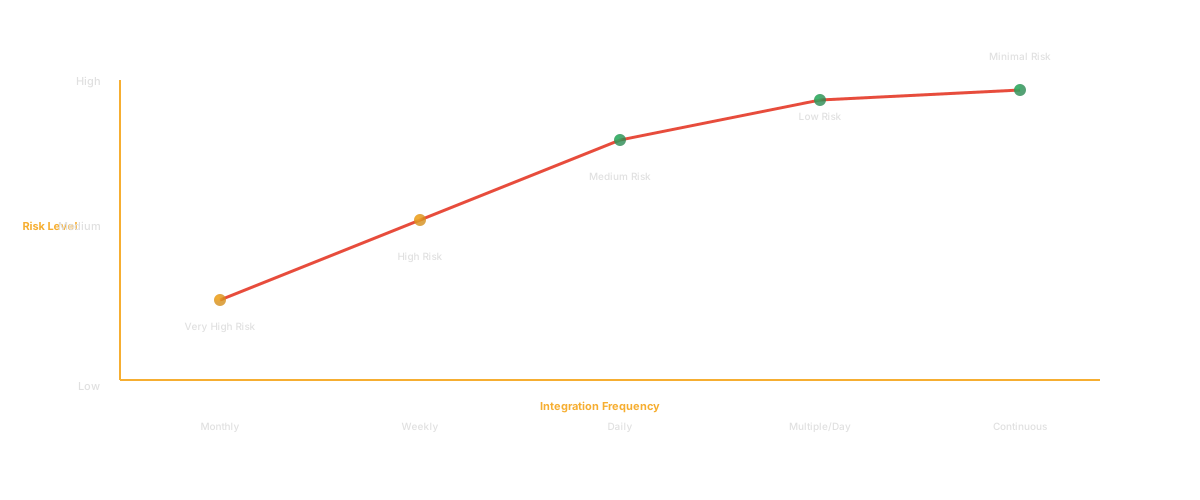
The way your team manages branches is not just a technical detail. It shapes how fast you ship, how often you break things, and how much time engineers spend on work that is not writing code. Trunk-based development has become the default branching strategy at companies like Google, Meta, and Netflix, and the reasons go beyond engineering preference. The data consistently shows that this approach correlates with higher deployment frequency, lower change failure rates, and faster incident recovery.
I have migrated two teams from GitFlow to trunk-based development, and both times the initial reaction was fear. "What if someone pushes broken code to main?" "How do we manage features that take weeks?" "This will never work for our team." Six months later, both teams had cut their cycle time in half and would not go back. The fear was real but the problems were solvable.
This guide covers what trunk-based development is, how it compares to GitFlow, why it works, and how to adopt it without setting your codebase on fire.
What Is Trunk-Based Development
Trunk-based development is a source-control branching model where all developers commit to a single shared branch, typically called "main" or "trunk." Rather than creating long-lived feature branches that diverge from the main codebase for days or weeks, engineers make small, frequent commits directly to the trunk or through very short-lived branches that merge within one to two days.
The core principle is simple: keep the trunk always releasable. Every commit should leave the codebase in a state that could be deployed to production. This requires discipline, good testing, and a shift in how engineers think about work-in-progress code.
In its strictest form, the approach means no branches at all. Engineers commit directly to main. In its more common form, engineers create branches that live for a few hours to a couple of days, get reviewed quickly, and merge back. The defining characteristic is not the absence of branches but the absence of long-lived branches.
According to the 2023 DORA State of DevOps report, teams practicing trunk-based development are significantly more likely to be elite performers across all four DORA metrics: deployment frequency, lead time for changes, change failure rate, and mean time to recovery.
The model has been practiced at scale for decades. Google's monorepo, which contains billions of lines of code, operates on this model with over 25,000 engineers committing to a single trunk. If it works at that scale, the "our team is too big" argument does not hold up.
"Make the change easy, then make the easy change." - Kent Beck
That philosophy is central to how trunk-based development works in practice. Instead of building a complete feature on a branch and merging it all at once, you make a series of small changes to the trunk that prepare the codebase for the feature: extract an interface, add a configuration option, create a new table. Each change is trivial to review and safe to deploy. Then the final change, the one that actually enables the feature, is also small.
Trunk-Based Development vs GitFlow
GitFlow, introduced by Vincent Driessen in 2010, was the dominant branching model for over a decade. It prescribes a structured set of branches: main, develop, feature branches, release branches, and hotfix branches. Each branch type has specific rules about where it originates and where it merges.
GitFlow worked well for a specific era: teams that shipped software on a release schedule (monthly, quarterly) and needed to maintain multiple versions simultaneously. If you are shipping packaged software or maintaining parallel release lines, GitFlow still has a place.
But for teams that deploy continuously, and that is most modern web and SaaS teams, GitFlow introduces friction that committing to a shared trunk eliminates.
Merge conflicts. Long-lived feature branches diverge from the main codebase. The longer a branch lives, the more it drifts. When it is time to merge, the conflicts can be extensive and painful. Working off a single trunk eliminates this by keeping everyone on the same base, with integrations happening at least daily.
Integration delays. In GitFlow, code written on Day 1 of a feature branch might not be integrated until Day 14. During those two weeks, other changes have landed on the develop branch. The feature code was written against assumptions about the codebase that may no longer hold. Committing to trunk forces continuous integration in the literal sense: code is integrated continuously.
Release complexity. GitFlow release branches require a choreographed process of merging, tagging, and back-merging. This process is error-prone and time-consuming. When the trunk is always releasable, deploying is as simple as picking a commit and shipping it.
Cognitive overhead. GitFlow requires engineers to think about which branch they should be working on, where to merge, and how to handle the branching ceremony. A single-trunk model has one rule: commit to main. The cognitive load is dramatically lower.
The trade-off is real, though. Working directly on trunk requires a higher baseline of engineering discipline. You need good CI, automated testing, and feature flags. GitFlow lets you be sloppier because the branch structure provides isolation. But that isolation is false safety. It just delays the pain of integration to a point where the pain is larger. For a broader perspective on branching models, see our comparison of git branching strategies.
Why Top Teams Choose Trunk-Based
The case for this approach is not theoretical. It is empirical.
The DORA research program, which has studied thousands of engineering teams over a decade, consistently finds that trunk-based development is a predictor of elite performance. Teams that use it deploy more frequently, recover from incidents faster, and have lower change failure rates. These are not small differences. Elite performers deploy on demand (multiple times per day) while low performers deploy between once per month and once per six months.
"If it hurts, do it more frequently, and bring the pain forward." - Jez Humble, Continuous Delivery
The mechanism is straightforward. When you commit small changes frequently, each individual change is easy to understand, easy to review, easy to test, and easy to roll back if something goes wrong. When you batch changes into large feature branches, each merge is a high-risk event that is hard to understand, hard to review, and hard to roll back.
Think of it like this. Would you rather cross a river by stepping on twenty small, stable stones? Or by making one massive leap? The individual steps are small enough that failure is cheap. That changes the team's relationship with risk. Engineers stop fearing deployment because each deployment is a minor change, not a multi-week accumulation of work.
This also affects code review quality. A 50-line pull request gets a thorough review. A 2,000-line pull request gets a cursory "looks good to me." Short-lived branches naturally produce smaller PRs because the branch only lives for a day or two. The result is better reviews, fewer bugs, and faster knowledge sharing across the team.
How to Migrate from GitFlow
Migration is where most teams get stuck. They agree the single-trunk model is better but cannot figure out how to get from here to there. The answer is incrementally.
Phase 1: Shorten branch lifetimes. Do not mandate the change overnight. Start by setting a maximum branch lifetime. Two weeks is a reasonable starting point if your branches currently live for months. Then ratchet it down: one week, three days, one day. Each reduction forces the team to break work into smaller pieces.
Phase 2: Invest in CI. This model requires a CI pipeline that runs quickly and catches regressions reliably. If your test suite takes 45 minutes, engineers will resist committing frequently because the feedback loop is too slow. Get your CI/CD pipeline to the point where it runs in under 10 minutes. Parallelize tests. Cut flaky tests. Make the green build trustworthy.
Phase 3: Adopt feature flags. The biggest objection is "how do I commit unfinished features to trunk?" The answer is feature flags. Wrap work-in-progress code behind a flag that is off in production. The code is on trunk but not active. This decouples deployment from release, which is one of the most powerful concepts in modern software delivery.
Phase 4: Build the review muscle. Fast code reviews are non-negotiable. If PRs sit for two days waiting for review, you cannot maintain short-lived branches. Establish team norms around review turnaround time. Many teams adopt a "review within 4 hours" rule. Some use pair programming to eliminate the review queue entirely.
Phase 5: Celebrate the first scary merge. The first time someone merges a change that feels risky, and it works, the team's confidence grows. The first time a small change breaks something and gets rolled back in minutes, the team sees that the safety net works. These moments are cultural turning points.
The timeline for migration varies by team size and existing practices. Small teams (under 10 engineers) can typically complete the transition in four to six weeks. Larger teams may need three to six months, migrating one team or service at a time. Do not try to migrate the entire organization at once. Start with one team, demonstrate success, and let that success pull other teams forward.
According to Puppet's State of DevOps report, high-performing teams are 2.5x more likely to have fully integrated CI/CD pipelines, which is a prerequisite for working on a shared trunk. If your CI infrastructure is weak, fix that before attempting the migration.
Feature Flags for Trunk-Based
Feature flags deserve their own section because they are the enabling technology for trunk-based development at scale.
A feature flag is a conditional check in your code that controls whether a feature is active. At its simplest, it is an if statement: if the flag is on, show the new checkout flow. If it is off, show the old one. In practice, feature flag systems support targeting (show the feature to 10% of users), gradual rollouts, and kill switches.
Flags solve the "unfinished work on trunk" problem. An engineer can merge code for a feature that is 60% complete. The code is on the main branch, passing CI, and reviewed. But it is behind a flag, so no user ever sees it. The engineer continues building the feature in subsequent commits, each merging to trunk. When the feature is complete and tested, the flag is turned on. If something goes wrong, the flag is turned off. No rollback. No hotfix branch. Just a configuration change.
The operational overhead of feature flags is real. Flags accumulate over time and need to be cleaned up. Stale flags add code complexity. But this cost is far smaller than the cost of maintaining long-lived branches. Tools like LaunchDarkly, Flagsmith, Split, and open-source options like Unleash make flag management practical even for small teams.
Flags also enable the approach for teams working on large features. Instead of a three-month feature branch, break the work into incremental commits behind a flag. Each commit is small, reviewable, and integrated with everyone else's work. The integration risk that accumulates in a long-lived branch simply disappears.
CI/CD Pipeline Setup
Working on a shared trunk without CI is like driving without brakes. Technically possible. Practically suicidal.
Your CI pipeline is the safety net that makes frequent commits safe. Every commit triggers the pipeline, which should, at minimum, compile the code, run the test suite, perform static analysis and linting, and run security scans.
The pipeline must be fast. If it takes 30 minutes, engineers will batch changes to avoid waiting, which defeats the entire purpose. Target under 10 minutes for the main pipeline. If your test suite is slow, split it: run fast unit tests on every commit and slower integration tests on a schedule.
The pipeline must be reliable. A flaky test that fails randomly teaches engineers to ignore failures. Every failure should be a real signal. If you have flaky tests, fix them or delete them. A smaller, reliable test suite is more valuable than a large, unreliable one.
For teams migrating to this model, the CI pipeline investment is non-negotiable. It is the foundation that everything else builds on. Track your pipeline performance using DORA metrics to ensure your infrastructure supports the pace of delivery the model enables.
Measuring Trunk-Based Development Success with DORA Metrics
How do you know if your adoption of trunk-based development is working? DORA metrics provide the answer.
Deployment frequency measures how often your team deploys to production. The trunk model should increase this. If you were deploying weekly under GitFlow, you should be deploying daily or multiple times daily after the migration.
Lead time for changes measures the time from code commit to production deployment. This metric drops dramatically because there is no branch lifecycle to manage. Code goes from commit to review to merge to deploy in hours, not days.
Change failure rate measures the percentage of deployments that cause a failure in production. Counterintuitively, more frequent deployments often reduce this rate. Smaller changes are easier to test and easier to understand, which means fewer escape defects.
Mean time to recovery (MTTR) measures how quickly the team recovers from a production failure. Small, frequent commits make it easy to identify which change caused the problem and roll it back. When a deployment contains thousands of lines of changes from a feature branch merge, finding the culprit takes much longer.
According to the 2023 DORA report, elite-performing teams have a lead time of less than one day and deploy on demand. Low performers have lead times of one to six months. Trunk-based development is the branching strategy that makes elite performance possible.
Track these metrics before you start the migration and monitor them throughout. The improvement will not be immediate. There is typically a transition period where things feel slower as the team builds new muscles. But within two to three months, the metrics should show clear improvement.
Glue can help track these metrics by analyzing your team's commit patterns, branch lifetimes, and deployment cycles directly from your repository data. Rather than manually assembling measurements from multiple tools, Glue provides a unified view of how your delivery pipeline is actually performing. This visibility is particularly valuable during a migration, when you need to identify bottlenecks in review turnaround, CI speed, or deployment frequency.
Common Pitfalls
Adopting the model without CI. This is the most dangerous mistake. Without automated testing on every commit, working on a shared trunk means every engineer can break the build for everyone else. Invest in CI first.
Not using feature flags. Teams that try committing to trunk without feature flags either ship unfinished features to users or stop committing until features are complete, which recreates the long-lived branch problem in disguise.
Keeping the old review culture. If your team's review turnaround is three days, the approach will not work. You will end up with branches that are "short-lived" only because the code changes are small, but they still sit in review for days. Fix review culture before or during the migration.
Making the switch too abruptly. Going from month-long branches to daily commits overnight creates chaos. Phase the migration. Start with shorter branches and work your way down.
Ignoring team communication. Frequent commits to a shared branch require more communication, not less. When everyone works on trunk, engineers need to coordinate. "I am about to refactor the auth module" is information the whole team needs. Daily standups become more important, not less.
Treating it as a silver bullet. The single-trunk model is a powerful practice, but it does not fix bad testing, unclear requirements, or lack of code review. It amplifies your existing practices. If those practices are strong, this approach makes them stronger. If they are weak, it exposes the weakness faster.
Neglecting flag cleanup. Feature flags are critical for the approach, but they create their own debt. A codebase with 200 stale feature flags is hard to understand and hard to test. Build flag retirement into your process. When a feature is fully rolled out, removing the flag should be the next task, not a backlog item that sits forever.
"Continuous integration is the practice of merging all developer working copies to a shared mainline several times a day." - Martin Fowler
That definition from Fowler is worth revisiting. "Several times a day" is the standard, not once a week. If your team is committing to trunk less than once per day per engineer, you are not yet practicing continuous integration. You are practicing "less-frequent integration," which captures some of the benefits but not all.
A 2022 survey by Atlassian found that 43% of development teams still use feature branch workflows with lifetimes exceeding one week. These teams report 2x more merge conflicts and 1.5x longer code review cycles compared to teams using short-lived branches. The data is consistent: shorter branch lifetimes correlate with better outcomes across every metric that matters.
The teams that succeed with trunk-based development are the ones that treat it as a system change, not just a branching change. It requires adjustments to CI, testing, review culture, feature management, and communication. But once those adjustments are in place, the speed and reliability improvements are substantial and lasting.
FAQ
What is trunk-based development?
Trunk-based development is a source-control branching model where all developers commit to a single shared branch (the "trunk" or "main"). Instead of creating long-lived feature branches, engineers make small, frequent commits directly to trunk or through very short-lived branches that merge within one to two days. The core principle is keeping the trunk always in a releasable state through small changes, automated testing, and feature flags for work in progress.
Is trunk-based better than GitFlow?
For teams that deploy continuously (most modern web and SaaS teams), the trunk model is measurably better. DORA research consistently shows it correlates with higher deployment frequency, lower change failure rates, and faster recovery times. GitFlow still has value for teams shipping packaged software or maintaining multiple release versions simultaneously. The key question is your deployment model. If you deploy continuously, working on a shared trunk eliminates the merge conflicts, integration delays, and release complexity that GitFlow introduces.
How do you handle features in trunk-based development?
Feature flags are the primary mechanism. Engineers commit work-in-progress code behind a flag that is off in production. The code lives on trunk, passes CI, and is reviewed incrementally. When the feature is complete and tested, the flag is turned on. This decouples deployment from release. Large features are broken into small, incremental commits rather than built on a long-lived branch. Each commit is small enough to review, test, and integrate without risk.
What size team needs trunk-based development?
Teams of any size can benefit, but the advantages scale with team size. A two-person team may not feel the pain of long-lived branches because coordination is easy. Once a team reaches five or more engineers committing to the same codebase, the merge conflicts and integration delays of feature branches become significant. Google operates this model with over 25,000 engineers on a single repository. The practice scales in both directions.