
At Shiksha Infotech, I built an in-house monitoring system that replaced IBM Netcool/Proviso. We could see fault metrics, performance metrics, availability metrics, all on a single dashboard. We reduced reporting cycles from a full day to a few hours. I thought we'd solved the visibility problem.
We hadn't. We'd built monitoring. We knew when things were down. But when a customer complained about intermittent slowness in a specific network segment, we couldn't answer "why." We had dashboards full of green numbers and a customer experiencing something our dashboards didn't capture. That was the first time I understood the gap between monitoring and observability, even though I didn't have the vocabulary for it then.
Years later at Salesken, the stakes were higher. We processed live sales calls in real-time, delivering coaching hints to salespeople mid-conversation. If latency spiked by even 200ms, the hint arrived too late to be useful. Monitoring told us when latency was high. It couldn't tell us whether the bottleneck was in the speech-to-text pipeline, the ML model inference, the event bus, or the database query that fetched the coaching playbook. We needed observability.
Monitoring Is Not Observability
Monitoring tells you about things you already know to look for. You define metrics ahead of time (CPU, memory, request latency, error rates) and collect them. You set thresholds. When those thresholds breach, you get an alert. This works great for known problems. It's terrible for unknown ones.
Observability is the ability to ask arbitrary questions about your system's state without knowing in advance what questions you'll need to ask. It's about unknown unknowns. You're not trying to predict failure modes. You're trying to build systems that reveal their own failure modes when you ask.
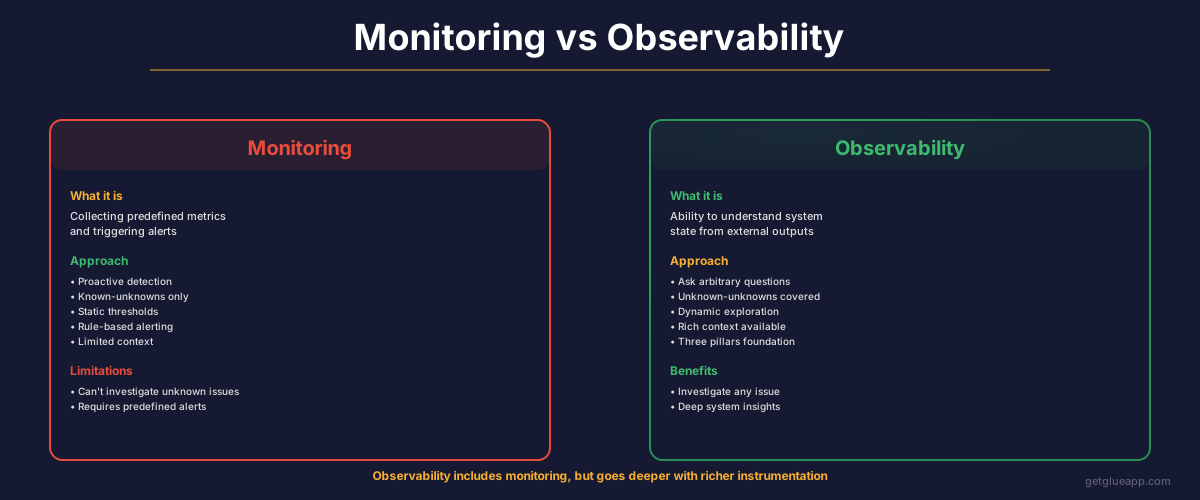
The practical difference: Monitoring says "we're alerting on 95th percentile latency." Observability lets you answer: what percentage of requests hit the cache? Of those that hit the database, what was the query time distribution by table? Of the slow queries, which came from the auth service? What percentage of those had retry loops?
Monitoring is a fire alarm. Observability is forensic evidence.
The Three Pillars
The observability industry settled on three pillars: logs, metrics, and traces. Each tells you something different, and you need all three.
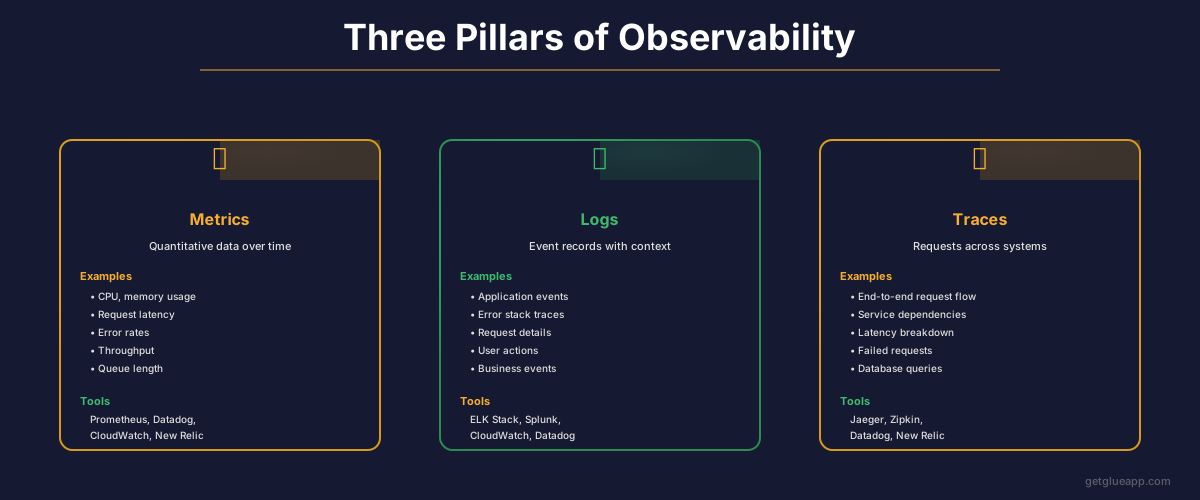
Logs are events that happened. "User 12345 logged in at 14:32:10 UTC." "Database connection pool exhausted at 14:32:15 UTC." Logs are high cardinality, meaning they can contain any arbitrary information, but they're expensive to store. Most teams can only afford to log a fraction of their events.
Metrics are measurements over time. They're aggregations: request count, latency distribution, CPU usage, queue depth. Cheap to store. You can keep metrics forever. But they're aggregates. When you look at a metric, you've lost the individual data points. You know the 95th percentile went up, but you don't know which requests were slow or why.
Traces are the request flow through your system. A single API request hits auth, then the gateway, then three backend services, then the database. A trace shows the entire path, the timing of each hop, and any errors.
Most teams implement metrics first, eventually add logs, and never implement traces. I made this exact mistake at Salesken. We had beautiful Grafana dashboards for months before we had any distributed tracing. When a coaching hint arrived late, we'd grep through logs across four services trying to reconstruct the timeline manually. It took 30-45 minutes per incident. After we added tracing with Jaeger, the same investigation took 3 minutes. I wish I'd prioritized traces from day one.
Why Traces Matter Most
Think about a slow request. With logs and metrics, you see "latency was high." You dig through logs, find the request ID, and try to correlate timestamps across services. It's manual and slow.
With traces, you see the exact timeline of every operation in every service. Auth took 50ms. API gateway took 20ms. Service A took 200ms and called Service B. Service B made three database queries. The second query was 150ms. You can zoom into that query. Was it a full table scan? A connection timeout? Lock contention?
At Salesken, traces revealed something we'd never have found through logs alone. Our speech-to-text service was making redundant calls to a feature flag service on every audio chunk. Hundreds of times per call. The feature flag service was fast (2ms per call), so it never showed up as a latency problem in metrics. But the cumulative overhead was adding 400ms to every 60-second call. We only found it because a trace showed 200 tiny spans from the same service. Without traces, we'd have kept optimizing the wrong things.
Implementing Observability
Here's what you actually need to do.
Instrument everything with OpenTelemetry. OpenTelemetry is the open standard for generating traces, metrics, and logs in a vendor-agnostic way. Use the language-specific SDKs. Instrument your frameworks (Django, FastAPI, Rails, Spring Boot all have integrations). Set it up once and it runs in the background.
What to instrument: every external call (database queries, HTTP requests, cache hits), every business operation (user login, payment processing, report generation), and every state change in critical services. You don't need to instrument every line of code. Instrument the boundaries where latency actually lives.
Structure your logs. Logs should be structured data, not free-form text. JSON with consistent keys. Every log entry should include: timestamp, request ID (for correlation), service name, operation name, and context-specific fields. Never log "error occurred." Log "database_connection_failed" with host, port, error_message. When your logs are structured, you can query them like a database.
Connect traces to logs. Every log entry should include the trace ID. This lets you reconstruct the full timeline. When you're looking at a trace in Jaeger, you click to see all log entries for that trace ID. When you're in your logs, you click to see the full trace. This connection is what makes the three pillars work as a system rather than three separate tools.
Implement distributed tracing. This is not optional. Logs and metrics alone are not enough for distributed systems. Use context propagation (W3C Trace Context standard) to pass trace information between services. If you're starting fresh, OpenTelemetry plus Jaeger or Grafana Tempo is the path of least resistance.
Create service maps from traces. Once you have traces, you can build a map of which services call which other services. This is your actual system topology, not the architecture diagram someone drew eighteen months ago. Real service maps reveal undocumented dependencies and unauthorized integrations. At Salesken, our service map showed that our analytics service was calling the billing service directly, bypassing the API gateway. Nobody had designed that. Someone had added it during a late-night fix and it stayed.
SLOs, Not SLAs
An SLA is a contract with your customer. "We guarantee 99.9% uptime." Miss it, you owe money.
An SLO is an internal target. More aggressive than your SLA because you want cushion. When you burn through your error budget (the planned-for downtime), you shift from features to reliability work until you're back in budget.
Most teams set SLOs based on arbitrary numbers. "99.9% sounds good." Real SLOs are based on observability data. You measure: when availability dropped below X%, did we lose customers? Did revenue change? You set your SLO at the threshold where business impact actually happens, not where it sounds impressive in a slide deck.
I'll admit we never got this right at Salesken. We set "99.9% availability" because it sounded professional. We never actually validated whether that was the right threshold. For real-time call coaching, a 200ms latency SLO might have been more meaningful than an availability SLO, because a slow hint is as useless as no hint. If I were doing it again, I'd set latency-based SLOs from the start.
The Culture Piece
Observability doesn't work as an infrastructure afterthought. You need to treat "understanding what's happening in production" as a first-class engineering concern.
This means: developers think about what they need to observe before they write code. Code reviews include questions about observability: "What happens when this service is overloaded? How will we know? What metric will change?" On-call engineers have time during their shift to improve observability of systems they support.
When a production incident happens, the post-mortem includes: "What made this hard to debug? What observability was missing?" That becomes a ticket. The next time you hit that scenario, you see it immediately.
In practice, getting this culture right is hard. Engineers want to build features, not instrument telemetry. The return on observability investment is invisible until the incident happens. I don't have a clean answer for this. At Salesken, what worked was making observability part of the definition of done: a feature isn't shipped until it has traces and structured logging for its critical paths. It added maybe 10% to development time. It saved us hours during every incident.
Connecting Observability to Codebase Intelligence
Observability tells you what's happening in production. Codebase intelligence explains why the code behaves that way.
You see a trace showing that Service A is consistently slower when calling Service B. Why? Is there a retry loop? Is connection pooling misconfigured? Is there a database N+1 problem? Codebase intelligence lets you ask: "Show me every call from Service A to Service B. How many HTTP clients are configured? Do they share a connection pool?" You see the pattern without reading hundreds of lines of code.
Observability is external (what's happening). Codebase intelligence is internal (why the code is structured this way). Together they close the debugging loop. We're building this connection at Glue, though I'll be honest: the hard part isn't surfacing either data source independently, it's correlating them automatically. A trace span labeled "db_query" and a code function called "fetchUserProfile" aren't obviously the same thing without context. That's an active problem we're working on.
Observability in 60 Seconds TL;DR
Monitoring tells you about known problems. Observability lets you ask arbitrary questions about system state. Three pillars: logs (structured events), metrics (aggregated measurements), traces (request flows). Implement OpenTelemetry for vendor-agnostic instrumentation. Connect logs to traces using trace IDs. Create real service maps from traces. Set SLOs based on data, not vibes. Treat observability as a first-class engineering concern, not an afterthought.
Frequently Asked Questions
Q: Doesn't implementing observability require expensive tools?
No. OpenTelemetry is free and open source. Jaeger for traces is free. The ELK Stack for logs is free. You can build world-class observability on open source. Commercial vendors like Datadog and New Relic add polish and managed hosting, but they're not required. We ran Jaeger and Prometheus at Salesken for two years before adding any commercial tooling. Start free, add paid tools when you hit specific limits.
Q: How much observability is enough?
Enough to answer questions without digging through code or doing manual correlation. If a production incident takes your on-call engineer 30 minutes to understand the root cause, you don't have enough. If it takes 3 minutes, you probably do. The metric is time-to-understanding, not the number of dashboards you've built.
Q: Can we retrofit observability into an existing system?
Yes. Start with OpenTelemetry SDKs in your frameworks (30 minutes of setup). Add structured logging (1-2 days). Add distributed tracing (1-2 weeks depending on system complexity). Do this incrementally. Trace the most critical user flows first, then expand. Don't try to instrument everything at once.
Related Reading
- Incident Management: From Alert to Resolution to Prevention
- Mean Time to Recovery: The Complete Guide to Faster Incident Resolution
- Deployment Frequency: The DORA Metric That Reveals Your True Engineering Velocity
- Autonomous Monitoring for Software Teams
- CI/CD Pipeline: The Definitive Guide
- How to Choose Your Technology Stack
- What Is DevOps