Glossary
Technical documentation explains how software systems work. Learn how to keep docs current with docs-as-code and AI-generated documentation strategies.
At Salesken, our documentation was scattered across Confluence, Google Docs, README files, and Slack pinned messages. Finding anything took longer than writing it from scratch.
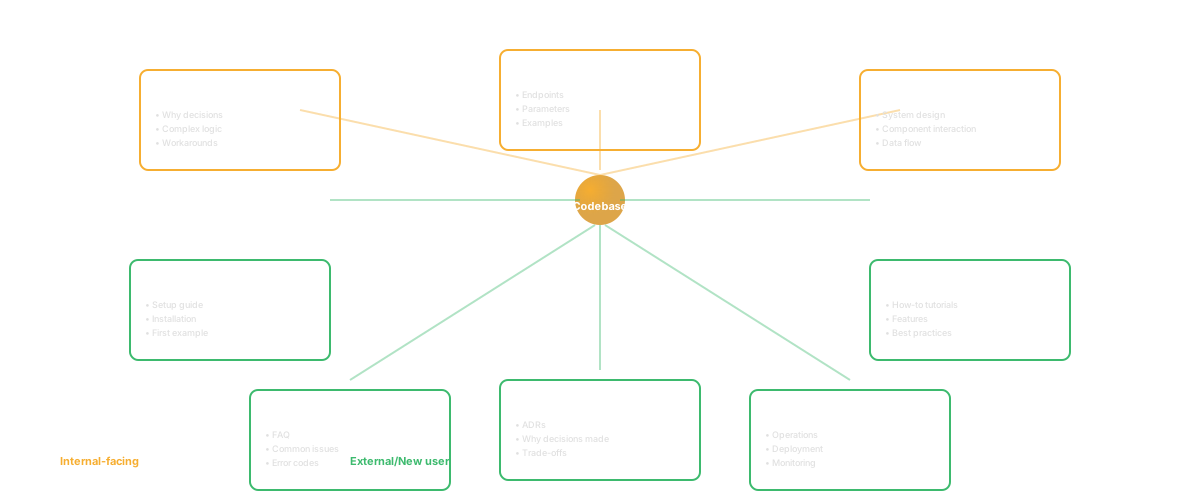
Technical documentation is written explanation of how a system works. It includes: architecture documentation (how systems are designed and why), API documentation (how to use interfaces), runbooks (how to operate systems), and onboarding guides (how to get started).
Good technical documentation enables people to understand systems without needing to ask the engineer who built them. Poor or missing documentation means knowledge is trapped in people's heads.
Technical documentation directly affects:
Onboarding speed: New engineers ramp faster with documentation. They can answer their own questions instead of asking busy people.
Reliability: Operators need to know how to run systems safely. Runbooks prevent mistakes during incidents.
Hiring: Engineers are attracted to companies where they can understand the codebase without heroic effort.
Continuity: When someone leaves, documentation preserves what they knew.
Decision-making: Product managers and leaders make better decisions when they understand system architecture and constraints.
Architecture Documentation
Explains: what systems exist, what they do, how they interact, why they're designed as they are, what constraints they have.
Audience: engineers new to the team, anyone making architectural decisions.
Example: "Our system uses microservices. Here's why. Here's the boundary between services. Here's how data flows."
API Documentation
Explains: what endpoints exist, what parameters they take, what they return, error cases, examples.
Audience: engineers using the API.
Example: "GET /users/:id returns user object. Parameters: id (required, integer). Returns: {id, name, email}. Errors: 404 if user not found."
Runbooks
Explains: how to operate systems, what to do when something breaks, debugging steps.
Audience: on-call engineers, operators.
Example: "If the payment service is down: Check if database is responding. Restart the service. If that doesn't work, escalate to the database team."
Onboarding Guides
Explains: how to get started, key concepts, first steps.
Audience: new engineers.
Example: "Welcome! Here's the tech stack. Here's how to set up your dev environment. Here are the three systems you'll interact with."
Decision Records
Explains: what decisions were made, why, what alternatives were considered.
Audience: engineers who need to understand the reasoning behind decisions.
Example: "We chose PostgreSQL over MongoDB because: 1) ACID transactions matter for financial data, 2) relational model fits our data, 3) operational simplicity."
Start with questions people ask: "How do I deploy?" "How does the auth system work?" "What happens if the database goes down?" Write docs that answer these.
Keep it concise: Long documentation gets skipped. 5 clear pages beats 50 pages of prose.
Use examples: Code examples are powerful. "Here's how to call the API" with a curl example is more useful than 2 paragraphs of explanation.
Keep it updated: Outdated documentation is worse than no documentation. Make updating docs part of your process. When code changes, documentation changes.
Make it accessible: Where do people look for documentation? In a Confluence page only the PM knows about? In code comments? In a readme? Make it searchable and visible.
Organize hierarchically: Start with high-level overview. Then dig into details. "System overview -> Components -> Component internals."
Wikis: Confluence, Notion. Easy to edit, searchable, accessible.
Code comments: Documenting code where it lives. Pros: stays with code. Cons: not discoverable, easy to become stale.
READMEs: In repository. Pros: visible. Cons: only for that repo.
Dedicated docs sites: Docusaurus, Sphinx. Pros: professional, customizable. Cons: more overhead to set up and maintain.
Documentation as code: Markdown in Git. Pros: versioned, code review. Cons: requires Git knowledge.
Documentation is often neglected:
"We're too busy." Documentation takes time. When you're shipping fast, it gets deferred. That's a choice with consequences: future velocity is slower.
"Documentation gets outdated." It does, if you don't update it. Make updating documentation part of the process.
"We'd rather have code than docs." False choice. Good code + good documentation is better than either alone.
"Only new people read docs." True, but new people are expensive to onboard poorly. Good documentation saves months of hiring cost.
Distributed teams: Synchronous explanation doesn't scale across time zones. Documentation becomes essential.
Complex systems: If the system is complex, only documentation makes it understandable.
Regulatory environments: Financial, healthcare, etc. need documented decisions and processes.
High turnover: If people leave frequently, documentation is insurance against knowledge loss.
"Code is self-documenting." Good code is clear, but it doesn't explain why decisions were made or what alternatives were considered. Documentation addresses why.
"We should write documentation after we ship." You rarely will. Write it as you go. Small docs continuously beat one comprehensive document never written.
"Documentation is the tech writer's job." Tech writers help, but engineers need to document their systems. They have the knowledge.
"We'll automate documentation generation." You can auto-generate API documentation from code. But you can't auto-generate architecture decisions or runbooks. Some documentation requires human judgment.
Q: How much documentation is enough?
A: Enough to answer: "How does the system work?" "How do I use it?" "What happens if it fails?" Start with those. Expand as needed.
Q: How do we keep documentation up to date?
A: Make it part of process. PR checklist: "Does this PR require documentation updates?" If yes, include doc updates in the PR. Code review: "Is documentation accurate?" If not, request updates.
Q: Should we document everything?
A: No. Document what's hard to understand or easy to get wrong. Self-explanatory code doesn't need docs. Surprising behavior does.
Q: Who writes documentation?
A: The person who knows the system. That's usually the engineer who built it. Have someone else read it and feedback. If it's hard to understand for others, it needs improvement.
Keep reading
Related resources
