Glossary
Codebase search lets you find functions, patterns, and logic in source code. Learn semantic vs. text search and how non-technical teams benefit.
Across three companies, I've seen the same pattern: critical knowledge locked inside a handful of senior engineers' heads, invisible to everyone else.
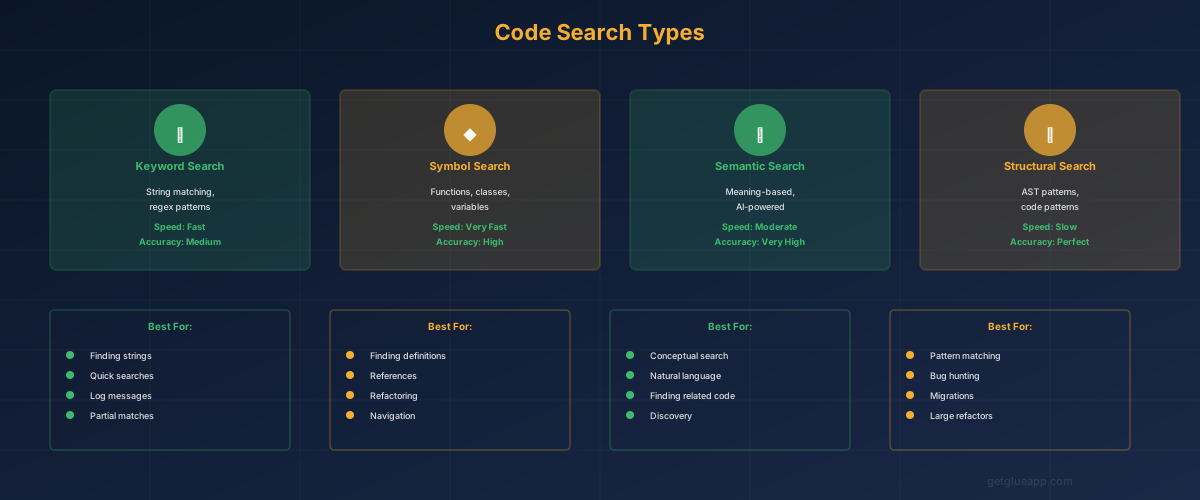
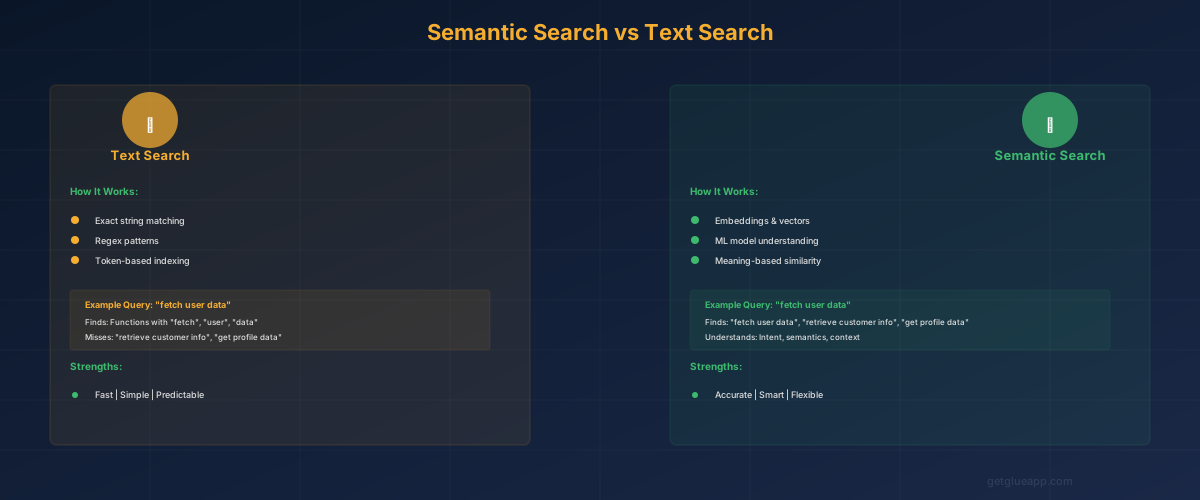
Codebase search is the ability to search through source code repositories to find specific functions, patterns, logic, or context. It bridges the gap between "I need to find something" and "I know exactly what I'm looking for." Traditional codebase search (grep, GitHub search) is text-matching: you find what you type exactly. If you search for "payment_processor," you get every line containing those characters. Modern AI-powered codebase search is semantic: you search for what you mean, even if you don't know the exact function name. Search "where do we handle failed payments?" and the system finds the relevant code without you needing to know it's in a function called "process_payment_retry" or a module named "billing_engine."
Traditional codebase search is an engineer's tool. You need domain knowledge to use it effectively. You need to know that payment logic lives in the "billing" module, not the "payments" module. You need to know the code uses a function called "process_retry" not "retry_payment." A PM trying to answer "what happens when a payment fails?" would struggle to find the relevant code without asking an engineer.
This is where codebase search becomes a PM's tool. When a PM can search for "payment failure handling" and find the relevant code without knowing internal naming conventions, they gain visibility into system behavior that previously required engineering time. When a product manager asks "how long do we wait before retrying a failed payment?", they can find that out directly instead of creating a Slack message and waiting for a response.
The business impact is significant. Product decisions often require understanding current system behavior. Can the system do X today? What would it take to add Y? How does Z currently work? Every question that requires "ask an engineer" is a question that doesn't get answered in strategy meetings, that slows down decision-making, and that creates friction between product and engineering.
The deeper insight is about scaling understanding. A single engineer can hold in their head how the system works. As the codebase grows and teams expand, that knowledge becomes distributed. With traditional codebase search, you need an engineer's assistance to find anything. With semantic codebase search, you can find answers yourself. This doesn't replace engineers - - it frees them from answering simple questions so they can focus on hard ones.
Consider a scenario where a product team is planning a feature to let users retry failed transactions themselves, instead of waiting for automatic retries.
Using traditional codebase search, a PM would need to:
services/billing/retry_engine.pyEach question requires an engineer's context. The PM can't search effectively without knowing the code's structure and naming conventions.
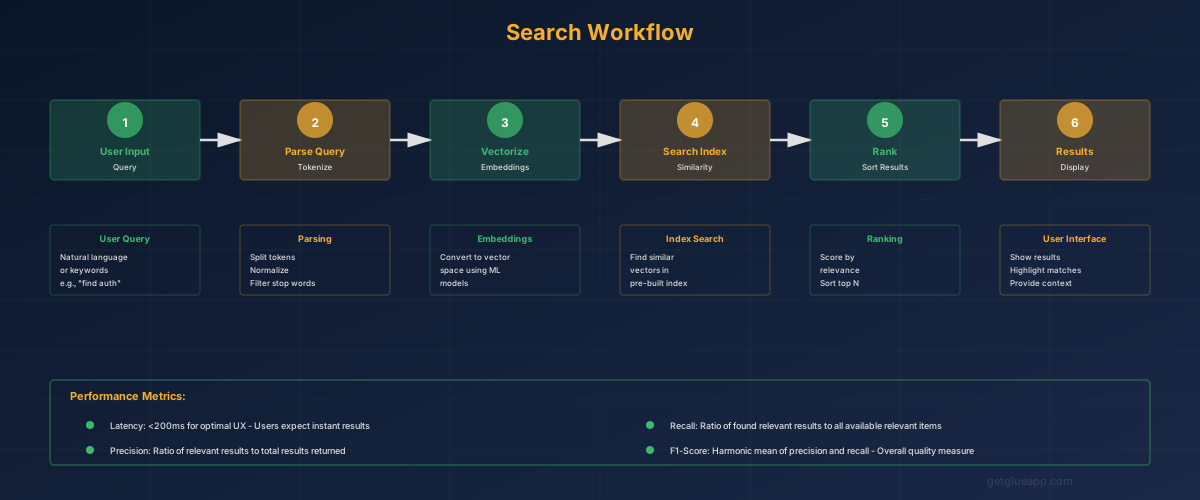
Using semantic codebase search, a PM can:
The PM has the same answers without interrupting engineers five times. The answers come in minutes instead of hours.
Now the PM has the information needed for better product decisions: "We can add manual retry, but it requires exposing the retry trigger endpoint currently used internally. Architecture impact is low because the trigger logic is separate from the retry logic. Timeline estimate: 3 days if we also add retry status visibility in the UI."
Text-based search finds exact character matches. You search for "payment_processor" and find every line with those characters. Advantages: fast, precise, straightforward. Disadvantages: require knowing exact terms, miss related code using different names, require multiple searches to understand context.
Regex and pattern search lets you search for patterns rather than exact strings. You can search for "all functions that take a payment_id parameter" or "all places where we log payment failures." Advantages: flexible, finds related code. Disadvantages: still require technical knowledge and knowing which patterns matter.
Semantic search uses AI to understand meaning. You search for "payment failure handling" and the system finds code that handles payment failures, regardless of whether it contains those exact words. It understands that "transaction failure" and "payment failure" are related concepts. Advantages: accessible to non-technical people, finds related code easily, surfaces context. Disadvantages: requires AI models trained on code, may have false positives if the model misunderstands context.
Graph-based search treats code as a graph of relationships - - functions calling other functions, modules importing modules, data flowing between systems. You can search for "all code that touches the payment ledger" and find everything that reads or writes to it. Advantages: shows relationships and dependencies, finds indirect impacts. Disadvantages: computationally intensive, can overwhelm with too many results.
Ask questions, don't search for terms. Instead of searching "payment retry," ask "how do we retry failed payments?" Let the search engine translate your question to code patterns.
Search for behavior, not implementation. Don't search for specific function names; search for what the function does. "Where do we generate invoices?" instead of "find the Invoice class."
Use search results to understand impact. When evaluating a feature, search for related code to understand what would change. "What systems depend on the payment status field?" tells you the scope of impact.
Explore the search results as a graph. Don't just read the first result. Follow the chain: this function calls this other function, which updates this data model. Understanding relationships is more valuable than finding a single function.
Use search to validate assumptions. Before committing to an architecture decision, search the codebase to understand current patterns. "How do we handle timeouts in I/O operations?" shows you what the team's established pattern is.
Misconception: Codebase search replaces reading code. Reality: Codebase search helps you find the code you need to read. Once you've found it, you still need to understand it. Search accelerates the discovery phase; it doesn't eliminate the understanding phase.
Misconception: Better search means engineers don't need to document. Reality: Better search does reduce the need for documentation, but documentation still serves purposes search doesn't. Documentation explains why decisions were made. Search shows you what the code does; documentation explains why it does it that way.
Misconception: Semantic search is always better than text search. Reality: Semantic search is better for exploratory questions ("how do we handle X?"). Text search is better for precise questions ("find all instances of this function"). The best systems combine both, letting you choose based on your question.
Q: Can codebase search help non-engineers understand the system? A: Yes, that's its primary value. A non-technical product manager can ask "how is user permission checked before payment?" and find the relevant code without knowing the system's structure. The manager may not understand every line, but they can understand the flow and answer questions like "could we add a subscription approval step?"
Q: What's the difference between codebase search and documentation? A: Documentation is static - - it's written once and needs to be updated manually. Codebase search is dynamic - - it's generated from the current code, so it's always current. Documentation explains context and reasoning. Codebase search shows current behavior. Use documentation for "why did we build it this way?" and codebase search for "what does it currently do?"
Q: Does codebase search work for private repositories? A: Yes, but it requires access to the repository. It can't search code you don't have access to, which is appropriate for security and privacy. Teams using codebase search internally have access to their own repositories.
Keep reading
Related resources
