
Tribal knowledge in engineering teams is undocumented institutional context — architectural decisions, system quirks, deployment procedures, and failure mode understanding — concentrated in a small number of senior engineers' heads. It creates critical bus factor risk: when key engineers leave, teams lose months of context that no documentation system captured. The solution is not more documentation (which becomes stale) but embedding knowledge into workflows through code review comments, architecture decision records (ADRs), post-mortem-updated runbooks, and automated codebase analysis that surfaces ownership patterns and dependency relationships without manual maintenance.
At UshaOm with 27 engineers, tribal knowledge was our biggest risk. When two senior engineers left in the same month, we lost institutional context that took six months to rebuild.
By Vaibhav Verma
Your team has knowledge concentrations. Somewhere, an engineer owns the mental model of the payment system. Somewhere else, one person understands the deployment infrastructure deeply enough to feel comfortable changing it. A third engineer is the only person who fully grasps why a certain architectural decision was made two years ago.
This is tribal knowledge. And it's not a documentation problem.
I've watched teams spend six months building documentation systems, knowledge bases, and internal wikis. And six months later, the tribal knowledge concentration is still there. Not because the knowledge didn't get written down - it did. But because knowledge capture wasn't wired into how people work.
The real problem is structural. Engineers don't hoard knowledge because they're difficult. They hoard it because sharing knowledge is work, and their incentives - ship features, close tickets, maintain velocity - don't reward knowledge transfer. Fixing tribal knowledge requires changing three things: what gets rewarded, what gets tooled, and what gets measured.
Why Tribal Knowledge Exists
Before I talk about solutions, let's be clear about the problem.
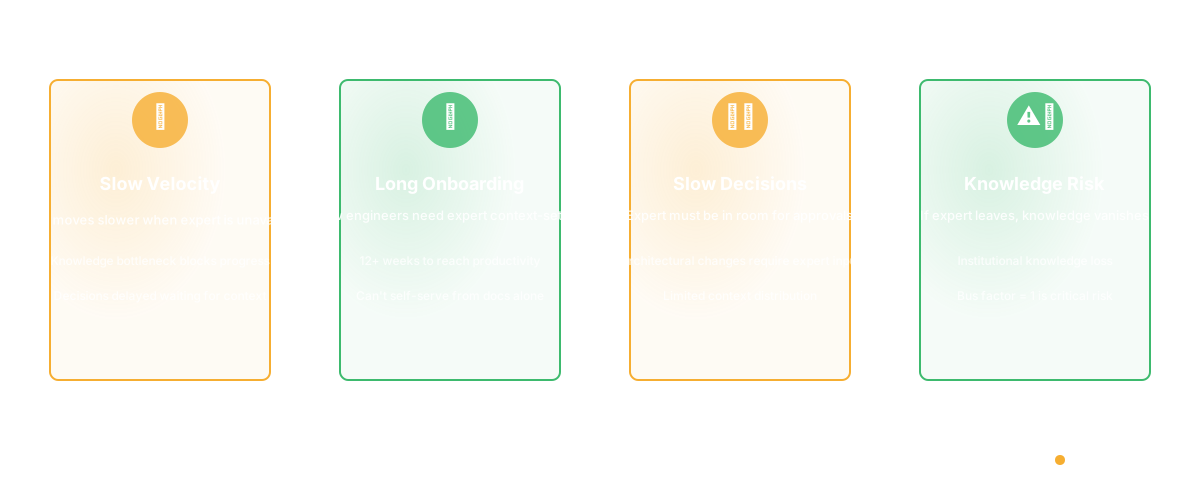
Tribal knowledge is expensive. When key knowledge lives in one person's head:
- You can't move fast if that person is on leave
- Onboarding new engineers takes longer (you need that person to context-set)
- Decisions get made slowly because you need that person in the room
- Risk concentrates: if that person leaves, you lose institutional knowledge
- You can't make certain architectural changes because you don't have the context to evaluate them
Teams know this. And most teams try to solve it with documentation. "Let's write down how the payment system works." "Let's create a runbook for deployments." "Let's document the architectural decision log."
The documentation doesn't stick. Why? Because the incentive structure works against it.
An engineer has 40 hours a week. They have:
- Features to ship (measured: velocity, shipped by sprint)
- Bugs to fix (measured: defect rate, incident response time)
- Code review responsibilities (measured: review turnaround)
- Maintenance work (measured: system health, uptime)
And they have knowledge transfer. Which isn't measured. Which doesn't contribute to velocity or feature output. Which feels like it takes time away from work that gets evaluated.
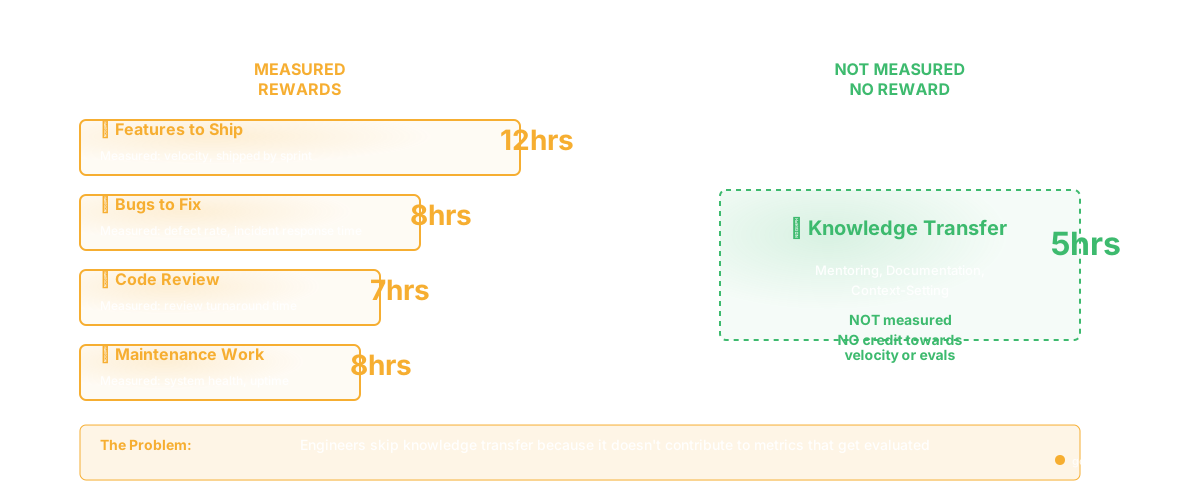
So knowledge transfer happens informally, rarely, and only when someone asks. And most people don't ask until they're blocked.
The Structural Fix
There are three levers:
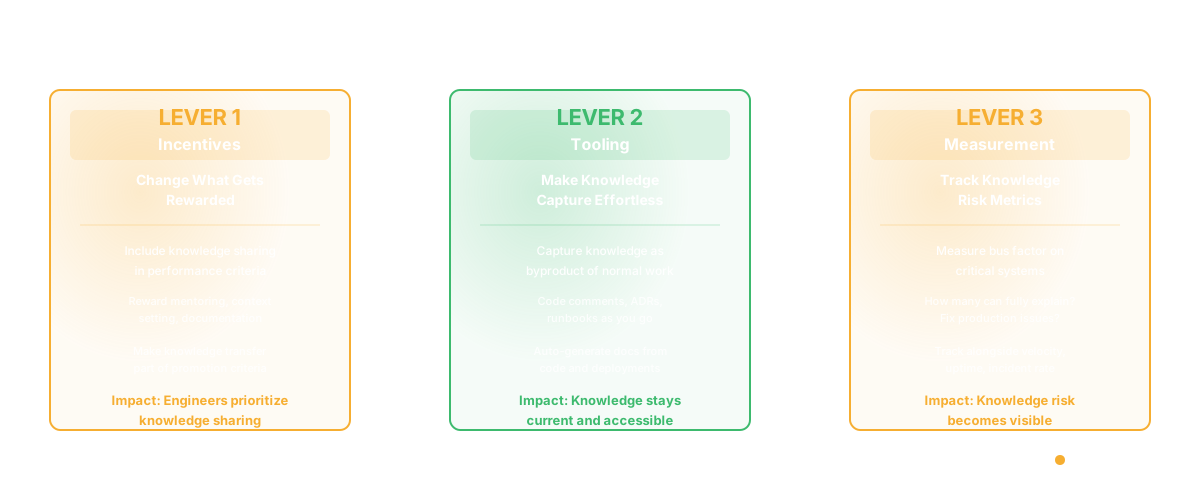
1. Change What Gets Rewarded
Include knowledge sharing in performance criteria. Not as a minor point - as a core part of what good engineering looks like.
"You shipped features fast" is good. "You shipped features fast and onboarded junior engineers effectively" is better. Explicitly reward knowledge transfer: peer mentoring, documentation, architectural context-setting. Make it part of promotion criteria.
This seems obvious. Most teams don't do it. Performance evaluations focus on output (features, fixes, velocity). Knowledge transfer feels secondary. Flipping that changes behavior.
2. Make Knowledge Capture the Path of Least Resistance
Don't ask engineers to write documentation as a separate task. Make it the natural byproduct of their work.
Examples:
- Code review should include a question: "Does the reviewer understand why this decision was made?" If not, document it in a comment or a linked ADR (Architecture Decision Record).
- When an engineer solves a tricky problem, the solution goes in code comments and a lightweight wiki entry. Not because they're dutiful, but because they're already explaining it to the PR reviewer.
- Deployment runbooks get written when incidents happen. When you're responding to an incident at 2 AM, you're learning how the system works. Capture that learning while it's hot.
- API documentation gets generated from code. Architectural diagrams get generated from code structure. You're not asking engineers to maintain documentation separately.
The theme: knowledge capture should be a side effect of normal work, not additional work.
3. Measure Knowledge Concentration as a Risk Metric
You measure velocity. You measure uptime. You measure incident rate. Measure knowledge concentration as a risk metric alongside these.
Concretely: for each critical system, track bus factor. How many people could fully explain how it works? How many could fix a production issue? How many could make an architectural change?
Track this alongside other risk metrics. If bus factor drops below your threshold, that's a red flag. It doesn't trigger alarm - it informs planning. If a critical system has bus factor = 1, you include knowledge-transfer work in the next quarter. Explicitly.
This makes knowledge concentration visible and actionable.
What Actually Works
These three changes - incentives, tooling, measurement - create conditions where knowledge transfer becomes normal.
I've seen teams implement this and see changes within two quarters:
- Onboarding time for engineers drops from 12 weeks to 6 - 8
- Knowledge of critical systems spreads to 3 - 4 people instead of 1 - 2
- Architectural decisions become clearer (because they're documented as they're made)
- Incidents get handled faster (because more people understand the system)
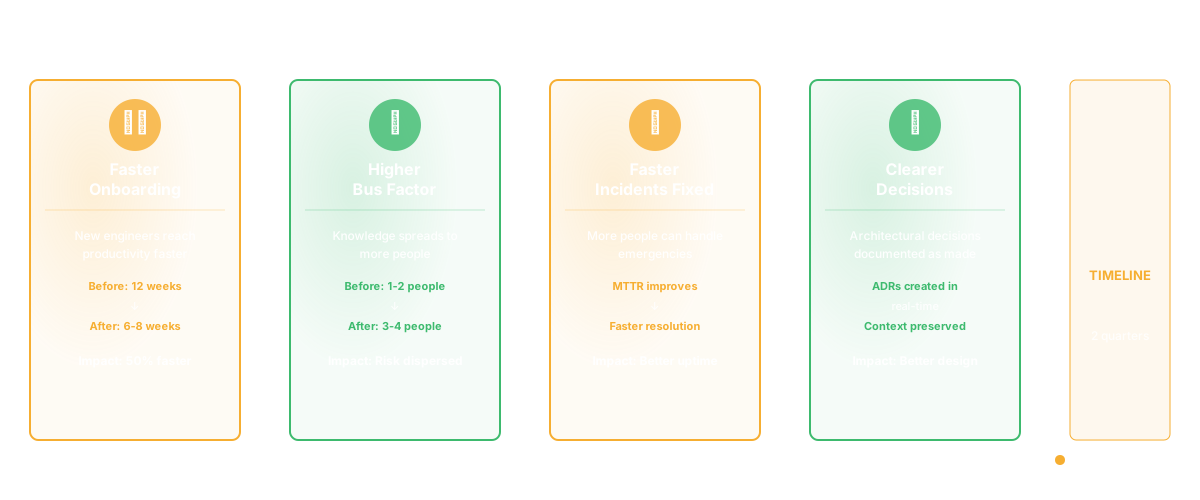
The mechanism isn't complicated. But it's different from "write better documentation." It's about making knowledge transfer a structural part of how engineering work gets valued and done.
Why Documentation Alone Fails
Most knowledge documentation efforts fail because they treat knowledge capture as a separate activity. "We should document the payment system architecture." So someone writes a 20-page document. It sits in a wiki. It doesn't get updated. It becomes stale. And when someone new joins, they read it and it's incomplete, because the real knowledge - the edge cases, the lessons learned from incidents, the decisions that didn't work out - that's not in the document. It's still in the heads of the people who built it.
A better approach: knowledge lives in multiple places, updated continuously.
Architecture decisions: documented in ADRs when they're made (not after the fact) API behavior: documented in code and auto-generated into reference docs System runbooks: updated when incidents happen Edge cases and gotchas: documented in PR comments as they're discovered
The point: knowledge capture happens as part of normal work. You're not asking anyone to write documentation "someday."
The Role of Tooling
The right tooling makes knowledge capture effortless. Examples:
- Codebase intelligence tools that surface why code exists, why decisions were made, who understands each system. This reduces the need to hunt down tribal knowledge.
- Automatic documentation generation from code. You don't maintain a separate doc - the system generates current documentation from your actual code.
- Incident review processes that force documentation of what happened and why. When you resolve an incident, you document the root cause. That becomes institutional knowledge.
Good tooling doesn't replace knowledge transfer. It makes it a byproduct of work rather than additional work.
Measuring Success
After you implement these changes, you'll see signals:
- Onboarding velocity improves (new engineers get productive faster)
- Bus factor on critical systems increases (knowledge spreads)
- Incident resolution time drops (more people can handle emergencies)
- Architectural decisions become clearer (decisions are documented as they're made)
- Knowledge-holding engineers stop being bottlenecks
These aren't just nice-to-haves. They're directly tied to engineering velocity and reliability. Fix tribal knowledge and you fix a major source of engineering friction.
Frequently Asked Questions
Q: How do we get senior engineers to share knowledge when they derive power from being the only expert?
This is real, and it's a management conversation. If an engineer is deliberately withholding knowledge, that's a performance issue. But most engineers aren't deliberate hoarders - they're busy. They just don't have time to transfer knowledge. Fix the incentive structure and the tooling — codebase intelligence tools can surface ownership and bus factor risk automatically — and they'll share. If they still won't, that's a cultural problem that needs leadership to address directly.
Q: What if we're a small team and can't afford to have everyone know everything?
True. There's always specialization. But specialization should be deliberate, not accidental. If someone specializes in the payment system, the team should know: (1) what that specialization covers, (2) which decisions or systems have dependencies on that knowledge, and (3) what the plan is for knowledge transfer. Even in a small team, document which knowledge lives where.
Q: How do we prevent knowledge from getting stale once it's documented?
Build refresh cycles into your practice. When you do code reviews, you're looking at the code and the context. If the documentation doesn't match the code, update it. If an incident happens in a documented system, the post-mortem updates the documentation. Knowledge stays fresh if it's tied to active work.
Q: Is this the same as a knowledge management system?
Not quite. Knowledge management systems often become graveyards - a lot of documentation nobody reads or updates. What works better: knowledge embedded in your workflow. Code review comments, ADRs created when decisions are made, runbooks updated after incidents. Platforms that surface code dependencies and architecture documentation automatically keep knowledge current. You're not maintaining a separate knowledge base - knowledge is just how you work.
Related Reading
- Knowledge Management System Software for Engineering Teams
- Software Architecture Documentation: A Practical Guide
- Conway's Law: Why Your Architecture Mirrors Your Org Chart
- Developer Onboarding Metrics: How to Measure and Accelerate Time-to-Productivity
- Code Dependencies: The Complete Guide
- What Is a Technical Lead? More Than Just the Best Coder