
Across three companies — Shiksha Infotech, UshaOm, and Salesken — I've seen the same engineering challenges repeat. The details change but the patterns don't.
The Hook
You've committed to shipping 47 story points this sprint. It's Wednesday of the second week. You've completed 18 points. Your product manager asks: "Are we on track?"
Most teams stare at their Jira board and guess. Some teams miss deadlines by days every single sprint. The teams that actually ship on time aren't working harder - they're using burndown charts to see problems days before they happen.
What Is a Burndown Chart? (Featured Snippet Definition)
A burndown chart is a visual representation of work remaining in a sprint or project over time. It displays the amount of unfinished work (measured in story points, tasks, or hours) on the vertical axis and time (in days) on the horizontal axis. As the team completes work, the line descends, ideally reaching zero by the sprint end date. Burndown charts help teams track whether they're on pace to complete their sprint commitment and identify problems before they become disasters.
The term "burndown" comes from the metaphor that you're "burning down" your workload day by day.
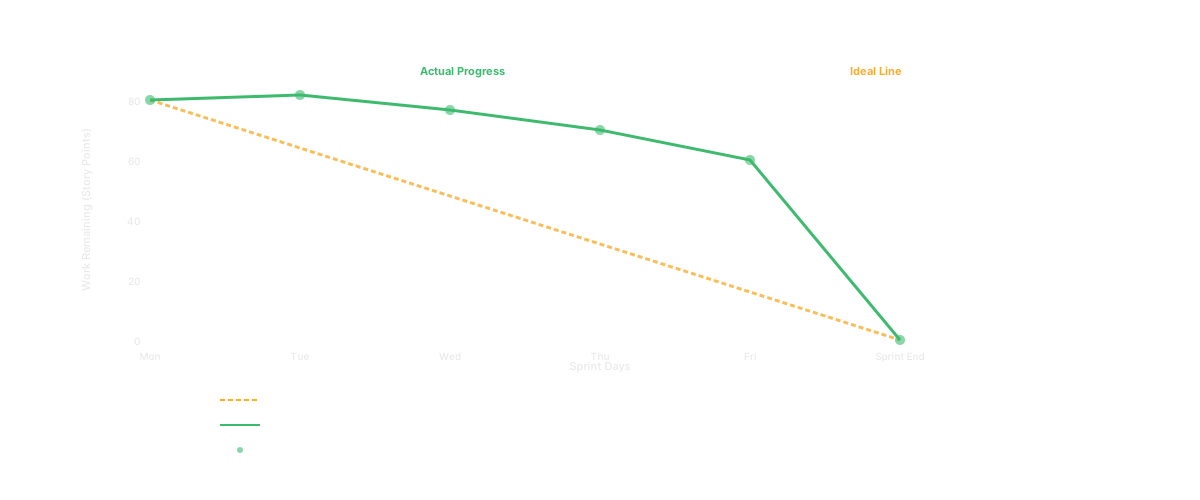
Why Teams Use Burndown Charts: What They Actually Tell You
Most teams think burndown charts are just for status reports. That's like thinking a thermometer is just for telling people if they have a fever. The real power is what you learn from the pattern.
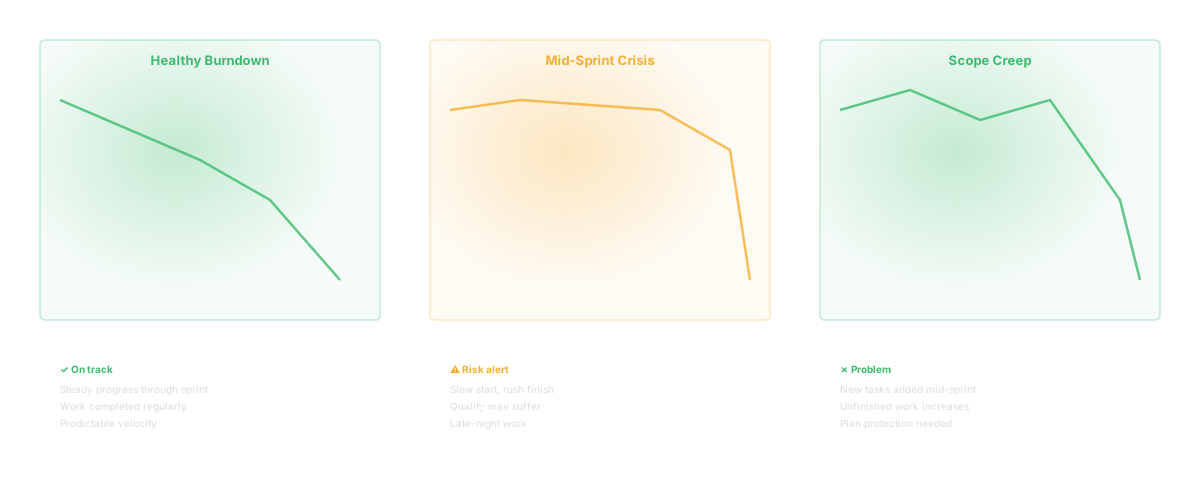
A Healthy Burndown Looks Like This
The line descends consistently from left to right. It's not a straight line (no team works perfectly), but it trends downward every day. By Thursday of week two, the team has burned down most of their work and they coast to the finish line.
What This Tells You:
- The team understands the work
- Work is sized reasonably (you discover issues gradually, not all at once)
- The team is focused and isn't distracted by unplanned work
- You'll hit your sprint goal
A Chaotic Burndown Looks Like This
The line goes up on Tuesday and Wednesday (new work was added), then drops sharply Friday after a frantic push. Or it flatlines for three days then drops off a cliff on the last day.
What This Tells You:
- Work was added mid-sprint (scope creep)
- Work was larger than estimated (discovery happened late)
- The team didn't start work until the deadline approached
- You won't hit your sprint goal (or you will, but people will be burned out)
A Red Flag Burndown Looks Like This
By mid-sprint, you've completed only 20% of your work. The line should have burned down to about 50% by day five of a ten-day sprint. At this pace, you won't finish.
What This Tells You:
- Your estimates were wildly off
- The team is blocked waiting for something (a decision, data, another team)
- Someone is pulling people off sprint work for urgent requests
- You need to re-scope the sprint immediately before you waste the last five days
The power of a burndown chart is that it shows problems by day three, not day nine. That's when you can actually do something about it.
How to Read a Burndown Chart: Decoding the Data
Let's walk through a real example. Your team committed to 80 story points for a two-week sprint.
The Basic Elements
On the chart:
- X-axis (horizontal): Days 1 through 10 (your sprint days)
- Y-axis (vertical): Story points remaining, from 0 to 80
- Ideal line: A dotted line from 80 points on Day 1 to 0 points on Day 10 (straight diagonal)
- Actual line: Your real progress, plotted each day
Reading Day by Day
Day 1: Team completes 5 story points. Burndown shows 75 points remaining. Your actual line is slightly above the ideal line (80 points remaining would be ideal). Small gap, no problem.
Day 2: Team completes 12 more points total. Burndown shows 63 points remaining. Now you're tracking above (behind) the ideal line, which would show 64 points remaining. Slight lag, but it's expected.
Day 3: Team completes 18 more points total. Burndown shows 45 points remaining. Ideal would be 48. You're ahead of pace now. Good sign.
Day 4: Team completes 25 more points total. Burndown shows 55 points remaining. Wait - you were at 45 yesterday. Your line went up. This could mean:
- New work was added to the sprint mid-sprint (scope creep)
- Work was re-estimated and turned out bigger than planned
- A story was reverted due to a bug
This is the moment you ask questions. Why did work go up?
Day 5 (Mid-sprint): Your burndown should be around 40 points or better. If you're still at 60+, you're at risk of missing the sprint goal. Time to re-scope.
By Day 7, your chart should show 20 or fewer points remaining. By Day 10, it should hit zero (or very close).
The Real-World Messiness
Perfect burndown charts don't exist. Here's what's normal:
- Jagged lines (not smooth) - different team members finish work on different days
- Lines that go up slightly - new tasks discovered, dependencies, bugs
- Slight under-performance the first few days - team getting into rhythm
- Small bumps and dips - this is just how work happens
Here's what's NOT normal:
- Flat line for days 1-4, then straight drop on day 5 - team didn't start work
- Consistent upward trend - scope is increasing faster than completion
- Straight line from 80 to 20 on day 9 - team didn't track work, just guessing
How to Create a Burndown Chart: Step by Step
You don't need fancy software. You can build a burndown chart in Excel or even on a whiteboard.
Step 1: Define Your Sprint
- Length: Most teams use two-week sprints
- Start date: Monday (or whatever your sprint starts)
- End date: Friday two weeks later
- Number of sprint days: Usually 10 working days (excluding weekends)
Step 2: Estimate All Sprint Work
Your team estimates every story, task, or item going into the sprint. Total up all the estimates. This is your starting point for the chart.
Let's say you have:
- Feature A: 8 points
- Feature B: 5 points
- Feature C: 13 points
- Bug fixes: 3 points
- Technical debt: 2 points Total: 31 story points
Step 3: Draw Your Chart
Create a simple graph:
- X-axis: Days 1 through 10
- Y-axis: 0 to 31 points
- Plot your ideal line: Start at 31, end at 0, make it a straight diagonal
Your ideal burndown drops by about 3.1 points per day (31 points / 10 days).
Step 4: Update Your Chart Daily
Each day, total up all the story points of completed work. Plot that on your chart.
Example:
- End of Day 1: 5 points completed, 26 remaining
- End of Day 2: 8 points completed, 23 remaining
- End of Day 3: 10 points completed, 21 remaining
- End of Day 4: 14 points completed, 17 remaining
- End of Day 5: 15 points completed, 16 remaining
Connect these points with a line.
Step 5: Look for Patterns and Problems
- You're tracking below the ideal line (positive): You're ahead of pace.
- You're tracking above the ideal line (but consistent): You're slightly behind, but likely to catch up.
- Your line is increasing: Scope is growing. Call a team meeting.
- Your line is flat for multiple days: Work isn't getting completed. Find blockers.
Step 6: Adjust Scope Mid-Sprint If Needed
If by day 5 you're significantly behind, you have options:
- Keep the same scope and work harder (only if it's truly doable)
- Move low-priority items to next sprint (most teams do this)
- Extend the sprint deadline (don't do this - defeats the purpose)
The point of a burndown is to make this decision by day 5, not discover it on day 9.
Burndown Chart vs. Burn-Up Chart: Which Should You Use?
Both track progress, but they're different in important ways.
Burndown Chart
- Starts high (80 points) and goes down to zero
- Shows work remaining
- If scope changes, the top of the chart moves
Burn-Up Chart
- Starts at zero and goes up
- Shows work completed
- Has two lines: one for completed work, one for total scope
- If scope changes mid-sprint, you see it clearly on the scope line
Which Is Better?
Use burndown if:
- Your sprint scope is locked (no changes allowed mid-sprint)
- Your team is new to tracking (burndown is more intuitive)
- You want simplicity
Use burn-up if:
- Your scope changes mid-sprint (urgent requests keep coming in)
- You want to make scope changes visible to stakeholders
- Your team is experienced with tracking
Most teams start with burndown and switch to burn-up once they realize they can never keep scope locked.
Sprint Burndown vs. Release Burndown: Different Timescales
Sprint Burndown:
- Tracks a single sprint (1-2 weeks)
- Shows daily progress
- Helps the team ship on time
- Updated every day
Release Burndown:
- Tracks an entire release (3-6 months)
- Shows weekly or bi-weekly progress
- Shows whether you'll ship the release on time
- Updated after each sprint
You'll typically have both:
- Team looks at sprint burndown daily (are we hitting this sprint goal?)
- Product manager looks at release burndown weekly (are we on track for launch?)
They answer different questions. Don't confuse them.
How Burndown Charts Work in Jira: Step by Step
Jira has built-in burndown charts. Here's how to use them.
Create a Sprint
- Go to your Backlog
- Click Create Sprint
- Set your sprint dates (usually two weeks)
- Drag stories from the backlog into the sprint
- Click Start Sprint
View the Burndown
- Go to your Board
- Click Reports (top right)
- Select Sprint Report
- Look for "Sprint Burndown"
Jira calculates the burndown automatically based on story point estimates and completion status.
Update Progress
As team members mark stories as Done, Jira's chart updates automatically. You don't manually plot points - it's automatic.
What Jira's Burndown Shows
- Ideal line (light gray)
- Actual burndown (blue line)
- Today's date (vertical line)
- Points completed vs. remaining
The problem: Jira only shows the high-level burndown. It doesn't show:
- Why work isn't getting done
- Which stories are blocked
- Whether the team is procrastinating
You have to look at the board itself to understand what the chart is telling you.
Burndown Charts in Azure DevOps: Configuration and Use
If your team uses Azure DevOps (formerly VSTS), burndown charts are called "Sprint Burndown."
Access the Burndown Chart
- Go to your project
- Navigate to Sprints
- Select your active sprint
- Click Burndown
Configure It
- Choose your iteration (sprint)
- Select "Work items only" or include "Test cases"
- Choose your measurement (story points or count)
Azure's burndown is similar to Jira's:
- Shows ideal vs. actual
- Updates as you mark work done
- Automatically calculates based on your sprint dates
The Azure Advantage
Azure's burndown includes a "Forecast" line. It looks at your current pace and predicts whether you'll finish on time. If you're on track, the forecast line touches zero on your sprint end date. If you're behind, it shows when you'll actually finish.
Velocity Chart vs. Burndown Chart: What's the Difference?
People often confuse these two charts. They're different tools that answer different questions.
Burndown Chart
- Measures: Work remaining in the current sprint
- Updates: Daily
- Answers: Will we finish this sprint on time?
- Time window: 1-2 weeks
Velocity Chart
- Measures: How many story points the team completes per sprint
- Updates: After each sprint ends
- Answers: How much work can this team commit to in the next sprint?
- Time window: Multiple sprints (last 3-6 sprints)
Example:
- Sprint 1: Team completes 25 story points (velocity = 25)
- Sprint 2: Team completes 28 story points (velocity = 28)
- Sprint 3: Team completes 24 story points (velocity = 24)
- Average velocity: 25-26 points per sprint
In Sprint 4, you should commit to 25-26 points (based on velocity). Your burndown chart during Sprint 4 will show whether you're staying on pace.
Use velocity to plan. Use burndown to execute.
Cycle Time and Lead Time: Related But Different Metrics
These concepts relate to burndown charts but measure something different.
Cycle Time
- How long does it take from when a team starts work on a story until it's done?
- Usually measured in days
- Example: A story goes into "In Progress" on Monday, done on Thursday. Cycle time = 3 days.
Lead Time
- How long does it take from when a story is requested until it's shipped to production?
- Usually measured in days or weeks
- Example: Product requests a feature on Jan 1, it ships on Feb 15. Lead time = 45 days.
How These Relate to Burndown Charts
A burndown chart shows progress during a sprint, but it doesn't tell you:
- How long each story actually takes to build (cycle time)
- How long from request to shipped (lead time)
If your cycle time is high (stories sit in "In Progress" for days), your burndown will be jagged - lots of days with no progress, then big drops when work finally completes.
If your lead time is high (stories sit in backlog forever before getting picked up), you're shipping slow even if your sprint burndown looks good.
Look at all three metrics together:
- Cycle time: Is the team working efficiently during the sprint?
- Lead time: Are you getting value to customers fast?
- Burndown: Are you hitting your sprint commitments?
Common Mistakes: What Teams Get Wrong About Burndown Charts
Mistake 1: Only Updating the Chart at Sprint Planning and Sprint Review
The Trap: Team updates the burndown only on Mondays (sprint starts) and Fridays (sprint ends).
Why It Fails: A burndown chart is useless if you're not looking at it daily. It's like checking your bank account only once a month. The whole point is to spot problems early.
The Right Way: Update your burndown at the end of each working day. Make it a habit - end of standup, someone plots the completed points on the chart. Takes 30 seconds.
Mistake 2: Counting "In Progress" as "Done"
The Trap: A developer starts work on Monday, by Friday it's still not done, but it's been "In Progress" all week. The team counts it as partial progress.
Why It Fails: Partial progress doesn't matter. A story that's 90% done is still not delivering value. Your burndown should only count work that's actually done - tested, reviewed, ready to ship.
The Right Way: Have a clear definition of done. Usually: code written, code reviewed, tests passing, ready to deploy. Only then does it count on your burndown.
Mistake 3: Adding New Work Mid-Sprint Without Removing Old Work
The Trap: Urgent bug comes in, gets added to the sprint. But the team doesn't remove anything to make room.
Why It Fails: Your sprint becomes ever-increasing scope. By the end, you've committed to 80 points and somehow also added 15 more. Nobody can hit that.
The Right Way: Have a rule: if you add to the sprint, you must remove something of equal size. Makes people very careful about mid-sprint additions. Most urgencies can wait until next sprint.
Mistake 4: Ignoring Blockers on the Burndown Chart
The Trap: Story is blocked on something (waiting for API response, blocked by another team), so it's been in "In Progress" for four days. The burndown doesn't reflect this.
Why It Fails: Your burndown hides the real problem. It looks like the team is slow, but actually the team is stuck waiting.
The Right Way: Mark blocked items differently. Remove them from the sprint if they'll stay blocked. Or mark them "blocked" so the burndown chart shows work isn't moving because of external dependencies, not because the team is slow.
Mistake 5: Burning Down Estimated Points Instead of Actual Work
The Trap: Story was estimated at 5 points. Team started work, realized it's actually 8 points of work, re-estimated it. Now your burndown is confusing because the scope changed.
Why It Fails: You can't compare your actual progress to your ideal line anymore. The chart becomes meaningless.
The Right Way: Don't re-estimate mid-sprint. If a story is bigger than expected, mark it as "blocked" or "at risk" and discuss in standup. Keep the original estimate on the burndown. If it needs to move to next sprint, move the whole story, not pieces.
What a Healthy Burndown Chart Looks Like: Real Examples
Example 1: The Textbook Burndown
Day 1:  80 points remaining
Day 2:  72 points remaining
Day 3:  65 points remaining
Day 4:  58 points remaining
Day 5:  50 points remaining (halfway through sprint)
Day 6:  40 points remaining
Day 7:  28 points remaining
Day 8:  15 points remaining
Day 9:   3 points remaining
Day 10:  0 points remaining
This team is rock solid. Consistent pace, hits their sprint goal. You'd want more days like this.
Example 2: The Realistic Burndown
Day 1:  80 points remaining
Day 2:  80 points remaining (team getting started, definitions of done being discussed)
Day 3:  68 points remaining
Day 4:  62 points remaining
Day 5:  55 points remaining (discovered more work, re-estimated some items)
Day 6:  50 points remaining
Day 7:  40 points remaining
Day 8:  25 points remaining
Day 9:  10 points remaining
Day 10:  2 points remaining (not quite done, but close)
This is more realistic. Not every day shows progress (day 1-2 is usual - team is reading requirements, pair programming setup). They discovered more work mid-sprint. But they still finish.
Example 3: The Red Flag
Day 1:  80 points remaining
Day 2:  78 points remaining
Day 3:  76 points remaining
Day 4:  75 points remaining (should be at 48 by now, and they're at 75 - way behind)
Day 5:  72 points remaining (getting worse)
Day 6:  60 points remaining (finally picking up pace)
Day 7:  50 points remaining
Day 8:  40 points remaining
Day 9:  25 points remaining
Day 10: 10 points remaining (didn't hit the sprint goal)
By day 4, this team is at risk. They didn't start work until day 5. This should trigger a conversation: why the slow start? Were people pulled away? Are stories blocked? This team needs to either accelerate or re-scope by day 5.
FAQ: Common Questions About Burndown Charts
Q: Should we measure in story points or hours? A: Story points are better for most teams. Story points measure relative complexity. Hours are more precise but harder to estimate. If you're new to tracking, use story points. Switch to hours only if you have a specific reason (e.g., you're consulting/billing by the hour).
Q: What if our burndown line is jagged instead of smooth? A: That's normal and fine. Different team members finish work on different days. Tuesday you might complete nothing, Wednesday you might complete 15 points. That's just how work happens. As long as the trend is downward, you're fine.
Q: Should we re-estimate stories mid-sprint? A: No. Lock estimates at sprint planning. If a story is bigger than estimated, mark it as "at risk" or "needs re-scope" in standup. Don't change the estimate mid-sprint - that just confuses your burndown chart.
Q: What if we don't hit our sprint goal? A: It happens. Look at your burndown chart to understand why. Were stories added mid-sprint? Did something block the team? Was the original scope estimate too ambitious? Use that learning for next sprint.
Q: How do we handle bugs discovered during the sprint? A: If the bug is in code you're building, fix it within the sprint - it's part of that story. If the bug is in existing code, decide: is it a priority or can it wait? If it's a priority, add it to the sprint and remove something else. Never just add more scope without removing scope.
Q: What if half the team is on vacation mid-sprint? A: This is a good reason to adjust your sprint commitment or adjust your ideal burndown line. If you're losing 2 people for 3 days, your ideal burndown should reflect that. Don't hold the team to the same commitment when you have fewer people.
Q: Should we include spike stories (research/investigation) in the burndown? A: Yes, but estimate them conservatively. Spike stories are hard to estimate because you don't know what you'll find. Estimate what the spike will cost (3 days of one person), not what it will discover. As the team works on it, update if needed.
Q: Can we have a perfect flat burndown line? A: Theoretically yes, but practically no. A perfectly flat line means zero progress, which isn't a goal. You want a line that descends smoothly from high to low. Small bumps and jagged edges are fine.
Practical Tips: How to Make Burndown Charts Actually Useful
Make It Visible
Print your burndown chart and put it on the wall. Seriously. A chart on the wall makes burndown part of your team's daily conversation. A chart in Jira that nobody looks at is useless.
Update It at Standup
Last person at standup plots the previous day's completed points. Takes 30 seconds. Becomes a ritual.
Use It to Guide Standup Conversations
Instead of "what did you do yesterday?" start with "our burndown shows we're behind pace, what's blocking us?"
Weekly Retro Questions
"Why did our burndown have a spike on Tuesday?" "Why did we complete so much on Friday?" Use the chart to guide retrospective conversations.
Share It with Stakeholders
Let product managers see your sprint burndown. It builds trust. They see you're on track to ship. When you're off track, they see it early and can help re-scope rather than being surprised on day 9.
The Glue Connection: Visibility Beyond the Burndown Chart
Burndown charts tell you whether your sprint is on track, but they don't tell you why. They don't show:
- Which team members are blocked?
- Are code reviews slowing you down?
- Is a particular feature taking way longer than estimated?
- Who's pulling people off sprint work?
That's where tools like Glue come in. Glue connects to your Git repos and shows you the reality beneath the burndown chart:
- Which stories have slow code review
- Where people are spending their time
- Which dependencies are blocking the team
- Whether estimates are getting more accurate over time
Combined with your burndown chart, Glue gives you both the "are we on track?" (burndown) and "why or why not?" (Glue insights).
Burndown Charts and Beyond: The Bigger Picture
A burndown chart is your sprint execution tool. But sustainable high performance requires more:
- Release burndown: Are you on track for the broader release?
- Velocity trending: Is your team getting more productive over time?
- Cycle time: How long do stories actually take to build?
- Lead time: How fast from request to shipped?
- Code quality: Are you shipping working code or technical debt?
A team with a perfect burndown chart but declining code quality is building problems for future sprints. A team with a rough burndown but learning and improving is building the right habits.
Use the burndown chart as your primary feedback mechanism for "did we execute this sprint?" But pair it with broader metrics to understand whether you're improving as an organization.
This guide was last updated February 2026. Sprint management practices continue to evolve. Adapt these practices to fit your team's working style.
Related Reading
- DORA Metrics: The Complete Guide for Engineering Leaders
- Software Productivity: What It Really Means and How to Measure It
- Developer Productivity: Stop Measuring Output, Start Measuring Impact
- Technical Debt: The Complete Guide for Engineering Leaders
- Cycle Time: Definition, Formula, and Why It Matters
- AI Agents for Engineering Teams: From Copilot to Autonomous Ops