Glue

AI codebase intelligence for product teams. See your product without reading code.

Product

  • How It Works
  • Benefits
  • For PMs
  • For EMs
  • For CTOs

Resources

  • Blog
  • Guides
  • Glossary
  • Comparisons
  • Use Cases

Company

  • About
  • Authors
  • Support
© 2026 Glue. All rights reserved.
RSS
Glue
For PMsFor EMsFor CTOsHow It WorksBlogAbout
GUIDE

API Documentation: How to Write Docs Developers Actually Want to Read

Great API documentation is the #1 driver of developer adoption. Learn structure, tools, examples, and how AI auto-generates endpoint docs from your codebase.

SS
Sahil SinghFounder & CEO
June 11, 202614 min read
Code Documentation

Great API documentation is the difference between an API that developers adopt and an API that developers abandon after 15 minutes of frustration. According to SmartBear's 2023 State of Software Quality report, 63% of developers cite poor documentation as the biggest obstacle to API integration. That number should alarm every team that builds APIs, which in 2026 means nearly every team.

I have shipped APIs where the docs were an afterthought (usage was dismal) and APIs where we treated documentation as a first-class deliverable (adoption happened organically). The documentation was the variable. The API quality was comparable in both cases. Developers will tolerate a slightly awkward API with clear documentation far more readily than they will tolerate an elegant API with confusing or missing docs.

This guide covers what great API docs look like, which tools produce them, common mistakes that drive developers away, and how to measure whether your documentation is actually working.

Why API Docs Matter

API documentation is not a formality. It is your API's user interface.

When a developer evaluates your API, the first thing they read is the documentation. Not your marketing page. Not your SDK. The docs. If the docs are confusing, incomplete, or outdated, they move on. The switching cost for choosing a different API is almost always lower than the cost of figuring out a poorly documented one.

This applies equally to internal APIs. When your frontend team needs to integrate with the backend team's user service, the documentation (or lack thereof) determines how long that integration takes. Poor internal API docs create a hidden tax on every team that depends on the API. Engineers end up reading source code, reverse-engineering behavior from tests, or pinging the API owner on Slack. Every one of those workarounds is slower and more error-prone than reading clear documentation.

Postman's 2023 State of the API report found that teams with comprehensive API documentation complete integrations 2.5x faster than teams without. For a product organization shipping multiple features per quarter, each dependent on internal APIs, that multiplier translates directly to delivery speed.

The business case extends beyond development speed. Well-documented APIs reduce support costs (fewer "how do I use this?" tickets), accelerate partner onboarding, and serve as a form of technical documentation that outlasts any individual engineer's tenure.

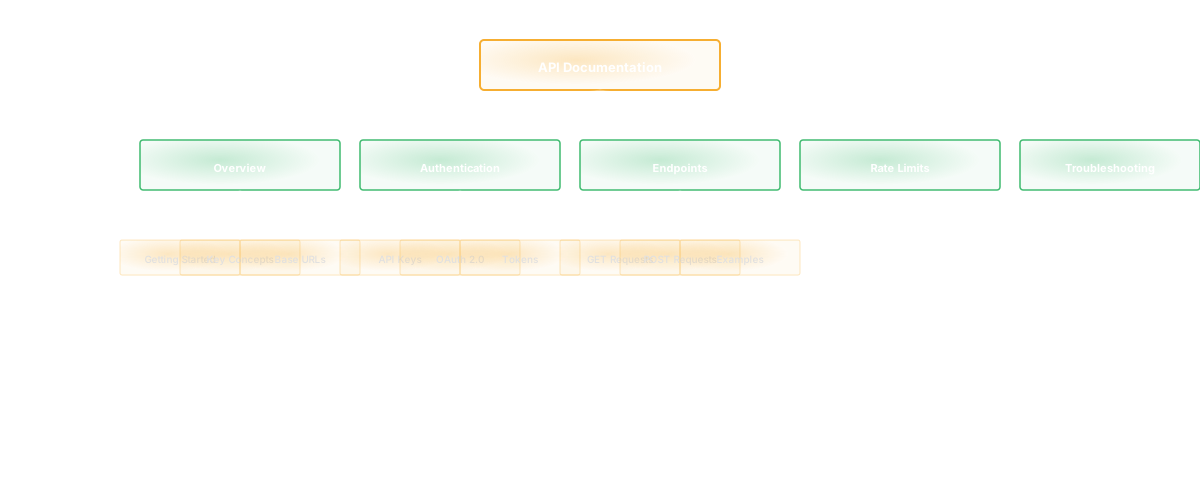
Anatomy of Great API Docs

The best API documentation follows a consistent structure that serves both the developer scanning for a quick answer and the developer reading end-to-end.

Overview and getting started. A new developer should be able to make their first successful API call within 5 minutes of landing on the docs. This section covers authentication, base URLs, and a minimal working example. Skip the lengthy preamble about your company's mission. Developers want to see code, not vision statements.

Authentication guide. How do I get a key? How do I include it in requests? What happens when it expires? What error codes indicate auth failures? Authentication is the first barrier to API adoption. If it is confusing, developers bounce before they ever test an endpoint.

Endpoint reference. Every endpoint documented with: HTTP method, URL path, request parameters (with types and whether they are required or optional), request body schema, response schema (for success and error cases), and at least one working example. This is the core of your documentation and the section developers return to most frequently.

Error reference. A complete list of error codes with human-readable descriptions and suggested fixes. "400 Bad Request" tells the developer nothing. "400: The email field must be a valid email address (received: 'not-an-email')" tells them exactly what to fix.

Rate limiting and pagination. How many requests can I make? What happens when I hit the limit? How do I paginate through large result sets? These are universal API concerns that every developer will encounter.

Changelog. What changed, when, and whether it is a breaking change. Developers building on your API need to know when to update their integrations. Stripe's API changelog is the gold standard for this. Every change is dated, categorized (breaking, non-breaking, deprecation), and explained.

According to a survey by ReadMe, the documentation platform, 80% of developers say working code examples are the most important element of API documentation. Not descriptions. Not diagrams. Working code they can copy, paste, and modify. If your docs lack examples, you are failing the majority of your audience.

API Documentation Tools

The tooling for API documentation has matured significantly. Each tool category serves a different workflow.

OpenAPI/Swagger. The OpenAPI Specification (formerly Swagger) is the de facto standard for describing RESTful APIs. You write a YAML or JSON spec file that defines your endpoints, schemas, and authentication. Tools like Swagger UI, Redoc, and Stoplight render the spec into interactive documentation. The strength is standardization. The weakness is that the generated docs often lack the narrative context (guides, tutorials, conceptual explanations) that developers need alongside reference material.

Dedicated documentation platforms (ReadMe, Mintlify, GitBook). These platforms combine API reference generation with content management, allowing you to mix auto-generated endpoint docs with hand-written guides, tutorials, and conceptual explanations. ReadMe, for example, generates reference docs from an OpenAPI spec and lets you add markdown guides alongside them. Mintlify has gained traction for its developer-first design and git-based workflow.

Code-embedded documentation (JSDoc, Sphinx, Godoc, Rustdoc). Documentation generated directly from comments in the source code. The advantage is proximity: the documentation lives next to the code it describes, increasing the likelihood it stays current. The disadvantage is scope: code comments naturally focus on implementation details, not the conceptual overview and getting-started guidance that external consumers need.

Static site generators (Docusaurus, Hugo, Astro). For teams that want full control over their documentation site, static generators provide the framework. You write markdown, configure the site, and deploy. The trade-off is maintenance. You are responsible for everything from navigation to search to API reference formatting.

For teams evaluating which approach fits their workflow, the choice often depends on whether your API is primarily internal or external, and whether you have dedicated technical writers or expect engineers to maintain the docs. Tools like Glue's code documentation generator can bridge the gap by extracting API structures and relationships directly from the codebase, reducing the manual effort of keeping documentation in sync with code.

Writing Your First API Doc

If you are starting from scratch, this workflow gets you from zero to published documentation efficiently.

Start with a working example. Before you document any endpoint, write the code that calls it. A cURL command, a Python snippet, and a JavaScript fetch example for your most common endpoint. If you cannot write the example easily, your API has a usability problem that documentation cannot fix.

Write the authentication section. Step-by-step, from "I have no credentials" to "I made a successful authenticated request." Include every command, every configuration step, and every expected output. Test the steps on a fresh environment. If any step fails, fix it before publishing.

Document endpoints in order of importance. Start with the endpoints new users call first. For a payment API, that is "create a charge" before "list dispute evidence." For a messaging API, that is "send a message" before "configure webhook retry policy." Prioritize the happy path that gets developers to value quickly.

Add error documentation after the happy path. Once the reader knows how the API works when things go right, document what happens when things go wrong. Every error code, every validation rule, every edge case you have seen in production.

Include a "Common Patterns" section. Real-world usage rarely maps to individual endpoints. Developers need to understand patterns: "To process a refund, first retrieve the charge, then create a refund linked to that charge ID." These multi-step patterns are where the most integration confusion occurs, and they are where documentation adds the most value.

According to a 2024 API developer experience study by Postman, developers spend an average of 12.6 hours per week working with APIs. Even a 10% improvement in documentation quality, measured by time to first successful integration, saves meaningful engineering hours across an organization.

Auto-Generated Docs from Code

Auto-generation reduces the maintenance burden of API documentation, but it comes with trade-offs that teams need to understand.

What auto-generation does well. It extracts endpoint definitions, parameter types, response schemas, and basic descriptions directly from code annotations or OpenAPI specs. This ensures the reference documentation stays in sync with the actual API behavior. When an engineer adds a new endpoint with proper annotations, the documentation updates automatically. No separate documentation task. No "docs are outdated" tickets.

What auto-generation does poorly. It cannot write the getting-started guide, the authentication walkthrough, the conceptual explanation of your data model, or the "Common Patterns" section. These require human understanding of how developers will actually use the API. Auto-generated docs without human-written context produce reference manuals that are technically complete and practically useless for someone trying to get started.

The effective approach is a hybrid: auto-generate the reference documentation from code, and manually maintain the guides, tutorials, and conceptual content. This combination keeps the tedious, change-prone reference material accurate while investing human writing effort where it adds the most value.

Frameworks that support this well include FastAPI (Python), which generates OpenAPI specs from type hints and docstrings; NestJS (TypeScript), which integrates with Swagger decorators; and Spring REST Docs (Java), which generates documentation from integration tests. Each approach ties documentation accuracy to the code or test suite, reducing drift.

For product managers overseeing API products, auto-generated docs solve the "are the docs up to date?" question definitively for reference content. The investment shifts from maintaining reference accuracy to creating and improving the narrative content that drives adoption.

Interactive API Explorers

Interactive documentation lets developers test API calls directly from the docs page, without switching to a terminal or writing code. This capability has moved from "nice to have" to "expected."

Swagger UI provides a "Try it out" button for every endpoint. Developers fill in parameters, click execute, and see the response. It is free, widely adopted, and easy to deploy from an OpenAPI spec.

Postman Collections serve as both testing tools and documentation. A published Postman collection lets developers fork it, modify examples, and run requests against your API immediately. Postman's 2023 report found that 89% of developers use Postman regularly, making it a natural documentation distribution channel.

Custom API explorers (like Stripe's) provide a fully branded, integrated experience where the documentation, code examples, and interactive testing live in a single interface. Building a custom explorer requires significant investment but provides the best developer experience for complex APIs.

Interactive explorers reduce the feedback loop between reading docs and verifying understanding. Instead of reading a description, writing code, running it, and debugging the result, the developer reads, clicks, and sees the response immediately. That compressed feedback loop accelerates learning and adoption.

The trade-off is authentication. Interactive explorers that use real API keys against real environments create security considerations. Sandbox environments with test data solve this but add infrastructure cost. The approach depends on your API's sensitivity and your team's willingness to maintain a sandbox.

Common API Doc Mistakes

After reviewing dozens of API documentation sets across internal tools and public APIs, these are the mistakes I see most frequently.

Missing examples. A parameter description that says "user_id (string, required)" without showing the parameter in a complete request/response example forces the developer to assemble the puzzle mentally. Always show, do not just tell.

Outdated content. Documentation that references deprecated endpoints or missing parameters erodes trust instantly. If a developer encounters one inaccuracy, they question everything else in the docs. Automated generation from code prevents this for reference content. Manual guides need scheduled reviews.

No error documentation. When a developer gets a 422 error and the docs do not explain what validation failed, they file a support ticket or give up. Error documentation is not optional.

Authentication buried or unclear. If authentication requires more than one page of documentation to understand, it is too complex. Simplify the auth flow or invest heavily in the auth docs.

Docs written for insiders. Internal terminology, assumed context, and references to systems the external developer cannot see. "Set the tenant_id to your organization's provisioning identifier" means nothing to someone who does not know your system's internal terminology. Write for the developer who knows nothing about your company.

No versioning strategy. When your API changes, developers need to know what changed, whether it is breaking, and what they need to update. A changelog is the minimum. Versioned docs (where developers can view documentation for the API version they are using) are the standard.

SmartBear's research found that 59% of developers have abandoned an API integration due to documentation issues. That means documentation quality directly determines API adoption and retention.

Measuring Doc Effectiveness

Publishing documentation is not the finish line. You need to know whether the docs are working.

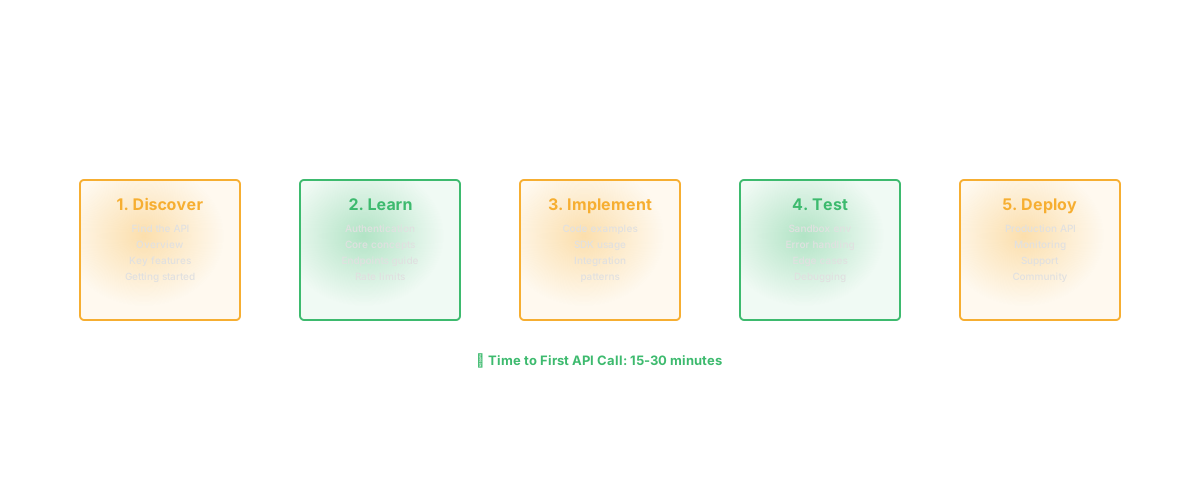
Time to first successful API call. This is the most important metric. How long does it take a new developer to go from landing on your docs to making a successful authenticated request? Track this through onboarding surveys, developer analytics, or sandbox usage data. If the median time exceeds 15 minutes for a simple API, your documentation or authentication flow has a problem.

Search queries with no results. If developers search for "rate limiting" and your docs return nothing, that is a gap. Documentation search analytics reveal what developers are looking for and what they cannot find.

Support ticket analysis. Categorize API support tickets by type. If 40% of tickets ask questions that are (or should be) answered in the docs, that tells you either the docs are hard to find, hard to understand, or missing the information entirely.

Page analytics. Which documentation pages get the most traffic? Where do developers drop off? High traffic to the authentication page followed by high bounce suggests the auth docs are confusing. High traffic to an error reference page suggests developers are encountering that error frequently (which may be an API design issue, not a docs issue).

Developer satisfaction surveys. Ask your API consumers directly. "On a scale of 1-10, how helpful do you find our API documentation?" is a blunt but effective measure. Follow up with "what would make them better?" for qualitative insights.

Measuring doc effectiveness closes the loop between publishing and improving. Documentation is a product. Like any product, it improves through measurement, user feedback, and iteration.


FAQ

What should API documentation include?

Comprehensive API documentation should include: a getting-started guide with authentication instructions and a first working example, a complete endpoint reference (HTTP method, path, parameters, request/response schemas, examples), error code documentation with descriptions and fixes, rate limiting and pagination details, SDKs and code examples in multiple languages, and a changelog tracking all changes. The getting-started guide and working code examples are the most critical sections according to developer surveys.

What is the best tool for API documentation?

The best tool depends on your needs. For OpenAPI-based APIs, Swagger UI or Redoc provides free, standards-compliant reference docs. For comprehensive documentation with guides alongside reference material, platforms like ReadMe or Mintlify offer the most complete developer experience. For maximum control, static site generators like Docusaurus let you build fully custom documentation sites. Most effective documentation strategies use a hybrid approach: auto-generate reference docs from code or specs, and manually write the guides and tutorials.

How do you auto-generate API docs?

Auto-generation typically works through code annotations that produce an OpenAPI specification, which is then rendered into documentation. Frameworks like FastAPI (Python), NestJS (TypeScript), and Spring (Java) support this natively. Write type hints, decorators, or annotations in your code, and the framework generates a spec file. Swagger UI, Redoc, or a documentation platform renders that spec into browsable, interactive documentation. The key limitation is that auto-generation covers reference material (endpoints, schemas, parameters) but not narrative content (guides, tutorials, conceptual explanations).

How often should API docs be updated?

Reference documentation should update automatically with every API change through auto-generation pipelines tied to your CI/CD process. Narrative content (guides, tutorials, getting-started) should be reviewed at least quarterly, and immediately after significant API changes that affect common workflows. Changelogs should update with every release. The most important rule: never ship an API change without updating the documentation. Outdated docs erode developer trust faster than almost any other documentation problem.

FAQ

Frequently asked questions

[ AUTHOR ]

SS
Sahil SinghFounder & CEO
RELATED

Keep reading

guideJun 1, 202620 min

Technical Documentation: The Complete Guide for Engineering Teams [2026]

Everything you need to know about technical documentation: types, templates, tools, and the AI-powered workflows that cut documentation time by 60%.

SS
Sahil SinghFounder & CEO
guideJun 16, 202614 min

Shift Left: How Moving Testing Earlier Cuts Defect Costs by 100x

Shift left testing and security catches defects when they are cheapest to fix. Learn implementation strategies, tools, and how to measure the ROI of shifting left.

SS
Sahil SinghFounder & CEO
guideJun 14, 202613 min

Feature Flags: The Complete Guide to Safe, Fast Feature Releases

Feature flags decouple deployment from release. Learn implementation patterns, management best practices, and how to avoid the flag debt trap.

SS
Sahil SinghFounder & CEO