
A product roadmap as a command center is a planning artifact grounded in real-time codebase signals — code complexity, ownership clarity, test coverage, dependency risk, and change velocity — rather than static quarterly feature lists. Most roadmaps disconnect planning from engineering reality, leading to chronic slippage; roadmap-as-command-center connects roadmap items to the actual state of the code they depend on, making risk visible before commitments are made and enabling 25% more accurate capacity planning.
At Salesken, our roadmap slipped every quarter for three consecutive quarters. The problem wasn't engineering capacity — it was that our estimates were based on vibes, not data.
By Glue Team
Your product roadmap lives in a spreadsheet. It's reviewed quarterly. It moves left to right as features ship. And it sits almost entirely disconnected from the reality of your codebase.
Most roadmaps are planning artifacts, not command centers. They tell you what leadership decided to build next. They don't tell you whether you can actually build it - not because of requirements or market conditions, but because of how your codebase is structured. They don't surface the technical obstacles that will determine whether your timeline is realistic or a fantasy.
A command center roadmap is different. It shows not just what's planned, but the current state of the codebase that will deliver it. Specifically: which items are blocked by technical debt? Which are in modules with high bus factor risk? Which depend on systems that have been showing instability? Which touch code that nobody fully understands anymore?
This isn't about adding more process. It's about connecting the roadmap to the signals that determine whether it's achievable.
The Gap Between Intent and Informed Planning
Every PM has experienced this moment: you're halfway through a sprint and engineering tells you a roadmap item will take three times longer than estimated. Not because requirements changed. Not because the feature is harder than expected. But because the code that needs to change is tangled with other systems, undocumented, and owned by someone who left the company six months ago.
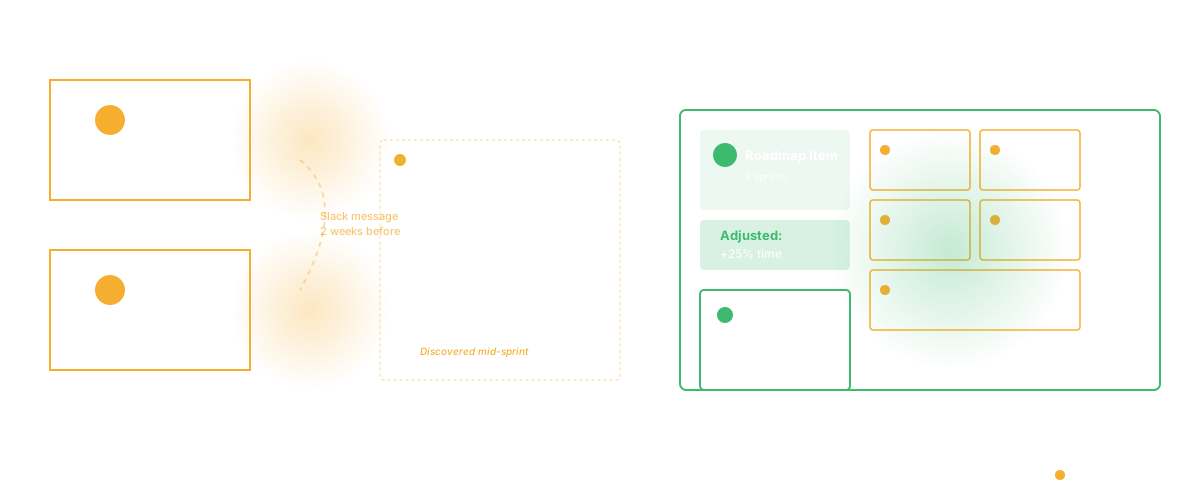
This happens because roadmaps and codebase health exist in separate universes. The roadmap lives in Jira or Linear. The codebase lives in your Git history. The PM reviews one, the tech lead reviews the other, and the connection between them is made in a Slack message two weeks before sprint planning.
A command center roadmap eliminates that gap. Every item shows its dependency on codebase state.
Here's what that looks like in practice:
Roadmap item: "Build customer analytics dashboard"
Without codebase context: Estimate is 2 sprints. Dependency list shows API work and database schema changes. Looks straightforward.
With codebase context: Same estimate, same dependencies, but now you see:
- The API service that powers customer data is running on deprecated infrastructure that's been flagged for 12 months with no migration plan
- The analytics queries hit a database view that's known to have performance issues in production
- The service touches two loosely-coupled modules, and the last engineer who understood both is now at another company
- The code touches a system that's had three incidents in the past six months, all rooted in the same architectural decision
Suddenly your 2-sprint estimate needs a confidence level attached. The same code that looked straightforward now needs either (1) risk mitigation work upfront, (2) a longer timeline, or (3) a decision to proceed with higher technical debt.
What Signals Should Drive Roadmap Decisions
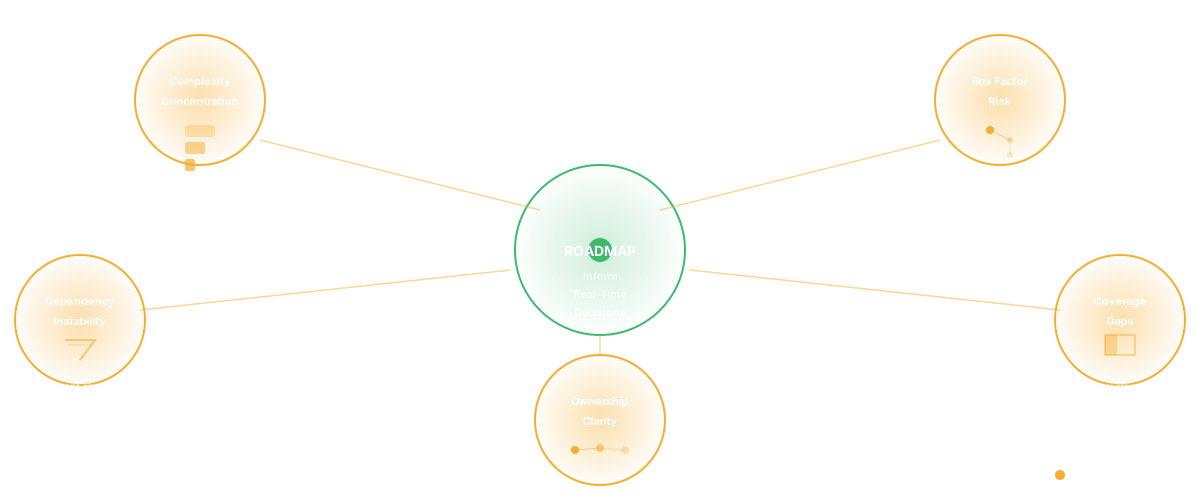
A command center roadmap is built on five categories of codebase signal:
1. Complexity Concentration
If the roadmap item touches modules that are above your complexity threshold, that's a signal. High cyclomatic complexity, deep nesting, oversized methods - these create execution risk. Not because the work is harder to understand in the moment, but because the code is fragile. Small changes create cascading effects. Reviews take longer. Testing surfaces unexpected interactions.
A command center flags this. Not as "don't do it," but as "if you do this, allocate time for structural work first."
2. Bus Factor Risk
Bus factor is the number of people who could get hit by a bus before a system becomes unmaintainable. Low bus factor in code you're about to change is execution risk.
If your roadmap item requires changes to code where only one engineer fully understands the architecture, you have a problem. Not immediately - but if that engineer is on leave, or context-switches to something else, or gets pulled into incidents, your timeline breaks.
A command center surfaces this. It says: "This work requires knowledge that's concentrated in one person. Plan for knowledge transfer time, or sequence this after other priorities that build broader understanding."
3. Dependency Instability
Some systems are unstable. Not because they're poorly built, but because they're changing frequently, or they're at a boundary between teams, or they've been on a migration plan for a year.
If your roadmap item depends on these systems, you inherit their instability. The feature might be simple to build, but if it ships on top of unstable foundations, you're shipping risk.
A command center shows this. It flags dependencies on systems with high incident rates, frequent architecture changes, or pending migrations. It prompts the question: "Do we stabilize this first, or do we accept the risk?"
4. Coverage Gaps
Code with low test coverage is riskier to change. Not always - sometimes low coverage is in code paths that never fail. But on average, coverage gaps mean unknown territory. Changes are harder to reason about. Regressions slip through.
If your roadmap item requires changes to code with coverage below your standards, that's a signal. Not a blocker, but a signal that you need more time for testing, or you need to improve coverage while you're making changes.
5. Ownership Clarity
Unclear ownership creates friction. When code is "owned by the platform team, except for this part which is owned by product, but actually payments is touching it too" - that's a friction multiplier.
A command center shows ownership clearly. It surfaces items where multiple teams need to coordinate, or where code has no clear owner. This doesn't change the work, but it changes planning. Coordination takes time.
From Static Planning to Real-Time Responsiveness
Here's where a command center roadmap becomes genuinely powerful:
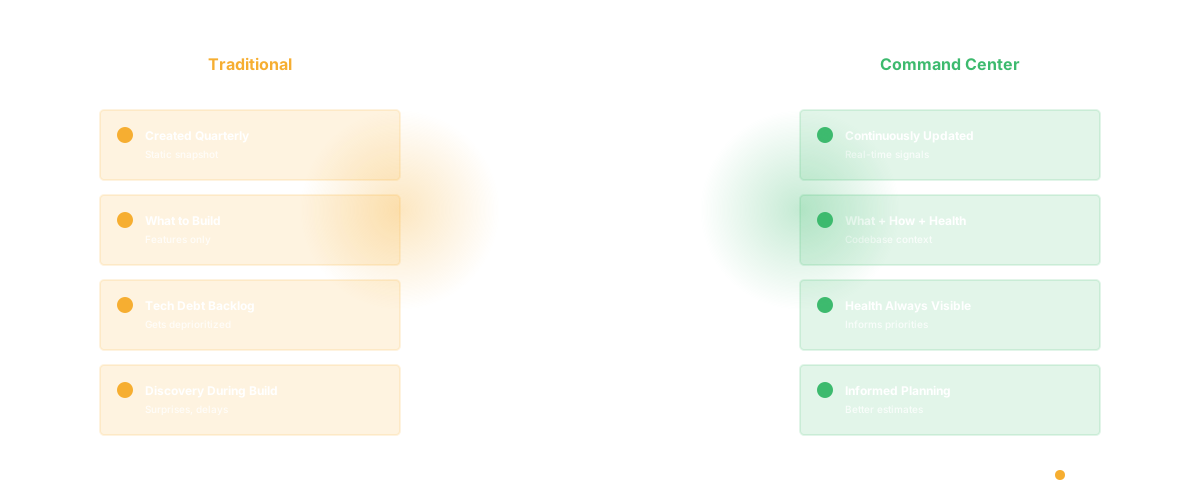
In a traditional roadmap, you create it quarterly. Codebase health is a backlog item that gets deprioritized every sprint because features matter more. Technical debt compounds. And the roadmap stays the same even as the codebase it depends on gets less stable.
In a command center roadmap, codebase health is continuously visible. You see when a system crosses from "stable" to "showing risk signals." You see when bus factor concentration increases (someone's about to go on leave). You see when complexity in critical paths exceeds your thresholds.
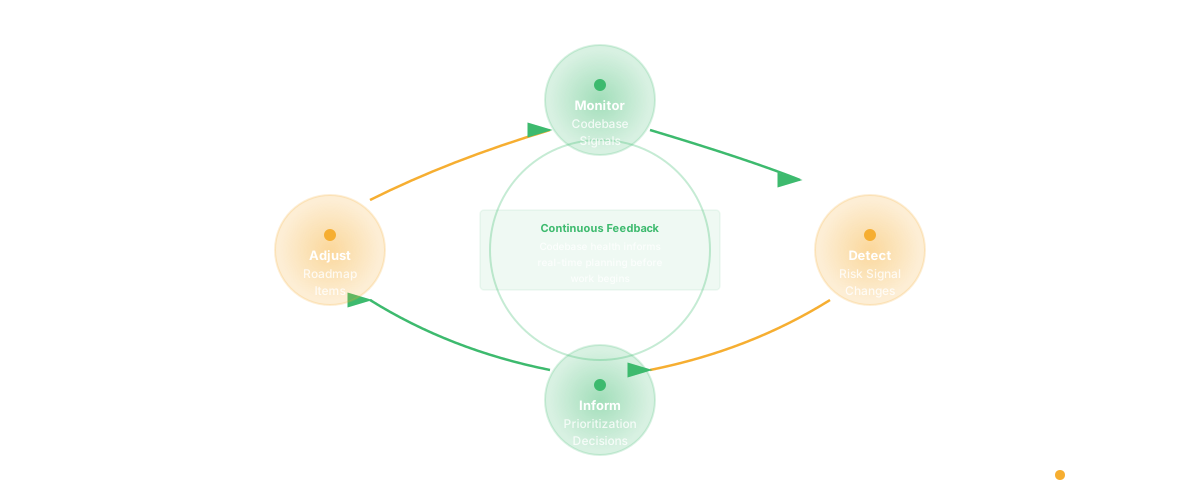
This creates a feedback loop: codebase signals inform prioritization in real time. If the system powering your next roadmap item starts showing instability, you see it before you start work. You can either build in mitigation time, or reshuffle priorities to work on something that depends on stable systems.
This is what a command center does. It doesn't create process overhead. It makes the process more informed.
How to Start
You don't need to rebuild your roadmap process from scratch. Start here:
- Take your current roadmap. Pick 3 - 5 high-priority items.
- For each, identify the code modules that will need to change.
- Run metrics on those modules: complexity, coverage, recent change frequency, ownership clarity.
- Add a column to your roadmap: "Codebase Risk Signals."
- Use that signal to adjust timelines or add mitigation tasks.
After one planning cycle, you'll see impact: better estimates, fewer surprises mid-sprint, and a clearer picture of what "achievable" actually means.
The roadmap doesn't stop being a planning artifact. It just becomes a planning artifact that's grounded in reality.
Frequently Asked Questions
Q: Doesn't this just create more process? Won't teams just ignore the signals and ship anyway?
Signals are only valuable if they inform decisions. The goal isn't to create blockers - it's to make tradeoffs visible. If you see that a roadmap item has high complexity risk and low ownership clarity, you're not saying "don't build it." You're saying "if you build it, plan for 25% more time, or pair it with ownership work." That's a choice, not a blocker. Connecting roadmap items to dependency mapping and technical debt signals makes these tradeoffs concrete.
Q: How often should we refresh these signals?
As often as your metrics update. If you're using automated codebase analysis, you can see signals shift weekly. In practice, it makes sense to review roadmap-level signals quarterly (as you update the roadmap) and check for red flags monthly. Real instability (incidents, major refactors) will be obvious regardless.
Q: What if the roadmap item is in code that's intentionally being deprecated?
That's important context. If you're building a feature in code you're planning to sunset in six months, the metrics look different. The complexity and coverage might not matter as much. You add that as part of the codebase context - "this module is being sunseted, so we're accepting higher risk."
Q: Does this work for smaller teams?
Yes, but the mechanism changes. Smaller teams often know their codebase intimately, so formal metrics matter less. But the principle is the same: understand what your roadmap depends on. For a five-person team, that might just be a conversation about which modules are fragile. For a 50-person team, you need automated signals powered by codebase intelligence and DORA metrics. The principle scales.
Related Reading
- AI Product Discovery: Why What You Build Next Should Not Be a Guess
- Automated Sprint Planning: How AI Agents Build Better Sprints
- Sprint Velocity: The Misunderstood Metric
- Cycle Time: Definition, Formula, and Why It Matters
- DORA Metrics: The Complete Guide for Engineering Leaders
- Software Productivity: What It Really Means and How to Measure It
- Glue vs Linear
- Glue vs Productboard
- Why Your Roadmap Keeps Slipping