
Sprint velocity measures throughput but fails at capacity planning because it treats all story points as equal, ignores cycle time distribution, and creates perverse incentives to inflate estimates. Cycle time distribution — tracking how long similar work actually takes at the 50th, 80th, and 95th percentile — produces more accurate delivery forecasts than velocity-based projections, typically reducing forecast error from 30%+ to under 15%.
I've shipped hundreds of estimates across three companies. My accuracy improved dramatically when I stopped relying on gut feel and started using historical data from our actual codebase.
I've been in more sprint planning meetings than I care to count, and the same conversation happens at least twice a year: "Our velocity is 47 points. We have 300 points of work. That's six sprints."
Everyone nods. The roadmap gets locked. Three months later, we're still working on features we promised in sprint 2.
The problem isn't that the math is wrong. The problem is that velocity is an output metric being used as an input for planning. And that creates a circular dependency that makes everything worse.
What Velocity Actually Measures
Let me be precise about what velocity tells you: it tells you how many story points your team estimated and marked as "done" in a given sprint. That's it.
It does not tell you:
- How much actual value was delivered
- How much work remains
- How similar the upcoming work is to past work
- Whether those "done" items are actually done
Velocity measures the rate at which you run, not the distance you need to cover. You can run very fast in the wrong direction.

The Velocity Trap
Here's what happens when you use velocity for planning:
Teams start optimizing for velocity instead of for delivery. That means:
- Breaking down stories into smaller and smaller slices to increase story count
- Marking items "done" when they're 90% done (the test still needs writing, the documentation is pending, the edge cases aren't handled)
- Padding estimates to hit velocity targets
- Avoiding the big, complex refactoring that actually needs to happen because it "hurts velocity"
I watched a team do this. Their velocity climbed 30% in two quarters. We delivered 10% more value. The other 20% was accounting fiction.
The root cause: velocity encourages you to measure what you did, not what you accomplished.
The Real Problem: Circular Dependency
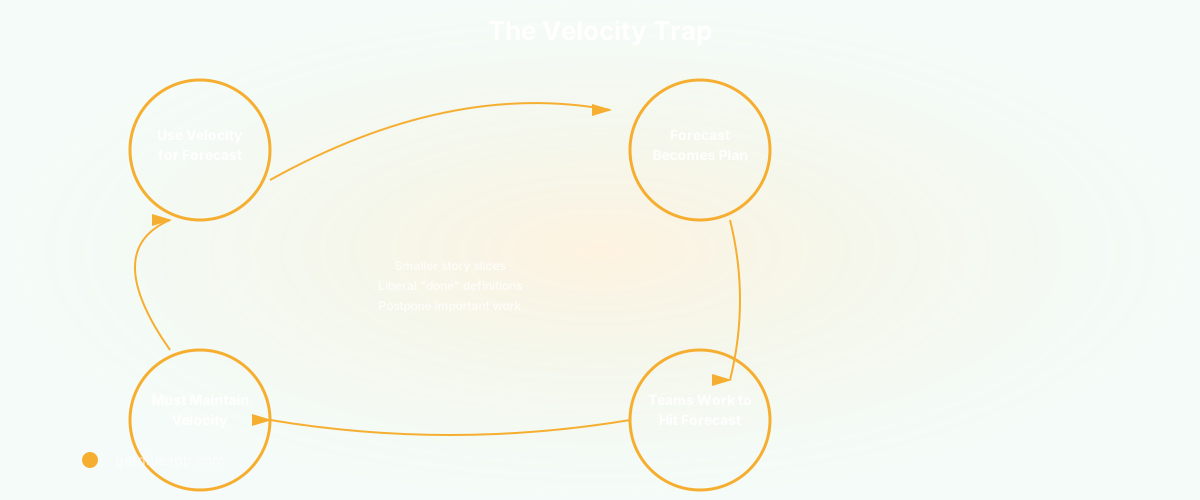
Here's the insidious part. You use velocity to forecast delivery dates. The forecast becomes the commitment. Teams then work to hit that forecast. But to hit the forecast, they need to maintain velocity. So they slice stories smaller, declare "done" more liberally, and deprioritize work that's valuable but slow.
This creates a feedback loop where the plan becomes self-fulfilling but also divorced from reality. You're on schedule - the plan was just wrong.
What Actually Works for Forecasting
I've talked to teams that have moved past velocity and they use three things instead:
1. Cycle Time Distribution
Cycle time is how long work takes from "we're starting this" to "this is in production." It's messier than velocity but infinitely more honest.
Plot your last 50 completed items by how long each took. You'll see a distribution - maybe 40% take 2 - 5 days, 30% take 1 - 2 weeks, 20% take 3 - 4 weeks, and 10% take a month or longer.
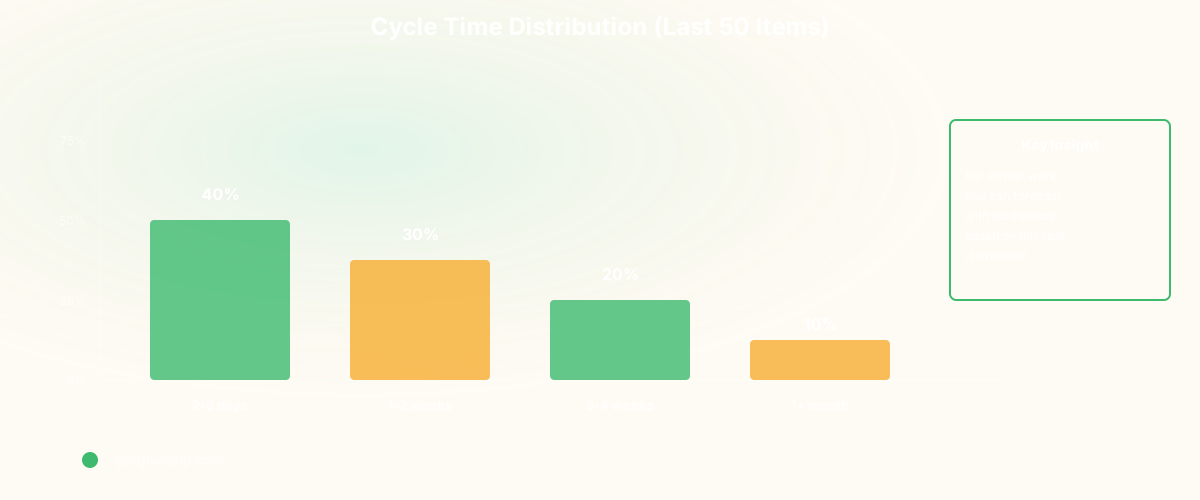
Now when you pick a new piece of work, you can say: "this is similar to the refactoring work we did last quarter, which took about 2 - 3 weeks 70% of the time." That's a real forecast. It includes uncertainty. It's honest about variability.
2. Probabilistic Estimates
Instead of "this takes 2 weeks," say: "this takes 2 weeks 70% of the time, sometimes 3 weeks, occasionally 4."
That's how engineering actually works. Complex systems have variability. Some bugs are shallow. Some are deep. Some implementations go smoothly. Some have unexpected dependencies.
Stakeholders hate this at first. They want a number. But after a few quarters of hitting your probabilistic ranges, they trust them more than they ever trusted velocity - based forecasts.
3. Show the Range, Not the Point
Here's the radical part: stop giving a single estimated delivery date. Give a range.
"The checkout refactoring will be done: - 70% likely before March 15 - 85% likely before March 25 - 95% likely before April 5"
This feels less certain to stakeholders, but it's actually more honest. It tells them the real range of outcomes. Some projects need the 95% confidence line (payment features). Some can live with the 70% line (internal tools).

The Velocity Conversation With Your Team
If you're running on velocity, this doesn't mean you can't use story points anymore. Points can still be useful for relative sizing - "is this bigger than that?" But stop treating velocity as predictive.
Instead, start tracking:
- Cycle time by feature or epic
- Time spent in code review
- Time to get from "done" in CI to "done" in production
- How often items labeled "done" actually need rework
These metrics tell you where the system is slow. Velocity just tells you the team is moving.
How To Talk To Stakeholders About This
The conversation usually goes:
- Stakeholder: "When will this be done?"
- You: "Probably mid - May, possibly earlier, could slip to mid - June"
- Stakeholder: "Pick a date"
- You: "That's not how variable work actually behaves"
This is uncomfortable. But the alternative is keeping a system that consistently produces wrong predictions, then acts like the team is responsible for missing dates that were never achievable.
I've found that stakeholders accept probabilistic forecasts much faster when you've first shown them that your velocity forecasts were wrong. Show them the historical data. "We predicted this would take 3 sprints based on velocity. It took 5. Here's why - it's not team capacity, it's this category of work is more variable than we modeled."
Then the probabilistic range feels not like uncertainty, but like realism.
One More Thing: Velocity For Comparing Work, Not For Forecasting
There is one place velocity works okay: comparing your own team to itself over time. If your velocity is consistently 40 points, and it suddenly drops to 25 points, something changed. Either you took on harder work, or something's blocking you, or people are gone. That's a useful signal.
But even there, cycle time tells you more. If cycle time is increasing while velocity drops, that's different from if velocity drops while cycle time stays the same. The first means the work got harder. The second means people are switching context more.
The Path Forward
You don't have to blow up your velocity tracking system. But stop using it for capacity planning. Start using it as one signal among many, and weight cycle time and cycle time distribution much more heavily.
Your forecasts will be less precise - and more accurate. Your teams will optimize for delivery instead of for the appearance of productivity. Stakeholders will get probabilistic ranges instead of false certainty.
That's worth the uncomfortable conversation.
Frequently Asked Questions
Q: Doesn't velocity help teams see if they're getting slower or faster?
A: It can, but cycle time is better. Velocity can fluctuate because you changed how you're slicing work or how strictly you define "done." Cycle time changes when the actual time to complete work changes. If you want to know if your team is healthier, look at cycle time, time in review, and rework rate. Those tell the real story.
Q: Can I use velocity with cycle time together?
A: Yes. Many teams I know do this. Use velocity for trend spotting ("we did 45 points this sprint, 42 last sprint, that's stable"). Use cycle time distribution for forecasting ("similar work took 8 - 14 days 80% of the time"). They measure different things and both have value.
Q: What if my leadership is convinced about velocity and won't change?
A: Show them the data. Pull your last 12 sprints of velocity forecasts vs. actual delivery. Calculate the forecast error. If velocity forecasts are off by 30% or more (which they usually are), you have leverage. Say: "Our forecasts are wrong 30% of the time. We can keep using a broken system or try something that matches how work actually happens." Supplement with DORA metrics to show leadership what delivery health actually looks like.
Related Reading
- Sprint Velocity: The Misunderstood Metric
- Cycle Time: Definition, Formula, and Why It Matters
- DORA Metrics: The Complete Guide for Engineering Leaders
- Programmer Productivity: Why Measuring Output Is the Wrong Question
- Software Productivity: What It Really Means and How to Measure It
- Automated Sprint Planning: How AI Agents Build Better Sprints